19
1
1
Press and hold the MENU/FOLDER button for more than 1 second
in the Stop mode to enter the Options mode.
In the Options mode, each time you press the ( ) button, the
displayed setting item changes in the following order: [MODE] ➝
[MIC] ➝ [VCVA] ➝ [ALARM] ➝ [S] [ALARM] ➝ [BEEP] ➝ [TIME].
To exit from the options mode, press the STOP button.
If no buttons are pressed for 3 minutes during the Options mode,
the Options mode will be canceled.
To set any option, you must press MENU/FOLDER to confirm
selection.
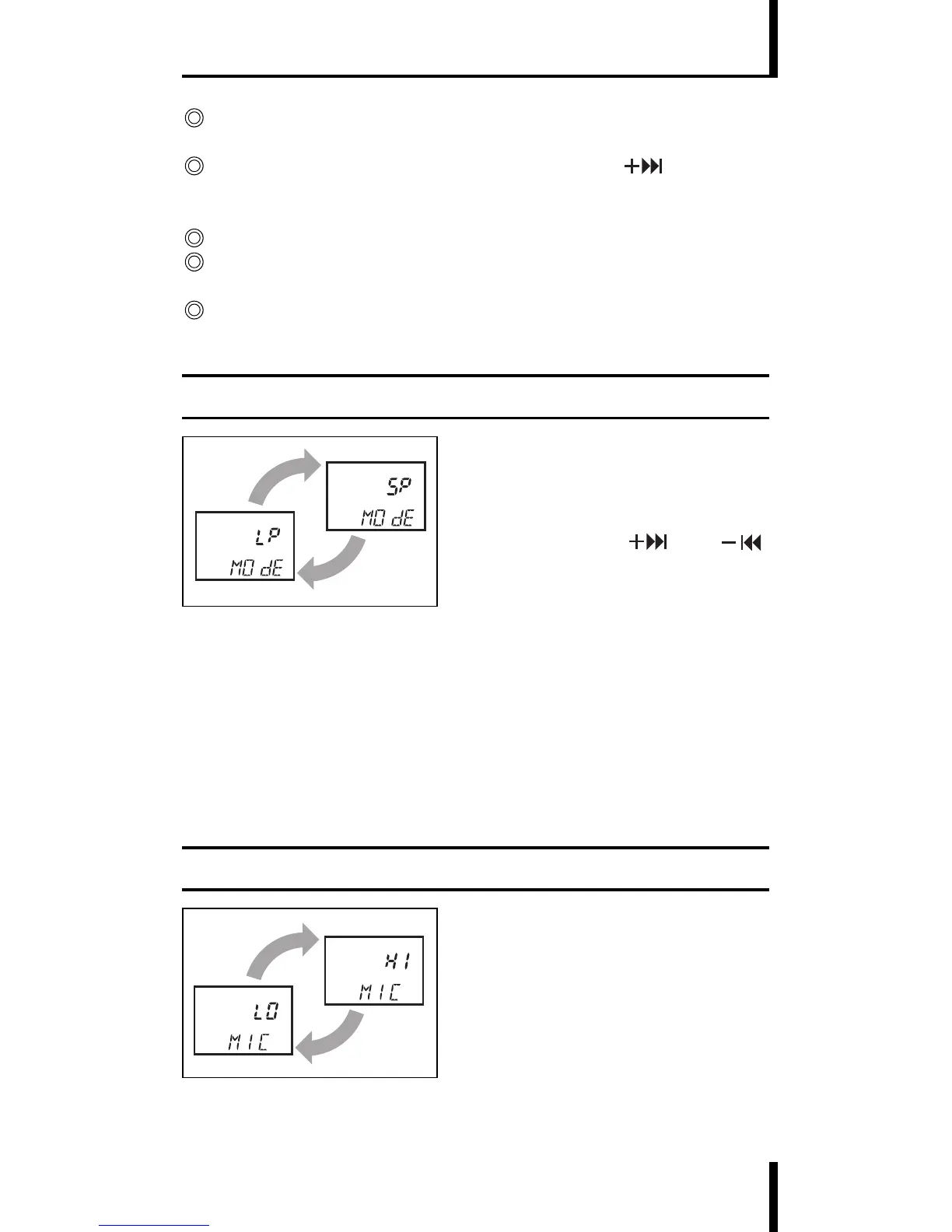
Recording Mode (MODE) Setting
1 In the Options mode, display
[MODE] and press the MENU/
FOLDER button to start the
recording mode setting.
2 Pressing the (
) or ( )
button switches the recording
modes: SP ➝ LP ➝ SP ➝...
· SP: Standard Playback mode (recording time approx. 67 minutes
with the VN-180 or 33 minutes with
the VN-90)
· LP: Long Playback mode (recording time approx. 180
minutes with the VN-180 or 90
minutes with the VN-90)
3 Press the MENU/FOLDER button while the desired mode is
displayed to complete its setting.
Microphone Sensitivity (MIC) Setting
1 In the Options mode, display
[MIC] and press the MENU/
FOLDER button to start the
microphone sensitivity setting.
ENTERING OPTIONS MODE


 To Next Page