45
EN
Viewing images on a TV [TV Out] (VR-360/D-760)
Viewing images on a TV [TV Out] (VR-360/D-760)
d (Settings Menu 2) TV Out
Submenu 2 Submenu 3 Application
NTSC/PAL
NTSC
Choose when connecting the camera to TVs in countries or regions
where NTSC is used (e.g., North America, Taiwan, Korea, and Japan).
PAL
Choose when connecting the camera to TVs in countries or regions
where PAL is used (e.g., Europe and China).
HDMI Out
480p/576p/720p/1080i Choose an HDMI output format.
HDMI Control
Off
Playback operations are performed using camera controls.
On Playback operations are performed using the TV remote control.
Camera factory defaults vary with the country or region of sale.
Viewing images on a TV
Using an AV cable
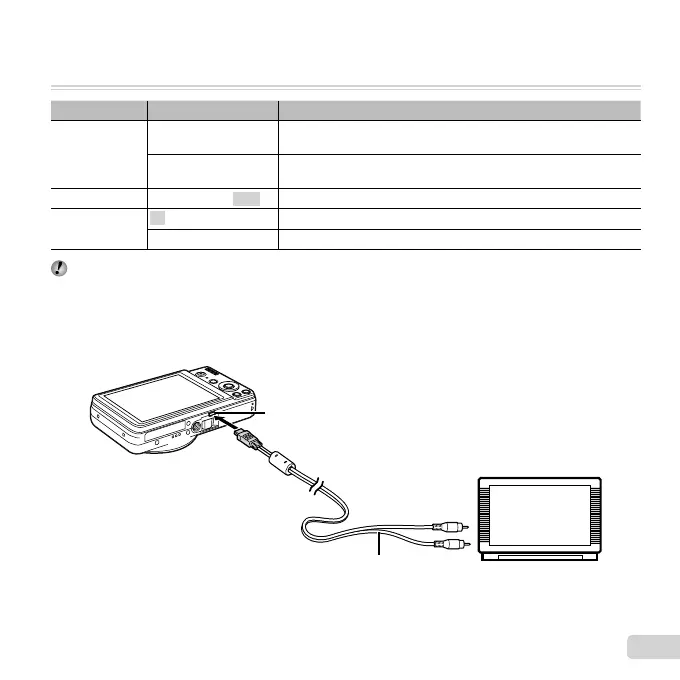
1 Match the camera video signal format ([NTSC]/[PAL]) to that used by the TV.
2 Connect the camera to the TV.
Connect to the TV video
input jack (yellow) and
audio input jack (white).
AV cable (supplied)
Multi-connector



 To Next Page