48
EN
Frequently-used options/Customizing camera settings
3
Restoring default or custom settings (Reset/C Mode Setup)
Camera settings can be easily restored to one of two presets.
Using reset settings
Restore default settings.
1
Select [Reset/C Mode Setup] in shooting menu W.
2
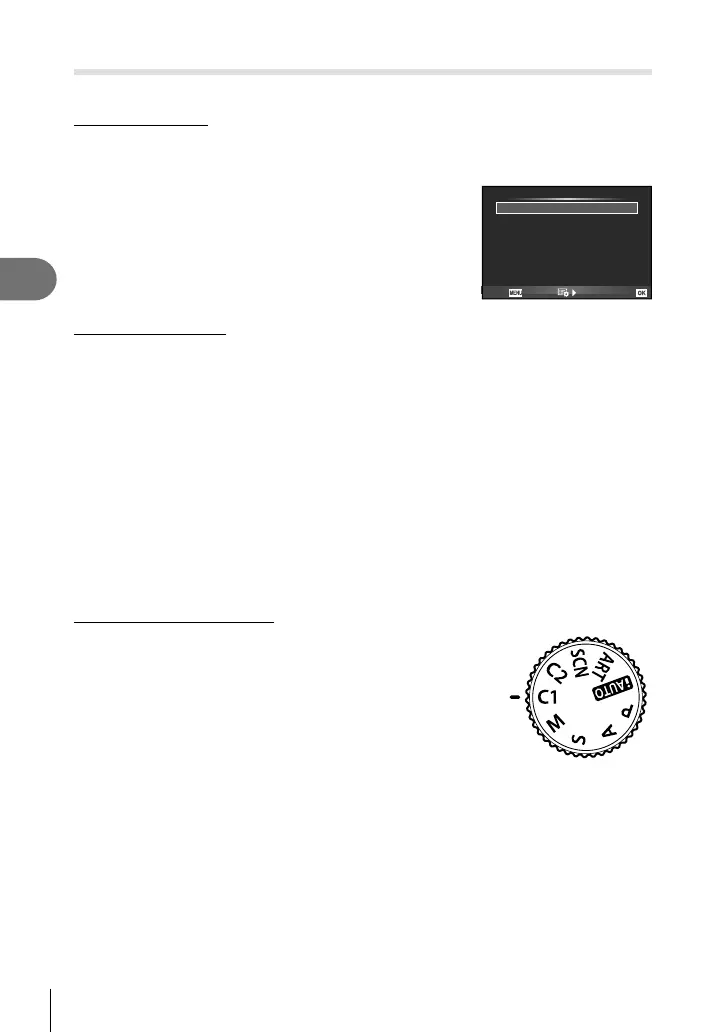
Select [Reset] and press Q.
• Highlight [Reset] and press I to choose the reset
type. To reset all settings except the date, language,
and a few others, highlight [Full] and press Q.
g “Menu directory” (P. 88)
3
Select [Yes] and press Q.
Reset/C Mode Setup
Reset
Custom Mode 1
Custom Mode 2 Set
Set
Basic
Back
Set
Saving [C Mode Setup]
Restore preselected settings for P, A, S or M mode. The shooting mode does not
change. Up to 2 sets of preselected settings can be stored.
1
Adjust settings in order to save.
2
Select [Reset/C Mode Setup] in shooting menu W.
3
Select the desired destination ([Custom Mode 1]–[Custom Mode 2]) and
press I.
• [Set] appears next to destinations ([Custom Mode 1]–[Custom Mode 2]) to which
settings have already been saved. Selecting [Set] again overwrites the registered
setting.
• To cancel the registration, select [Reset].
4
Select [Set] and press Q.
• Functions that can be saved to [C Mode Setup]. g “Menu directory” (P. 88)
Calling the settings registered
Set the mode dial to C1 or C2, and you can call
the settings registered in [Custom Mode 1] or
[Custom Mode 2] respectively.



 To Next Page