59
EN
Frequently-used options/Customizing camera settings
3
Custom Menu
R AF/MF
MENU
c
R
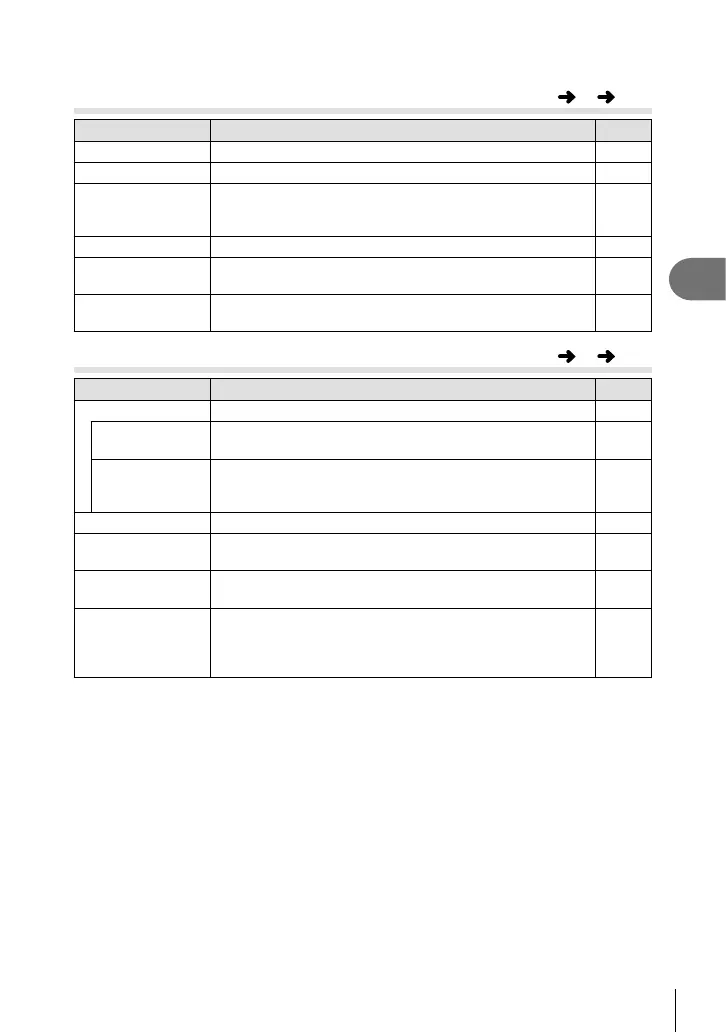
Option Description
g
AF Mode Choose the AF mode. 43
AF Area Choose the AF target mode. 26
P Set Home
Choose the AF target position that will be saved as the
home position. p appears in the AF target selection
display while you choose a home position.
—
AF Illuminat. Select [Off] to disable the AF illuminator. —
I Face Priority
The camera gives priority to the faces or pupils of human
portrait subjects during focusing.
44
MF Assist Select [On] to automatically magnify the image for precise
focus when the control ring is rotated in manual focus mode.
—
S Button/Dial/Lever
MENU
c
S
Option Description
g
Button Function Choose the function assigned to the selected button. —
U Function Off, AEL, Preview, k, P Home, Digital Tele-converter,
Conversion Lens, ND Filter Setting
65
V Function
IS Mode, Picture Mode, SCN, ART, WB, j/Y, Aspect,
K Image Quality, n Image Quality, #, w, Metering, AF
Mode, ISO, I Face Priority, ND Filter Setting
65
Dial Function Choose the roles played by the control ring and sub dials. 89
LLever Function
You can choose the control ring function from [MF], [Zoom]
or [MF/Zoom] while the lever function is activated.
89
Dial Direction Choose the direction in which the dials are rotated to adjust
shutter speed or aperture or to move the cursor.
89
d Lock Select [On] to disable the
I
,
G
and sub dial in shooting
mode. You can also enable or disable [d Lock] by pressing
the Fn1 button while the Fn2 button is held down in
shooting mode.
—



 To Next Page