34
AC selector range can be changed according to the specific conditions in individual
countries. Default settings is 220, 230, 240V / 50Hz for EU market and 230, 240, 250v /
60Hz for USA market. If you need different settings in the range of 200 – 260V, this
should be specified in the order!
Manufacturer reserves the right to make future changes in the way of connecting the
transformer to the board. Allways mark the position of the terminals before
disconnecting the transformer.
7.2. Controlling the OM4001A with Flex Radios Series 6xxx
There are two possible methods to connect the Flex Radio series 6xxx to the OM4001A:
• Using the SmartSDR CAT program
• Using the USB connector at Flex 6xxx
Flex Radio 6xxx series connection using SmartSDR CAT
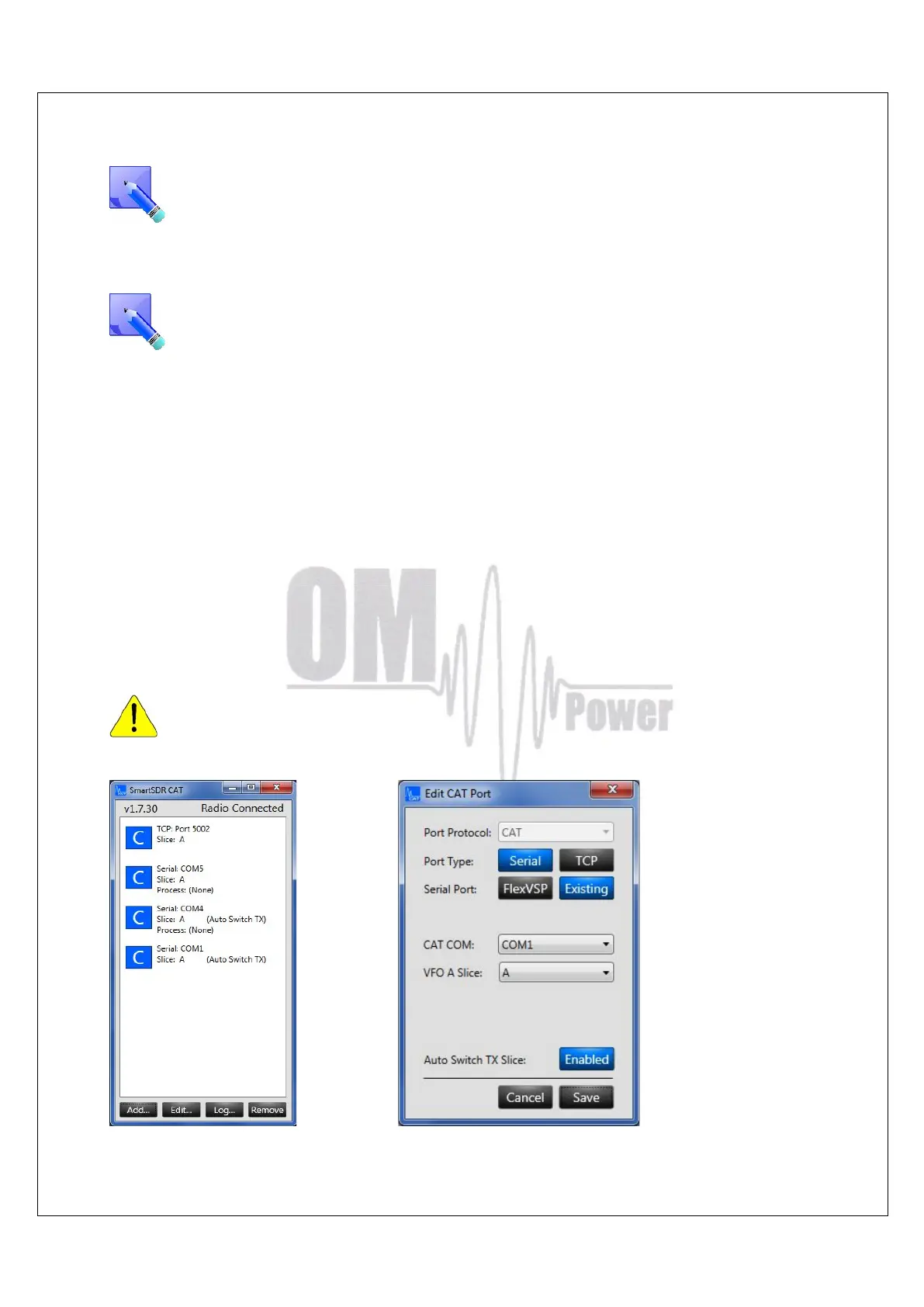
Choose the control port in the SmartSDR CAT window that you will use to control the power
amplifier. It must be an existing serial port – a hardware COM port in your PC or an USB to
serial port adapter. Connect the chosen COM port and the transceiver port ( TCVR DB9 )to the
OM Power amplifier with a null modem serial cable (both ends of the cable have a female DB-9
connector and pins 2 and 3 are crossed).
You must assign this serial port to the TX slice that is associated with the Flex 6XXX.
otherwise the amplifier will not set on the proper frequency.


 To Next Page