EasyManua.ls Logo

OM POWER OM4001A - Page 45

OM POWER OM4001A
56 pages
Print Icon
To Next Page IconTo Next Page
To Previous Page IconTo Previous Page
Loading...
45
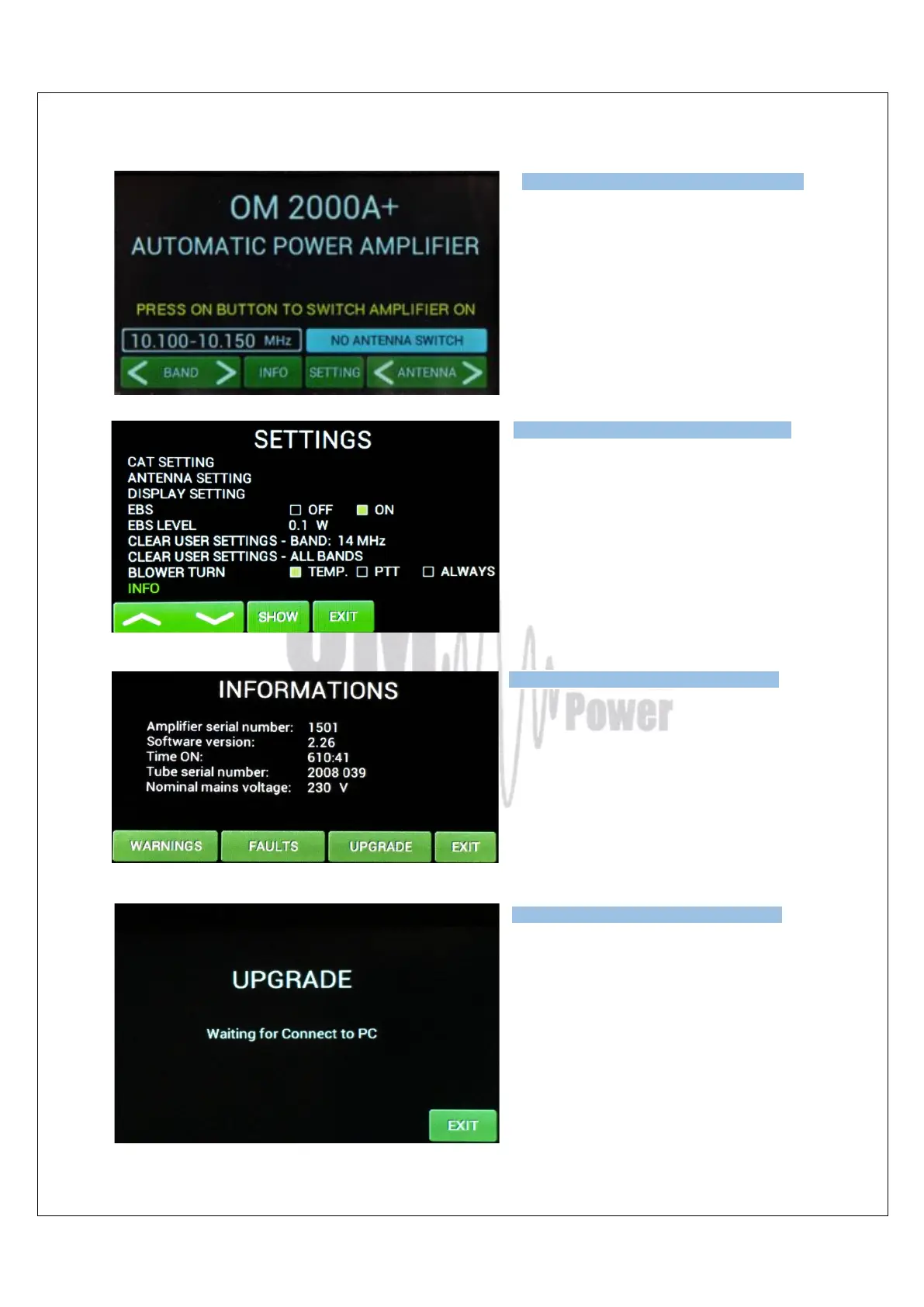
Switch ON the power amplifier using the
front panel green ON switch.
Press SETTINGS to enter the
SETTINGS Menu.
Choose INFO and press SHOW.
Press UPGRADE to start the Amplifier
upgrade process..
When you see this screen on the PA, go
to the PC and the PIC Loader software
and press button the SEND TO LINE
button.

Type of supported TCVR and
working
frequency are visible on the
display.
AUTO LED is ON.
Type of supported TCVR and
working
frequency are visible on the
display.
AUTO LED is ON.
Type of supported TCVR and
working
frequency are visible on the
display.
AUTO LED is ON.
Type of supported TCVR and
working
frequency are visible on the
display.
AUTO LED is ON.