EasyManua.ls Logo

OM POWER OM4001A - Page 46

OM POWER OM4001A
56 pages
Print Icon
To Next Page IconTo Next Page
To Previous Page IconTo Previous Page
Loading...
46
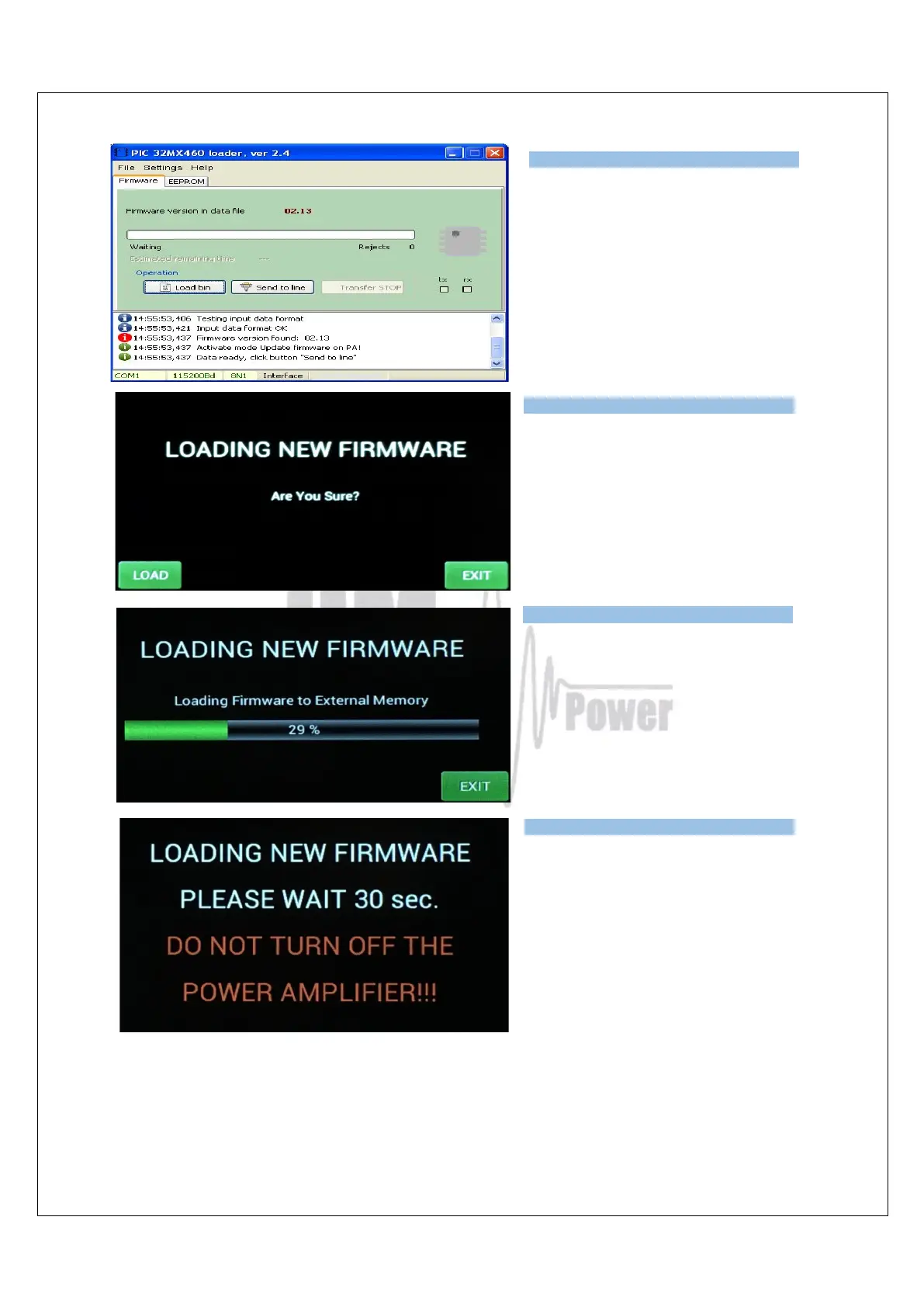
Press the SEND TO LINE button.
Press LOAD on the OM4001A to start
loading.
You can see the loading progress on
the bar graph
You will see this screen after the
firmware was successfully loaded
Usually, it takes about 30 seconds but
sometimes it might take a little bit
longer.
NOTE: Do not take any action until this screen disappears!
At the end you will return to the main screen of OM4001A. Switch PA OFF, disconnect the
TCVR serial cable and you are ready to use the OM4001A with the new firmware.

Type of supported TCVR and
working
frequency are visible on the
display.
AUTO LED is ON.
Type of supported TCVR and
working
frequency are visible on the
display.
AUTO LED is ON.
Type of supported TCVR and
working
frequency are visible on the
display.
AUTO LED is ON.
Type of supported TCVR and
working
frequency are visible on the
display.
AUTO LED is ON.