EasyManua.ls Logo

OmniBreeze DC2018 - Product Assembly; Parts List

OmniBreeze DC2018
11 pages
Print Icon
To Next Page IconTo Next Page
To Previous Page IconTo Previous Page
Loading...
PRODUCT
ASSEMBLY
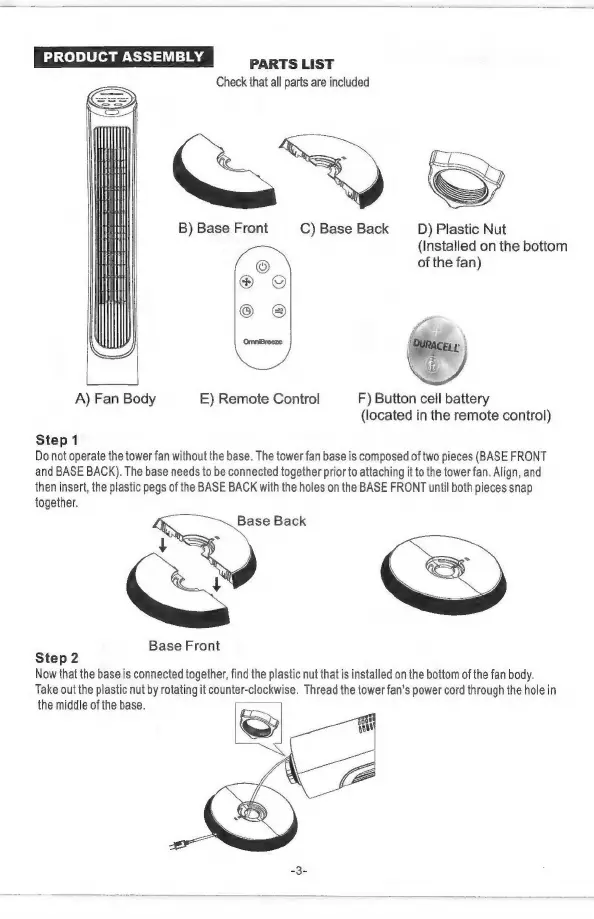
PARTS
LIST
Check
that
all
parts
are
included
B)
Base
Front
C)
Base Back
D)
Plastic
Nut
(Installed
on
the
bottom
of
the
fan)
fa
p
(g
3
n
A)
Fan
Body
E)
Remote
Control
F)
Button
cell
battery
(located
in
the
remote
control)
Step
1
Do
not
operate
the
tower
fan
without
the
base.
The
tower
fan
base
is
composed
of
two
pieces
(BASE
FRONT
and
BASE
BACK).
The
base
needs
to
be
connected
together
prior
to
attaching
it
to
the
tower
fan.
Align,
and
then
insert,
the
plastic
pegs
of
the
BASE
BACK
with
the
holes
on
the
BASE
FRONT
until
both
pieces
snap
together.
Base
Back
Base
Front
Step
2
Now
that
the
base
is
connected
together,
find
the
plastic
nut
that
is
installed
on
the
bottom
of
the fan
body.
Take
out
the
plastic
nut
by
rotating
it
counter-clockwise.
Thread
the
tower
fan's
power
cord
through
the
hole
in
the
middle
of
the
base.
=