EasyManua.ls Logo

OmniBreeze DC2018 - Cleaning and Storage

OmniBreeze DC2018
11 pages
Print Icon
To Next Page IconTo Next Page
To Previous Page IconTo Previous Page
Loading...
USER
SERVICING
INSTRUCTION
TO
REPLACE
THE
FUSE:
Risk
of
fire.
Use
only
with
a
fuse
rated
as
specification
listed
on
page
2.
A.
First,
disconnect
unit.
Grasp
plug
and
pull
it
from
the
wall
outlet.
DO
NOT
unplug
by
pulling
on
cord.
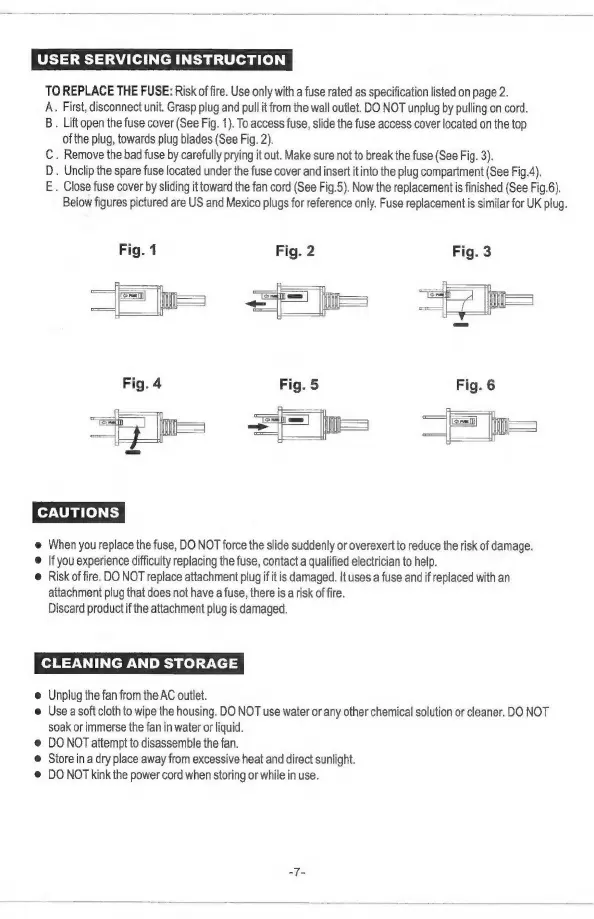
B.
Lift
open
the
fuse
cover
(See
Fig.
1).
To
access
fuse,
slide
the
fuse
access
cover
located
on
the
top
of
the
plug,
towards
plug
blades
(See
Fig.
2).
C.
Remove
the
bad
fuse
by
carefully
prying
it
out.
Make
sure
not
to
break
the
fuse
(See
Fig.
3).
D.
Unclip
the
spare
fuse
located
under
the
fuse
cover
and
insert
it
into
the
plug
compartment
(See
Fig.4).
E.
Close
fuse
cover
by
sliding
it
toward
the fan
cord
(See
Fig.5).
Now
the
replacement
is
finished
(See
Fig.6).
Below
figures
pictured
are
US
and
Mexico
plugs
for
reference
only.
Fuse
replacement
is
similar
for
UK
plug.
Fig.
1
Fig.
2
Fig.
3
aaa
@
When
you
replace
the
fuse,
DO
NOT
force
the
slide
suddenly
or
overexert
to
reduce
the
risk
of
damage.
@
Ifyou
experience
difficulty
replacing
the
fuse,
contact
a
qualified
electrician
to
help.
@
Risk
of
fire.
DO
NOT
replace
attachment
plug
if
it
is
damaged.
It
uses
a
fuse
and
if
replaced
with
an
attachment
plug
that
does
not
have
a
fuse,
there
is
a
risk
of
fire.
Discard
product
if
the
attachment
plug
is
damaged.
CLEANING
AND
STORAGE
@
Unplug
the
fan
from
the
AC
outlet.
@
Use
a
soft
cloth
to
wipe
the
housing.
DO
NOT
use
water
or
any
other
chemical
solution
or
cleaner.
DO
NOT
soak
or
immerse
the fan
in
water
or
liquid.
@
DO
NOT
attempt
to
disassemble
the
fan.
©
Store
in
a
dry
place
away
from
excessive
heat
and
direct
sunlight.
@
DO
NOT
kink
the
power
cord
when
storing
or
while
in
use.
ote