EasyManua.ls Logo

OmniBreeze DC2018 - Page 6

OmniBreeze DC2018
11 pages
Print Icon
To Next Page IconTo Next Page
To Previous Page IconTo Previous Page
Loading...
OPERATION
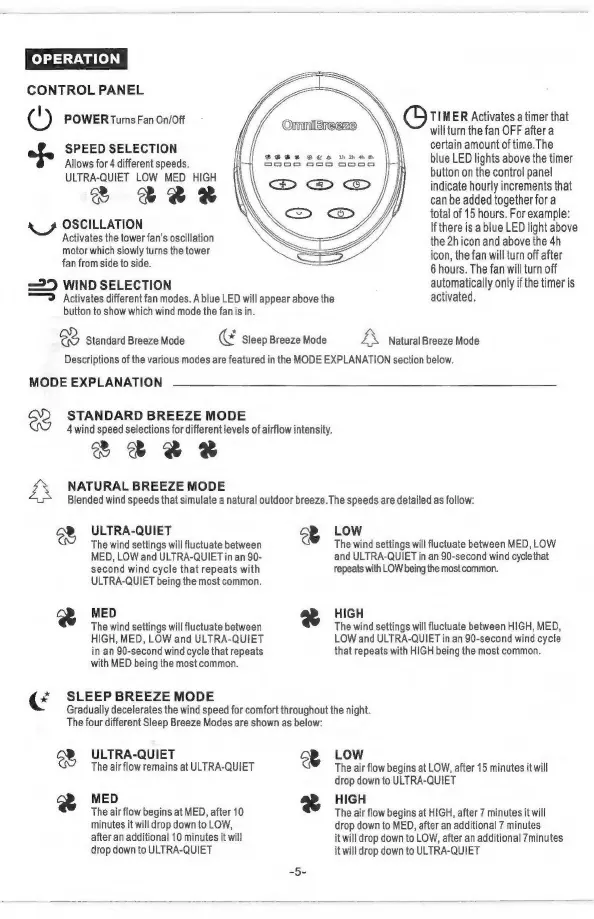
CONTROL
PANEL
l
A
:
©
POWER
Turns
Fan
On/Off
OnmniBreeze
ee
als
SPEED
SELECTION
certain
amount
of
time.
The
blue
LED
lights
above
the
timer
button
on
the
control
panel
indicate
hourly
increments
that
can
be
added
together
for
a
total
of
15
hours.
For
example:
If
there
is
a
blue
LED
light
above
the
2h
icon
and
above
the
4h
icon,
the
fan
will
turn
off
after
6
hours.
The
fan
will
turn
off
=
25
WIND
SELECTION
automatically
only
if
the
timer
is
=
Activates
different
fan
modes.
A
blue
LED
will
appear
above
the
activated.
button
to
show
which
wind
mode
the fan
is
in.
Allows
for
4
different
speeds.
ULTRA-QUIET
LOW
MED
HIGH
V
ee
à
yg
OSCILLATION
Activates
the
tower
fan’s
oscillation
motor
which
slowly
turns
the
tower
fan
from
side
to
side.
RA
Standard
Breeze
Mode
Œ
Sleep
Breeze
Mode
A
Natural
Breeze
Mode
Descriptions
of
the
various
modes
are
featured
in
the
MODE
EXPLANATION
section
below.
MODE
EXPLANATION
STANDARD
BREEZE
MODE
4
wind
speed
selections
for
different
levels
of
airflow
intensity.
V
EBL
NATURAL
BREEZE
MODE
Blended
wind
speeds
that
simulate
a
natural
outdoor
breeze.
The
speeds
are
detailed
as
follow:
ULTRA-QUIET
RA
LOW
The
wind
settings
will
fluctuate
between
The
wind
settings
will
fluctuate
between
MED,
LOW
MED,
LOW
and
ULTRA-QUIET
in
an
90-
and
ULTRA-QUIET
in
an
90-second
wind
cycle
that
second
wind
cycle
that
repeats
with
repeats
with
LOW
being
the
most
common.
ULTRA-QUIET
being
the
most
common.
R
MED
R
HIGH
The
wind
settings
will
fluctuate
between
The
wind
settings
will
fluctuate
between
HIGH,
MED,
HIGH,
MED,
LOW
and
ULTRA-QUIET
LOW
and
ULTRA-QUIET
in
an
90-second
wind
cycle
in
an
90-second
wind
cycle
that
repeats
that
repeats
with
HIGH
being
the
most
common.
with
MED
being
the
most
common.
¢
SLEEP
BREEZE
MODE
Gradually
decelerates
the
wind
speed
for
comfort
throughout
the
night.
The
four
different
Sleep
Breeze
Modes
are
shown
as
below:
ee
ULTRA-QUIET
RA
LOW
The
air
flow
remains
at
ULTRA-QUIET
The
air
flow
begins
at
LOW,
after
15
minutes
it
will
drop
down
to
ULTRA-QUIET
R
MED
r
4
HIGH
The
air
flow
begins
at
MED,
after
10
The
air
flow
begins
at
HIGH,
after
7
minutes
it
will
minutes
it
will
drop
down
to
LOW,
drop
down
to
MED,
after
an
additional
7
minutes
after
an
additional
10
minutes
it
will
it
will
drop
down
to
LOW,
after
an
additional
7minutes
drop
down
to
ULTRA-QUIET
it
will
drop
down
to
ULTRA-QUIET