
EasyManua.ls Logo

Omnifilter RO2000 Series B - User Manual

Omnifilter RO2000 Series B
16 pages
Print Icon
To Next Page IconTo Next Page
Loading...
Tested and Certified
by NSF International
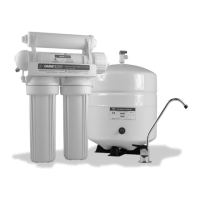
Model: RO2000 Series B
System Tested and Certified by NSF International against NSF/ANSI Standard 58 for the reduction of Barium, Cadmium, Copper, Cyst, Hexavalent Chromium,
Lead, Radium 226/228, Selenium, TDS, Trivalent Chromium as verified and substantiated by test data
INSTALLATION & SERVICE MANUAL
Under-the-sink Reverse Osmosis System
293 Wright Street, Delavan, WI 53115
Phone: 1-800-937-6664 www.omnifilter.com
© Copyright 2006 OMNIFILTER Printed in the U.S.A.
Filters Fast • 866-438-3458 • sales@filtersfast.com • www.filtersfast.com

Questions and Answers

  • C
    Cindy LyonsJul 30, 2025
    Why is my Omnifilter RO2000 B producing water slowly?
    • W
      Wanda CervantesJul 30, 2025
      Slow water production in your Omnifilter Water System can occur due to several reasons. It might be caused by low water pressure, which can be resolved by adding a booster pump. Other potential causes include crimped tubing (ensure the tubing is straight), clogged prefilters (replace them), or a fouled membrane (replace the membrane).
  • A
    Amber SolisAug 3, 2025
    What to do if Omnifilter RO2000 B produces a small amount of water?
    • J
      Jesus ClarkAug 3, 2025
      If your Omnifilter Water System is producing only a small amount of water from the storage tank, especially when first starting up, remember that it normally takes 2-3 hours to fill the tank. Low water pressure or temperatures can also reduce the production rate. Another possible cause is low air pressure in the storage tank. Add pressure to the storage tank; it should be 8-10 psi when the tank is empty.
  • T
    tammyballAug 7, 2025
    What to do if the Omnifilter RO2000 B Water System water tastes or smells bad?
    • J
      Jeffrey JenkinsAug 7, 2025
      If the water from your Omnifilter Water System has an offensive taste or smell, it could be due to a few reasons. The post carbon filter might be depleted, in which case you should replace it. Alternatively, the membrane could be fouled, requiring replacement. It's also possible that sanitizer wasn't fully flushed out; try draining the storage tank and refilling it overnight.
  • J
    Jeremy ShawAug 12, 2025
    What causes leaks in my Omnifilter Water System?
    • K
      Kristina TorresAug 12, 2025
      Leaks in your Omnifilter Water System can stem from a few sources. Check if the fittings are not tightened enough and tighten them as necessary. A twisted O-ring can also cause leaks, so replace it if needed. Lastly, ensure that the hole in the drain saddle is properly aligned; realign it if there's a misalignment.
  • S
    smallchristianAug 16, 2025
    Why is my Omnifilter Water System faucet making noise?
    • T
      Troy PatelAug 16, 2025
      Noise from the faucet of your Omnifilter Water System can be attributed to a few factors. If you have an air gap faucet, the noise should disappear after the system shuts down. Another cause might be the location of the drain saddle; relocate the drain to above the water trap. A restriction in the drain line, possibly due to debris from the garbage disposal or dishwasher, could also be the culprit.
  • L
    Louis ReyesAug 20, 2025
    How to fix milky colored water from Omnifilter Water System?
    • P
      parsonsmariaAug 20, 2025
      Milky colored water from your Omnifilter Water System is often due to air in the system. This is a normal occurrence when initially starting up the RO system, and the milky appearance should disappear with normal use within 1 to 2 weeks.
  • D
    David BrownAug 25, 2025
    What causes no drain water in Omnifilter RO2000 B?
    • C
      Christopher BakerAug 26, 2025
      If there is no drain water in your Omnifilter Water System, it could be due to a clogged flow restrictor. In this case, you should replace the flow restrictor.

Summary

RO2000 FILTRATION PROCESS

REPLACEMENT PARTS

Lists OMNIFILTER item numbers, descriptions, and service life for replacement parts.

Performance Data Sheet

General Installation;Operation;Maintenance Requirements

Outlines essential compliance and usage guidelines for the RO system.

Warranty

Details the limited warranty coverage for the RO system.

Performance Indication: TDS Sampling Kit

Explains the function of the TDS sampling kit for monitoring system performance.

INSTALLATION

INSTALLING THE FAUCET

Step-by-step guide for drilling holes and mounting the RO faucet on the sink.

CONNECTING TO THE COLD WATER LINE

Instructions for connecting the RO system to the household cold water supply.

MOUNTING THE TANK BALL VALVE

Procedure for attaching the tank ball valve to the storage tank.

MOUNTING THE DRAIN CLAMP

Steps for installing the drain saddle clamp onto the sink drain pipe.

SYSTEM START UP

Guide for initial system operation, including filling and flushing.

PREVENTIVE MAINTENANCE

Filter Maintenance and Storage

Recommendations for storing and maintaining RO system filters for optimal shelf life.

Membrane Performance Maintenance

Guidelines for maintaining membrane performance and shelf life, including daily use recommendations.

Filter and Membrane Replacement Procedures

Detailed steps for replacing filters and the RO membrane, including housing opening and sealing.

TROUBLE SHOOTING

Omnifilter RO2000 Series B Specifications

General IconGeneral
TypeReverse Osmosis
Stages4
Membrane Life2-3 years
Water Production50 gallons per day
InstallationUnder Sink
Storage Tank Capacity3.2 gallons
Operating Pressure40-100 psi
Filter Life6 months