10356610_V_1_0.DOC
21/23
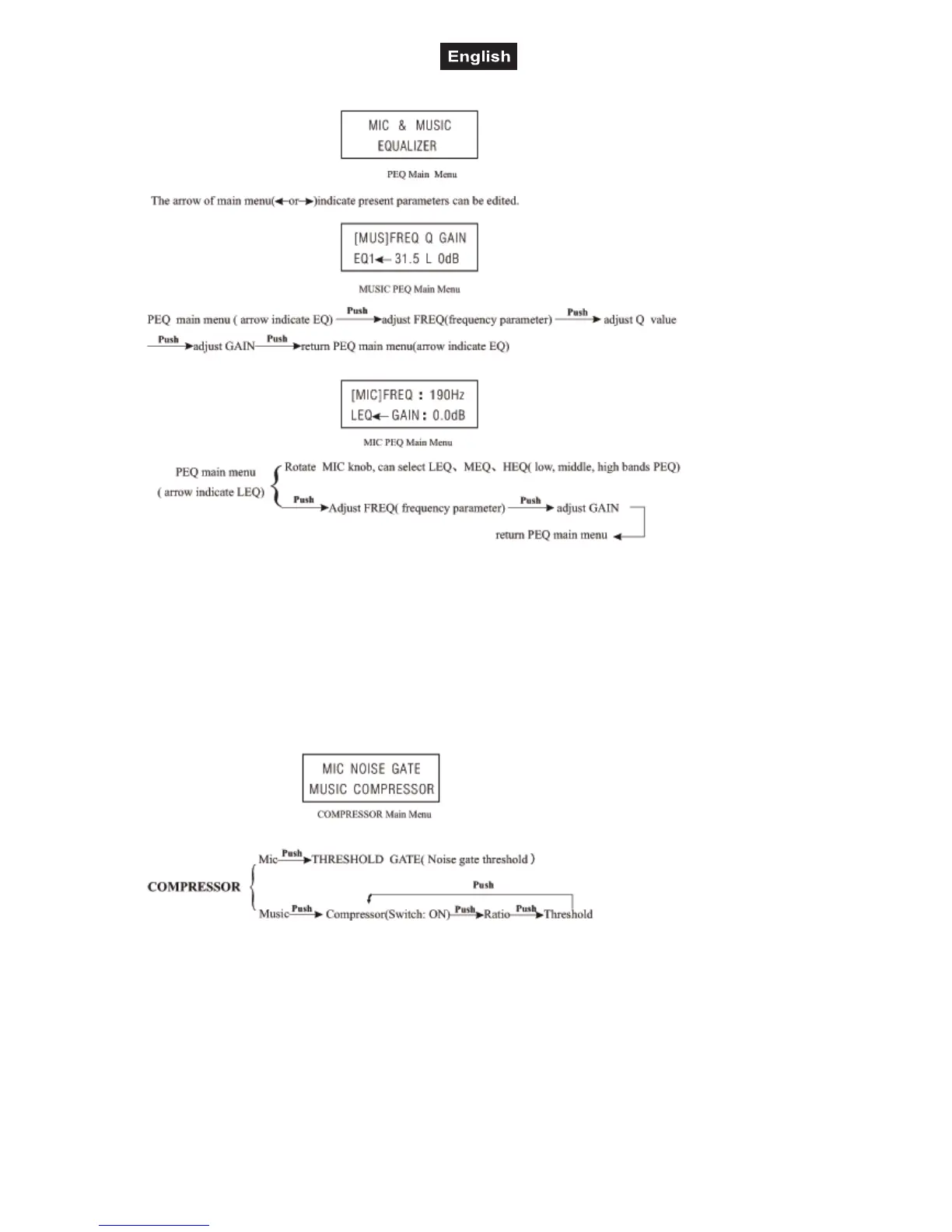
Equalizer-section
Bypass-section
By pressing the Bypass-button, all adjustments will be deactivated. The display shows „Bypass“. This
function allows to compare the original signal with the modified parametric equalizer signal.
Press and hold the Bypass-button for 3 seconds and the device enters into Mute-mode. In order to leave the
Mute-mode, press and hold the Bypass-button for 3 seconds.
Compressor-section
If the selection DRC Switch is set to Off, no parameters can be adjusted.
Lock-section
The DVP-36 offers the possibility to protect the programs and adjustments from unauthorized access.
Press and hold the Compressor/Lock-button for 3 seconds. Enter the desired password by name by turning
and pressing the Edit B-wheel. Confirm with the Store-button.
Repeat the steps mentioned above in order to unlock the device.
Please note: please write the new password down and keep it in a safe place. There is no possibility to
override a password you entered.



 To Next Page