00029011.DOC, Version 1.2
12/16
4 DESCRIPTION OF THE DEVICE
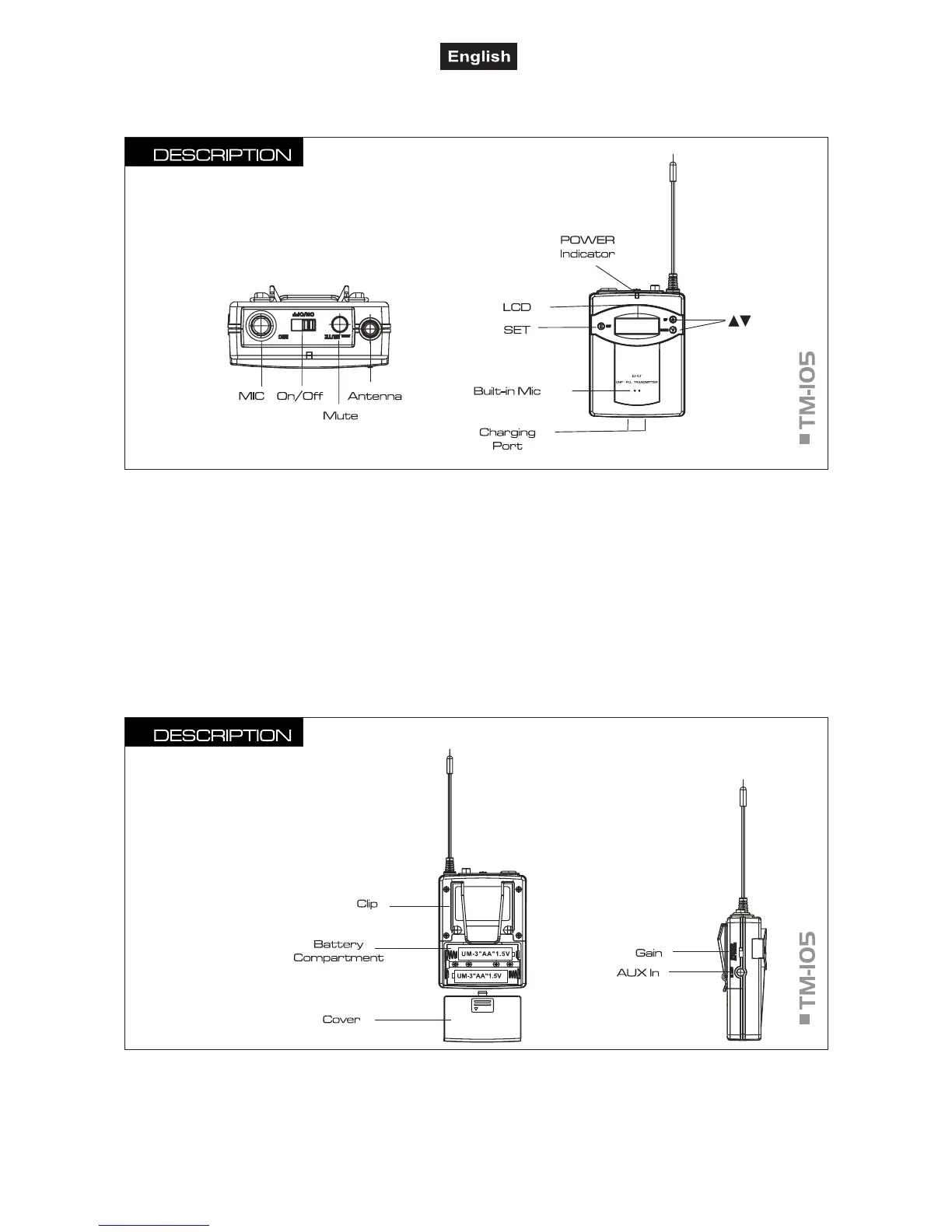
■ MIC
3.5 mm mini-jack for connecting the supplied headset
microphone or the optional lavalier microphone LS-
105.
■ POWER On/Off
Set this switch to ON, to turn on the transmitter. Set it to
OFF, to turn the transmitter off.
■ MUTE
Mutes the transmitter.
■ POWER Indicator
Lights up with fully charged batteries.
■ LCD
Indicates the transmission channel or the radio frequency
and the battery charging status.
■ SET
To activate the adjusting mode for the transmission
channel and to confirm.
■ ▲/▼
To adjust the channel. As long as one of these buttons is
pressed, the display indicates the frequency instead o
the channel.
■ Charging Contacts
For charging, place the transmitter into a charging
compartment of the optional charging station.
■ Battery Compartment
Insert the batteries type AA here.
■ Cover
Remove the cover to replace discharged batteries.
■ GAIN
To adjust the input sensitivity.
■ AUX IN
3.5 mm mini jack for connecting an external audio source
(e.g. hi-fi system, PC, CD/DVD player).



 To Next Page