00029011.DOC, Version 1.2
13/16
5 SETTING INTO OPERATION
5.1 Inserting/Replacing the batteries
If the TM-105 is not used for a longer period (approx. 1-2 weeks), please remove the batteries to prevent
damage in case of battery leakage.
■ Remove the compartment cover. When replacing discharged batteries, remove the old batteries from the
battery compartment.
CAUTION!
Danger of explosion when battery is replaced improperly.
Only replace by the same type or similar types recommended by the manufacturer.
Remove empty battery in accordance with the instructions of the manufacturer.
■ Insert the two 1.5 V mignon batteries (type AA) or two 1.2 V rechargeable batteries (type AA) and make
sure that the poles are correct. We recommend rechargeable NiMH batteries.
■ Replace the compartment cover.
BATTERY DISPOSAL NOTICE
Please dispose of discharged batteries properly.
Batteries are hazardous waste and should not be disposed of with regular domestic waste!
Please take discharged batteries to a collection center near you.
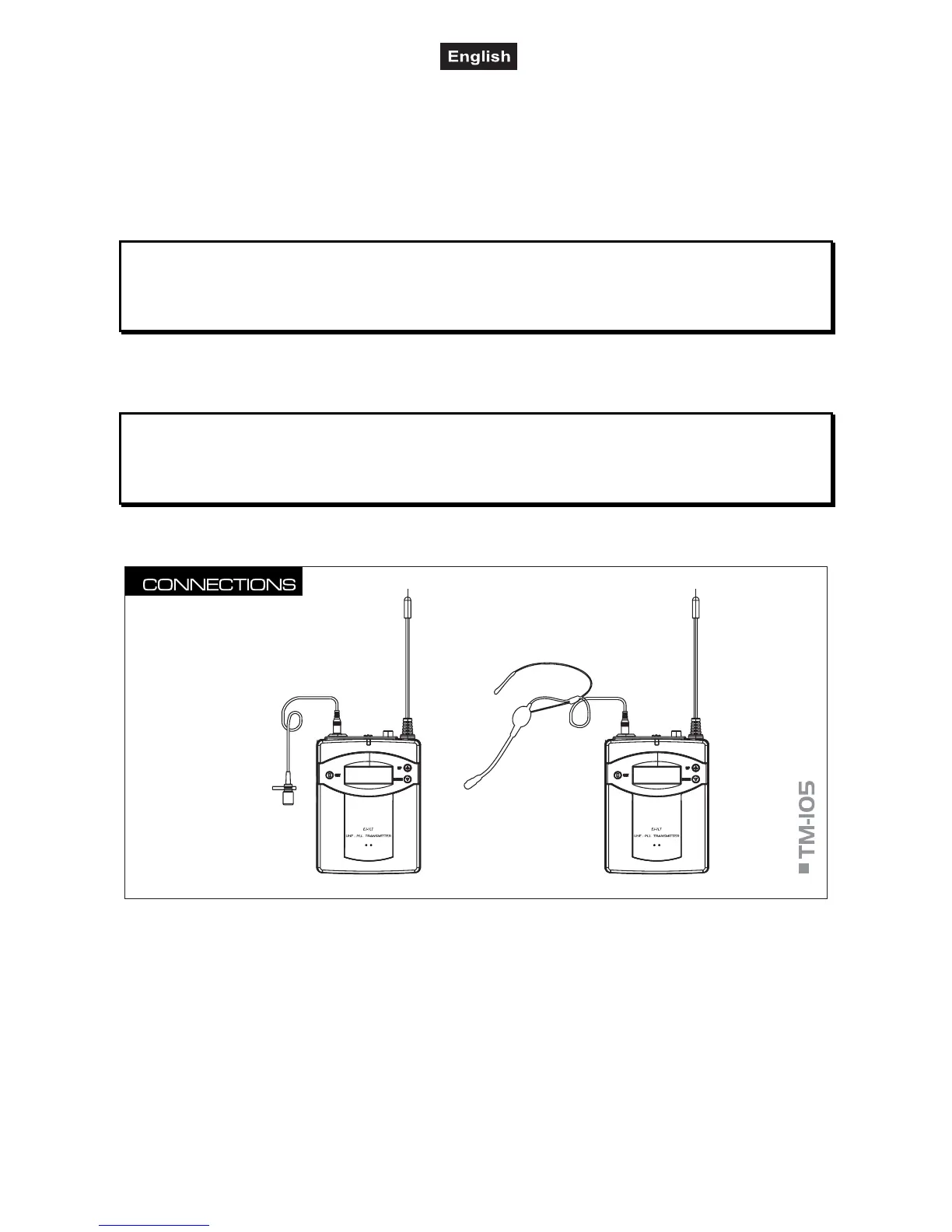
5.2 Connections
■ Plug the microphone cable of the headset microphone or the optional lavalier microphone LS-105 into
the MIC jack.
■ Attach the pocket transmitter via the belt clip to your belt or waistband.



 To Next Page