110
Online Editing Section 5-8
2. Press the NOT Key and then the WRITE Key.
3. Press the WRITE Key once more.
After pressing the WRITE Key the second time, the altered program will be
executed from the next scan.
4. Use the Up Key to check that LD has been changed to LD NOT.
5-8-7 Instruction Variation Change
This operation is used when the CPU Unit is in MONITOR mode to change
the variation of an instruction in the user program.
Note Refer to 4-3-6 Instruction Variation Change for details on changing bit
addresses in PROGRAM mode.
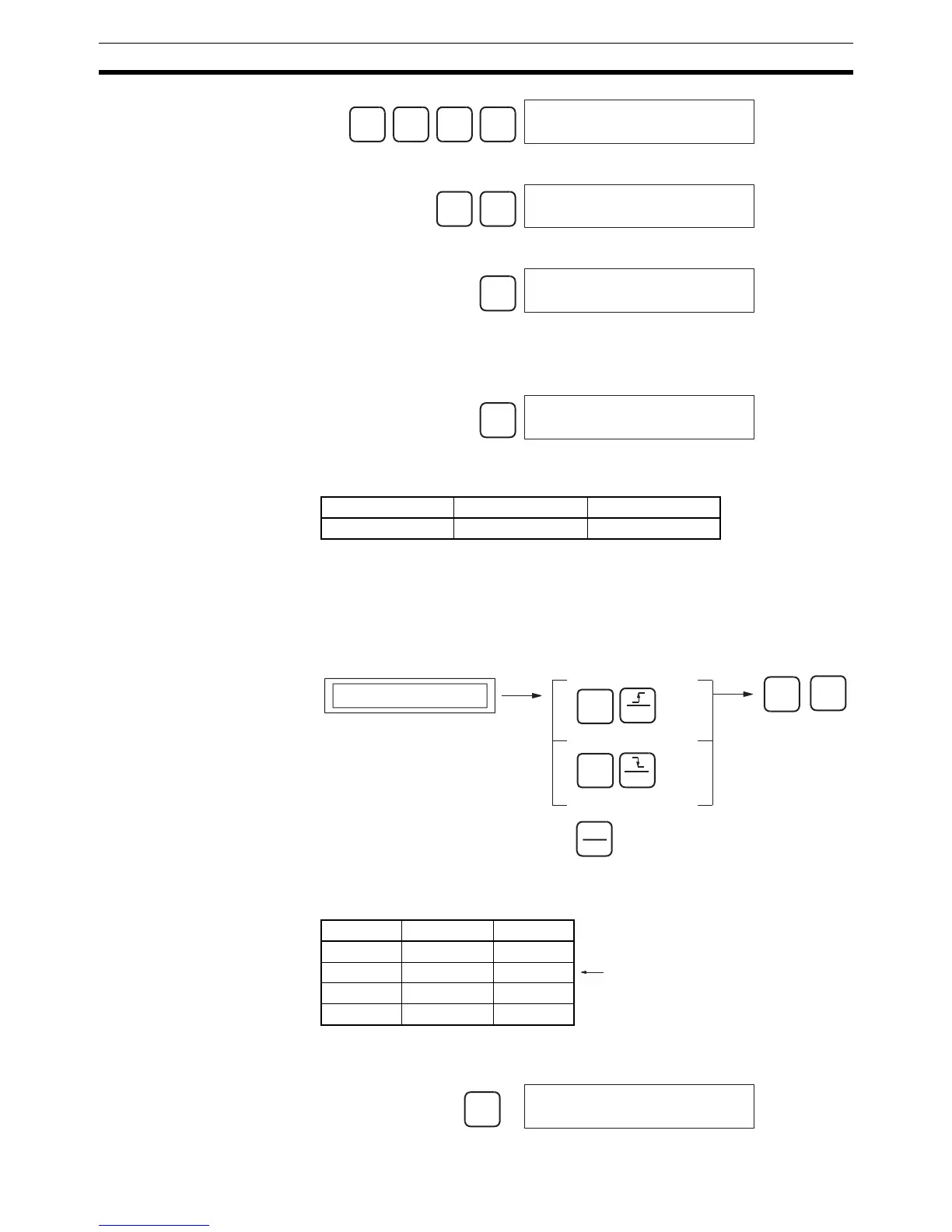
Key Sequence
Operation Example In the following instruction block, the instruction at address 000200 (LD
000001) will be changed to an upwardly differentiated LD instruction.
1,2,3... 1. From the initial display, access the program address containing the instruc-
tion to be changed.
…
2
0 0
↓
000200 CT00 0
LD 000001
NOT
WRITE
ONLINE EDIT?
LD N 000001
WRITE
000201 CT00 0
AND 000200
↑
000200 CT00 1
LD N 000001
RUN MONITOR PROGRAM
No OK See note.
Program address display
Differentiate up
Differentiate down
Immediate refresh
SHIFT
SHIFT
!
WRITE
WRITE
TEXT
SET
RESET
Address Instruction Operand
:::
000200 LD 000001
000201 AND 000200
:::
Changed to upwardly differentiated
@LD 000001.
CLR
000000 CT00


 To Next Page