Using More than One Conversion Cable
Using More than One Conversion Cable
The operating system recognizes USB-Serial Conversion Cables individually.
If a second Conversion Cable is connected after the driver has been installed, driver
installation will be requested again. Install the driver from the CD-ROM again.
If you do not own the CD-ROM and will use more than one Conversion Cable, copy the
win2000_XP folder from the CD-ROM to a folder on your hard disk, and select this
folder.
Note: Use the following directory for Windows 98 or Me: Win98_Me
1. Copy the win2000_XP folder from the CD-ROM to your hard disk (the CD-ROM is in
the same package as the Conversion Cable).
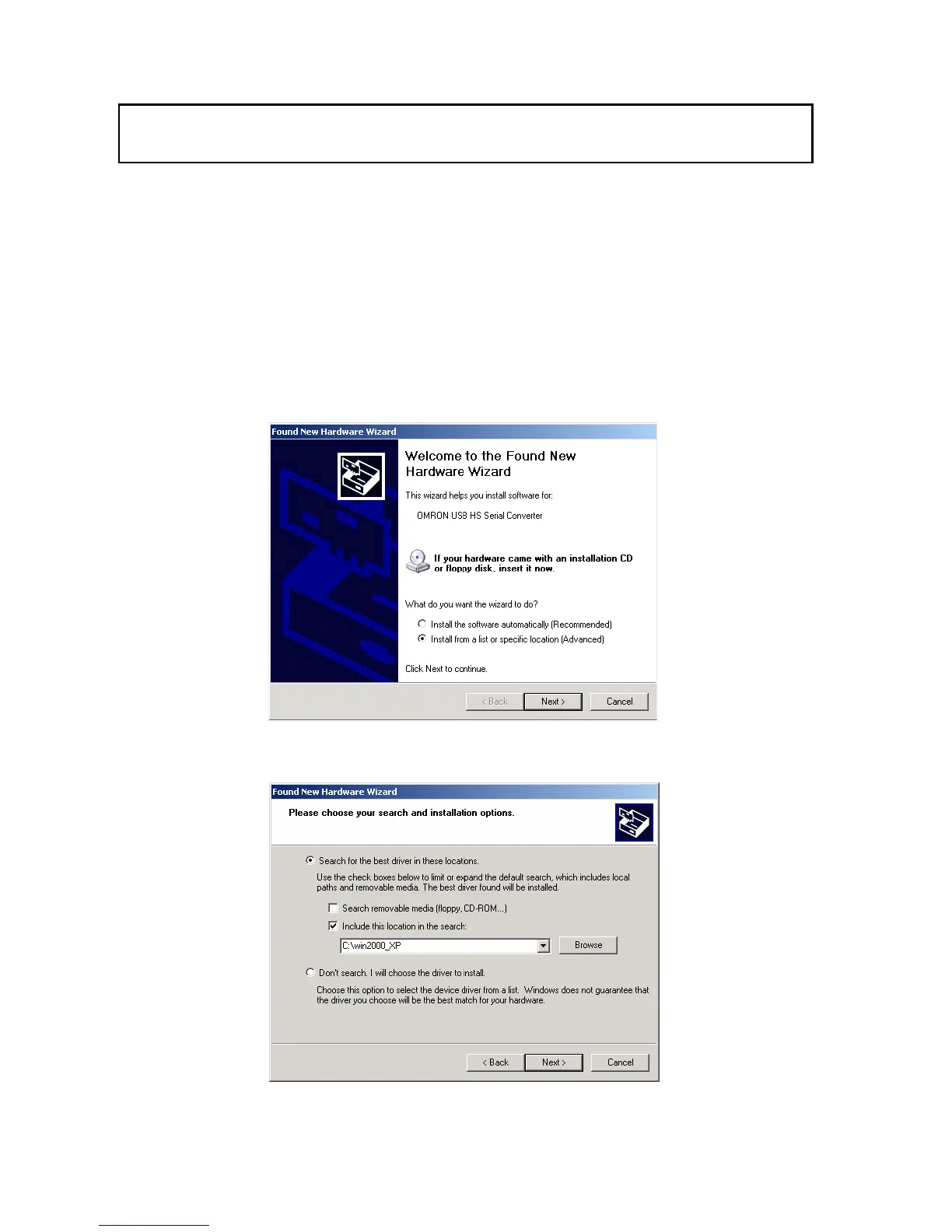
2. The following window will be displayed.
Select Install from a list or specific location (Advanced) and click the Next button.
3. Click the Browse button next to the Include this location in the search field, select
the win2000_XP folder copied from CD-ROM onto your hard disk, and click the Next
button.
38


 To Next Page