Need help?
Do you have a question about the Omron CS1W-CIF31 and is the answer not in the manual?
Information on product capitalization and abbreviations used in the manual for clarity.
Explanation of symbols used in the manual to help locate specific types of information.
Specifies the target personnel for the manual, requiring knowledge of electrical systems.
Guidelines for operating OMRON products according to specifications and consulting representatives.
Advises against using the cable in specific hazardous environments and suggests shielding.
Important warnings on proper usage, disassembly, static discharge, and cable handling.
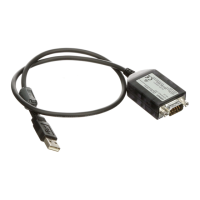
Introduces the USB-Serial Conversion Cable and its primary function connecting PC to PLC/PT.
Details the physical connectors and LED indicators of the USB-Serial Conversion Cable.
Lists the items included in the package for the CS1W-CIF31 cable.
Lists the operating systems supported by the USB-Serial Conversion Cable.
Details software applications compatible with the conversion cable for PLC/PT communication.
Explains port allocation constraints when using the NT Support Tool.
Outlines restrictions for downloading system programs to PTs via the cable.
Lists the OMRON PLCs, PTs, and Programmable Relays supported by the cable.
Illustrates various connection setups between computers, cables, and OMRON devices.
Provides key technical details such as USB interface rating, DTE speed, and environmental conditions.
Shows the physical dimensions and drawings of the CS1W-CIF31 cable.
Details connection methods for CS/CJ-series PLCs using different cables.
Explains how to connect C-series PLCs via peripheral or RS-232C ports.
Covers connection configurations for CQM1H and CPM2C PLCs using various cables.
Describes system configurations for connecting CVM1 and CV-series PLCs.
Details how to connect NS and NT series PTs using the appropriate cable.
Shows the connection setup for the ZEN Programmable Relay.
Provides tables outlining connection options with the CS1W-CIF31 cable.
Tables detailing connection configurations for CS/CJ-series CPU Units and communication boards.
Connection tables for various C-series PLCs, including C200HS, CQM1, CPM1, etc.
Connection details for C200H, C1000H, and C2000H CPU Units and Host Link Units.
Connection tables for CQM1H CPU Units and CPM2C PLCs.
Connection tables for CVM1 and CV-series CPU Units and Host Link Units.
Connection details for NS/NT Series PTs and ZEN Programmable Relay.
Step-by-step guide to physically connect the USB-Serial Conversion Cable.
Detailed steps for installing the USB-Serial Conversion Cable drivers on Windows.
How to confirm successful driver installation using the Windows Device Manager.
Step-by-step guide to remove the USB-Serial Conversion Cable drivers from the system.
Guide on configuring the CX-Programmer to use the correct COM port for the cable.
Method to confirm the assigned COM port for the USB-Serial Conversion Cable in Windows.
Instructions on how to change the COM port assigned to the conversion cable.
Procedure for installing drivers when connecting multiple USB-Serial Conversion Cables.
Lists changes made to the manual across different revision codes and dates.
Alphabetical listing of keywords and their corresponding page numbers for quick reference.
 General
| Category | Cables and connectors |
|---|---|
| Product Name | CS1W-CIF31 |
| Manufacturer | Omron |
| Operating Temperature | 0 to 55 °C |
| Weight | Approx. 100 g |
| Length | 3 m |
| Connector Type | D-sub 9-pin |
| Compatible Series | CS Series |
| Function | Connect a computer's RS-232C port to the PLC's peripheral port for programming and communication |

 To Next Page