EasyManua.ls Logo

Omron HEM-670ITCAN - To Display the Graph

Omron HEM-670ITCAN
74 pages
Print Icon
To Next Page IconTo Next Page
To Previous Page IconTo Previous Page
Loading...
45
TO DISPLAY THE GRAPH
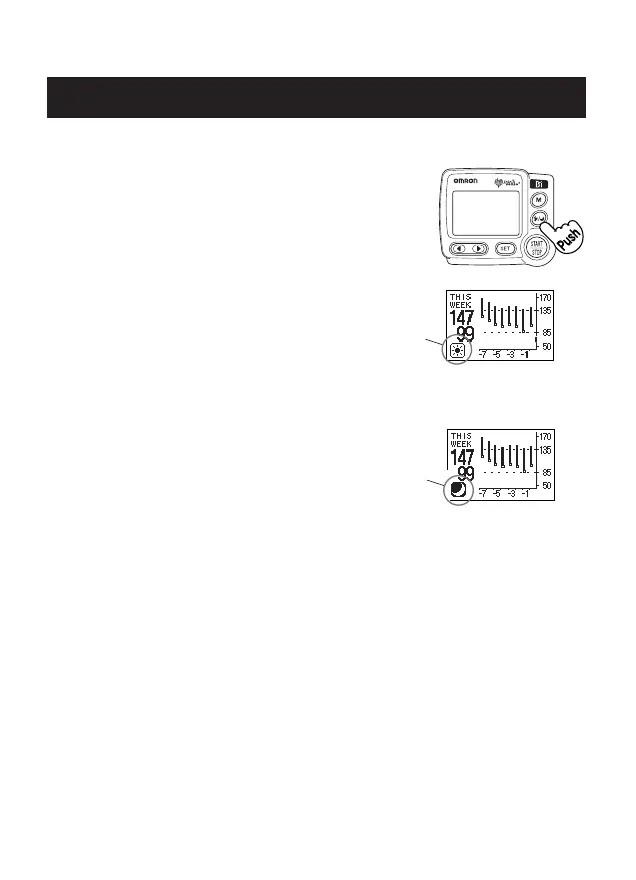
1. Press the MORNING/EVENING AVERAGE
button.
The Morning Data graph is displayed.
Press the MORNING/EVENING
AVERAGE button again.
The Evening Data graph is displayed.
NOTE: Continue to press the
MORNING/EVENING
AVERAGE button to display
the data again.
2. Press the START/STOP button to turn the monitor off.

HEM-670IT
Morning Data
Graph
Morning
Symbol
Evening
Symbol
USING THE MEMORY FUNCTION
Evening Data
Graph
HEM-670ITCAN_EN_FR_Q6_r2.qxd 5/13/09 10:45 PM Page 45

Related product manuals