10
EN
Important
Information
Know Your Unit
Operating
Instructions
Care and
Maintenance
Technical Data,
Warranty, etc.
Inhalation Method
Setting the
inhalation time
1
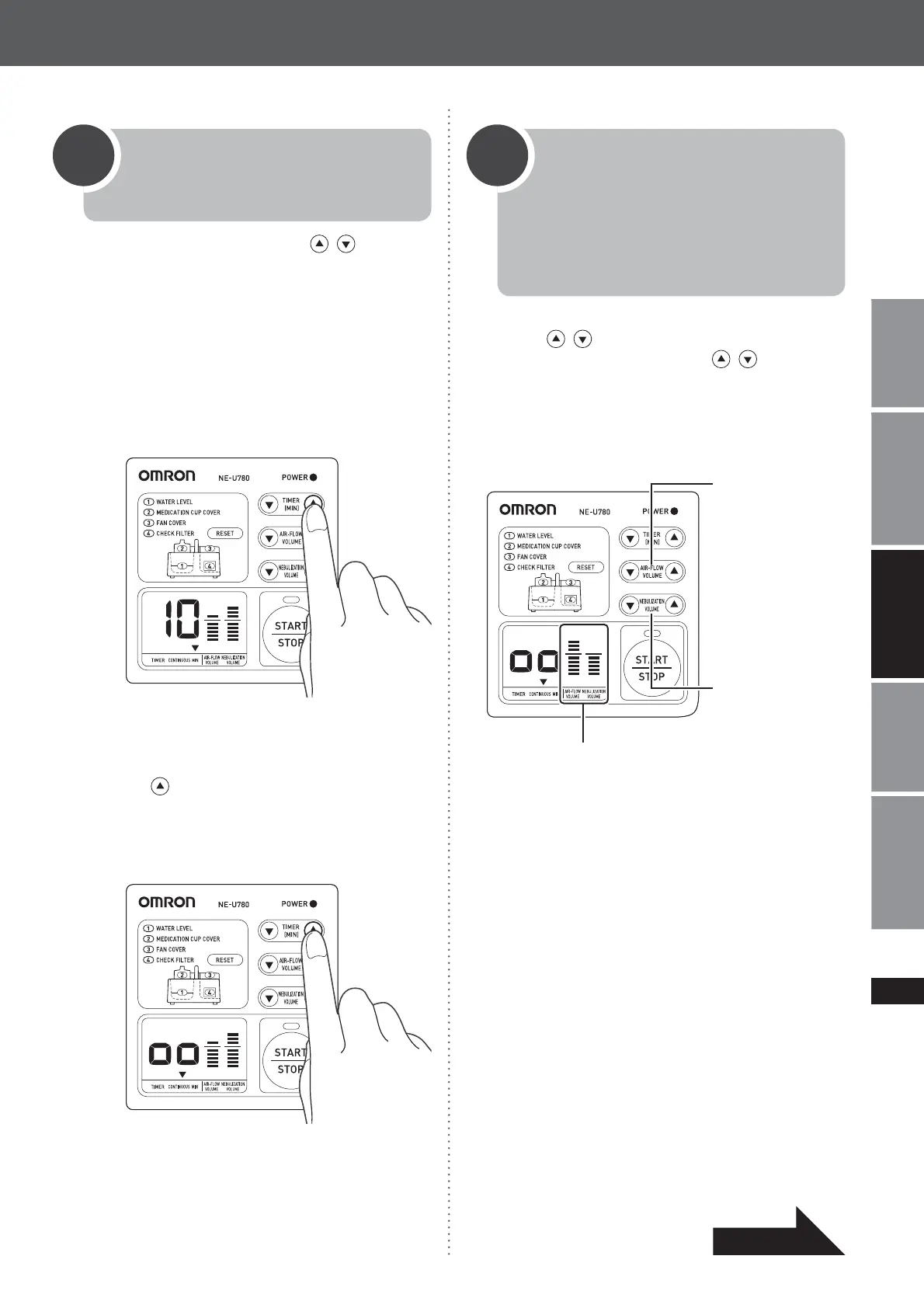
Press the TIMER(MIN) buttons to set
the inhalation time.
● Setting the timer
The timer can be set to an interval of up to
30 minutes in 1-minute increments. Press
and hold the buttons to increase or
GHFUHDVHWKHWLPHE\PLQXWHV7KHź
indicator will flash above the “MIN” mark on
the timer display.
● Continuous nebulization
Select “CONTINUOUS” with the timer
button
. “CONTINUOUS” is the next
VHWWLQJDIWHU³0,1´7KHźLQGLFDWRUZLOO
flash above “CONTINUOUS” on the timer
display.
Setting the
air-flow volume
and nebulization
volume
2
Using the AIR-FLOW VOLUME adjustment
buttons
and the NEBULIZATION
VOLUME adjustment buttons
, set the
air-flow volume and nebulization volume. You
can check both settings with the level displays,
which change to reflect the current value of
each.
The air-flow
volume is the
amount of air that
is flowing into the
medication cup
cover.
11 settings from 0
(no level display)
to 10 (maximum
level display)
The nebulization
volume is the
amount of aerosol
resulting from
nebulization of the
medication.
10 settings from 1
(minimum level
display) to 10
(maximum level
display)
Level display
Notes:
$GMXVWWKHDLUIORZYROXPHDQGQHEXOL]DWLRQYROXPH
according to the treatment.
'HSHQGLQJRQWKHW\SHRIPHGLFDWLRQEHLQJXVHG
there may be some unevenness in how the product
nebulizes the medication.
,I\RXVWDUWXVLQJWKHSURGXFWZLWKPORI
medication and with both the air-flow volume and
nebulization volume set to “10”, nebulization may
become intermittent. If this occurs, reduce the
nebulization volume.
Continued





 To Next Page