18
onesc
re
e
nso
lu
t
i
ons.
c
om
|
+1
858.552.0290
|
Un
i
t
ed
St
ate
s|
Pa
k
i
st
an
|
Colom
bi
a
|
Mexico
|
UAE
6.3.2. ConnectinganExternalPC
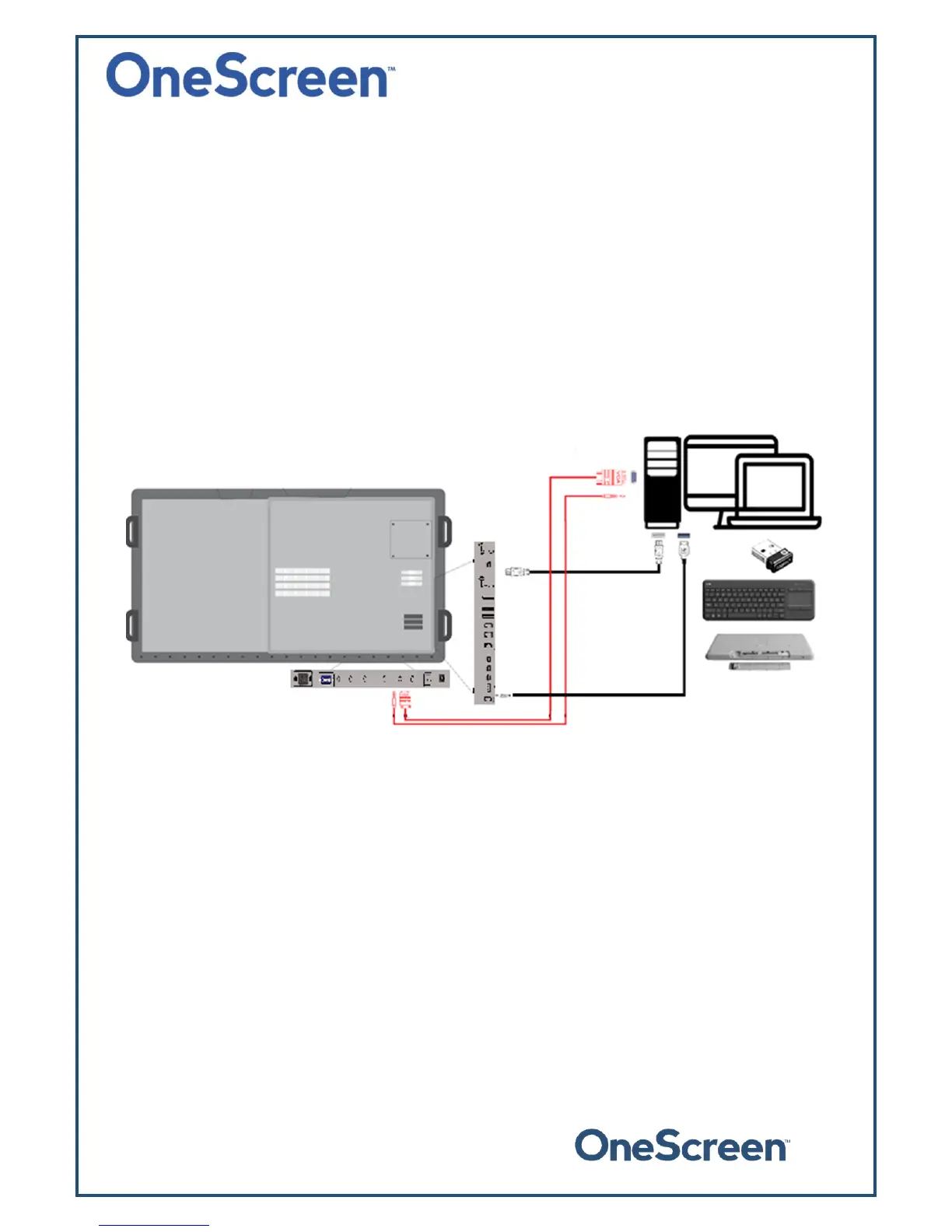
ToconnectanexternalPC,pleaseusetheHDMIorVGAcableandtheUSBtouchcable(asshowninWhat’s
Included).
Connect the USB Dongle to your PC, which will allow you to use the unit wirelessly. The USB dongle is
locatedinthekeyboardbatterycompartment,pleasetakeit
outandplugitinyourcomputer/laptop.
ConnectoneendoftheHDMIorVGAcabletoyourlaptopandtheotherendtooneofthecorresponding
portsontheOneScreenTouchscreen.IfyouareconnectingtheVGAcable,pleasealsousetheAUXcableto
transferaudio.
Connect
thestandardUSBendoftheUSBTouchCabletoyourlaptopandtheotherendtotheportshown
belowontheOneScreenT ouchscreen.


 To Next Page