12. TROUBLESHOOTING
BEFORE CALLING SERVICE
Many apparent malfunctions are caused by slight misadjustments of the regular controls or some
other equally simple cause. If any difficulty arises in the operation of your set, first check through
this list of symptoms & corrections. Should the difficulty persist, unplug the set & contact your
dealer or nearest ONIDA Service Centre.
Problem Symptoms Corrections
No Power Supply Is the power cord plug disconnected? Insert the plug in an AC outlet.
Is the main power button switched off? Then press the main power button ON.
No picture, Is your antenna Check the antenna
No sound disconnected ? connections.
No sound Is volume level on Zero? Increase the volume.
Sound Distortion Check sound system Select correct sound system.
Wrong colours Are the colour & brightness Adjust the colour & brightness controls.
controls adjusted correctly?
Spotted picture Could there be an interference from Replace the antenna cables with a
any electrical equipment, high co-axial cable, which is less prone to
tension wire, automobiles, etc. ? interference. Move antenna away from the
source of interference.
Double picture Could the direct signals from a TV Move antenna to a different position,
(ghost) broadcast station be affected by height or direction. Replace with an
signals reflected from mountains or antenna having good directivity.
buildings etc.?
Snowy picture Is the antenna wire cut or disconnected? Check antenna connection.
Is your antenna turned in the Direct the antenna properly.
wrong direction ?
Is the antenna damaged? Replace or repair the antenna.
Remote control Are the batteries exhausted? Replace the batteries.
not operating. Are the batteries placed in proper Reinstall the batteries correctly.
polarity ?
Is there any obstacle between Remove the obstacle.
remote & sensor ?
Lines or streaks Could there be any interference Move the device away until the
in Picture from a Personal Computer, TV, interference is eliminated, change antenna
Video Recorder, etc. position.
Colour patch Could there be external magnetic Switch off TV by the main power button.
field in the vicinity of your TV, Wait for 30 minutes before switching it
OR Earth’s magnetic field may have an on again. If the patch still appears
effect on your television. consult the service centre.
The company will provide service to the customer after the warranty period at a cost, for 7 years
from the date of discontinuation of the model, subject to the availability of the spare parts.
18
Fig. 2.1
2. PRE-INSTALLATION
1. CONNECTING THE AERIAL / CABLE AND EXTERNAL DEVICE
Place your TV on a flat surface, with atleast half a foot separating it from the nearest wall. Insert
the ‘mains’ plug into the appropriate source.
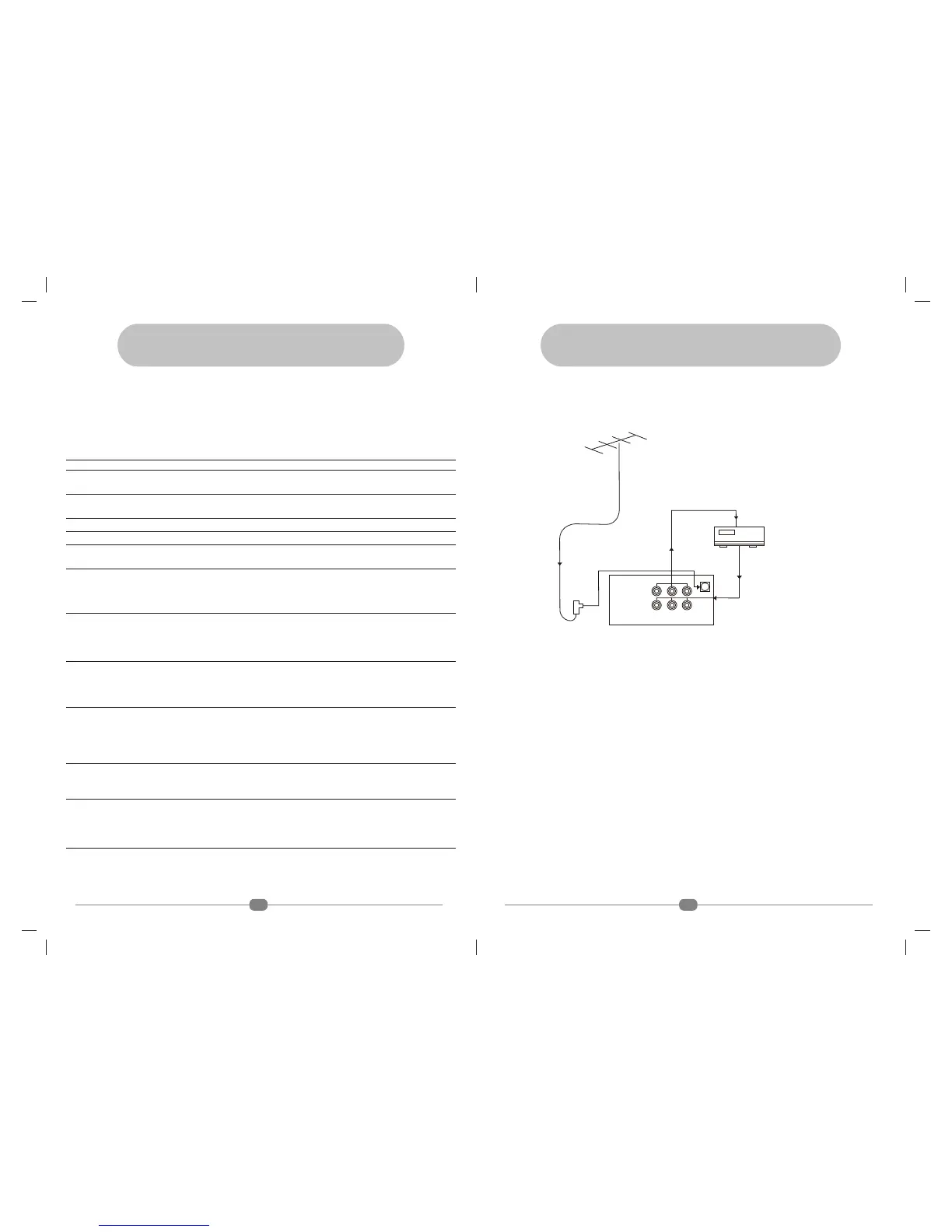
As shown above, connect the antenna cable to the socket(s) using a balun transformer attached
to the cable end. You can connect a VCR / VCD / LD / DVD player to your TV as shown above.
Note : • RF cord of video player can also be connected to socket(s).
• Switch off TV before connecting the antenna input.
• Before connecting any external inputs to your TV, switch off the TV.
3
ANTENNA (300 OHMS)
BALUN
OUTPUT
INPUT
VIDEO
REAR AV PANEL
FROM AV INPUT TERMINALS
OF THE VCR/VCP/VCD/DVD
TO AV INPUT TERMINALS
OF THE VCR/VCP/VCD/DVD
L/MONO R
(AUDIO)
(S)


 To Next Page