3. REMOTE AND TV CONTROLS
1.INSERTING BATTERIES INTO THE REMOTE CONTROL
• Insert two AA/R6/UM-3 dry cell batteries into the battery compartment at the back of the
remote, observing the (+) and (-) polarities.
• Do not use a combination of an old and a new battery or a pair of batteries, different by type.
• If the remote control operates erratically, replace the batteries with a new set.
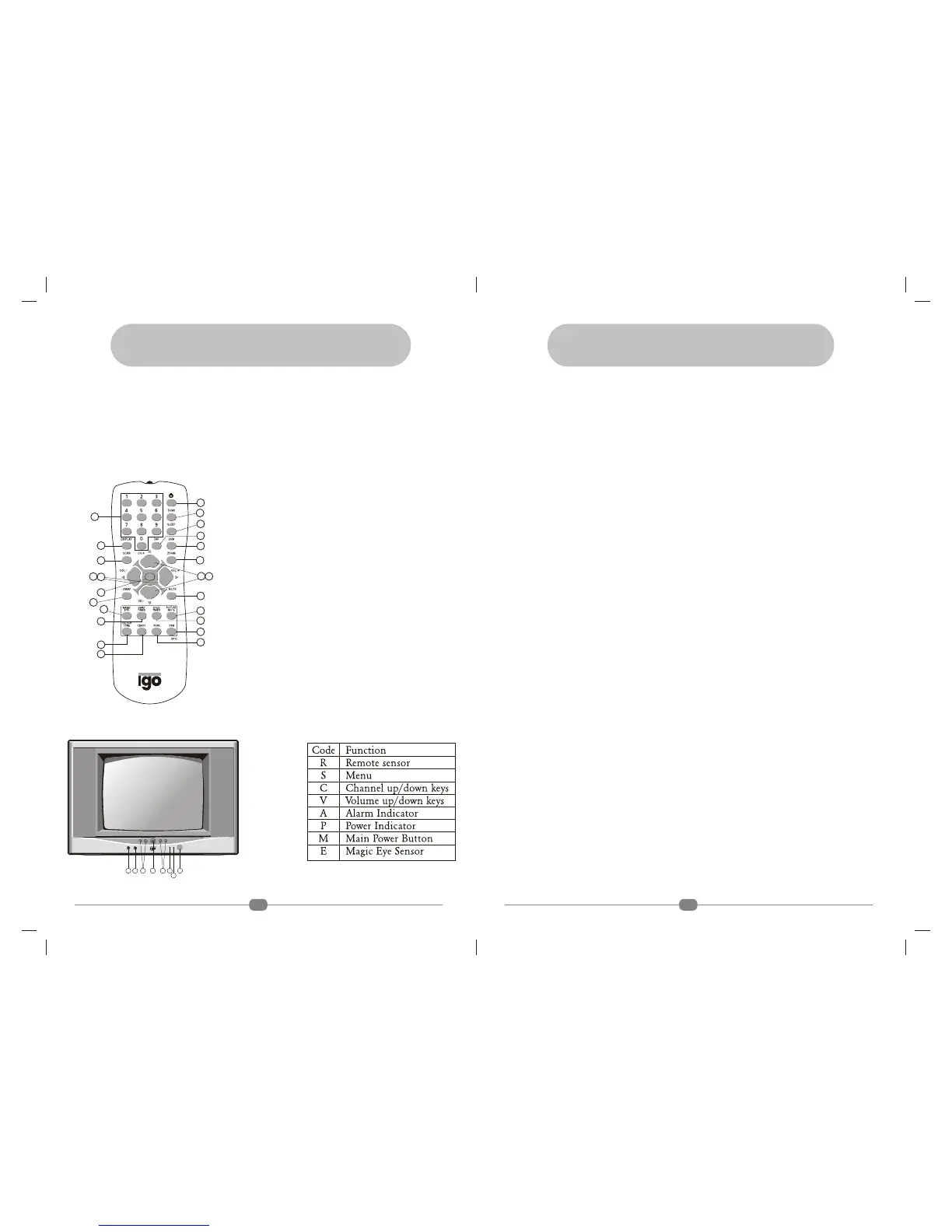
2.FUNCTION OF THE REMOTE CONTROL (R/C)
1) POWER 2) VSM
3) SSM 4) SURROUND*
5) POWER BASS* 6) FAV
7) VOLUME +/- 8) MENU UP /DOWN
9) MENU 10) MUTE
11) SLEEP 12) SWAP TIMER
13) CHILD TIMER 14) ZOOM
15) PICTURE MUTE 16) MAGIC EYE
17) SWAP 18) MENU LEFT / RIGHT
19) CHANNEL +/- 20) CHANNEL SCAN
21) NUMERIC KEYS 22) TV/AV
23) DISPLAY 24) COLOUR TONE
Fig. 3.1
4
1
2
3
4
5
6
7
8
9
10
11
12
14
15
16
18
19
20
21
23
24
13
17
MENU
22
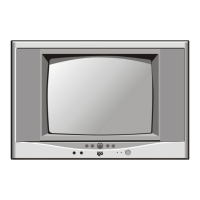
3. FUNCTION OF FRONT SIDE PANEL BUTTONS AND LAMPS
Fig. 3.2 Frontal Sketch of the Television
S MRE V C A
P
Note :* Feature not available
11. SAFETY INSTRUCTIONS
SAFETY INSTRUCTIONS
1. Unplug your TV set from the wall outlet before cleaning.
2. Do not use attachments not recommended by the company as they may cause fire or electric
shock.
3. Slots & openings in the cabinet and at the back or bottom of the TV set are provided for
ventilation. To ensure reliable operation of the TV set and to protect it from overheating,
these openings should not be blocked.
4. Do not allow anything to rest on the TV cord.
5. If an outside antenna is connected to the TV set, be sure that the antenna system is grounded.
The antenna should not be located in the vicinity of overhead powerlines.
6. For added protection to the TV set during a lightning storm, or when it is left unattended, not
used for long periods of time, unplug it from the wall outlet & disconnect the antenna.
7. Do not attempt to service the set yourself as opening or removing the cover may expose you to
dangerous voltages or other hazards. Refer all servicing to qualified service personnel only.
8. The Service Adjustment Controls are factory aligned and are to be used exclusively by
qualified service personnel. Do not tamper.
The following are not caused by TV malfunctions :
• When you touch the CRT (Cathode Ray Tube) Surface, you might feel slight charge of static
electricity. This is because the CRT contains static electricity : it does not affect the human
body.
• Due to alteration of ambient temperature, a cracking sound might be heard from the TV set;
there is no problem unless the picture, sound is abnormal.
• When a still bright image (white dress, for example) appears on the screen, the image might be
discoloured. This problem occurs in all CRTs. As the bright image disappears, such coloration
also disappears.
• Sometimes there could be a picture jump, noise in the picture and sound or some strange
disturbance in picture and sound caused due to electrical appliances, tubelights, etc. This will
normally be a temporary condition.
17


 To Next Page