54
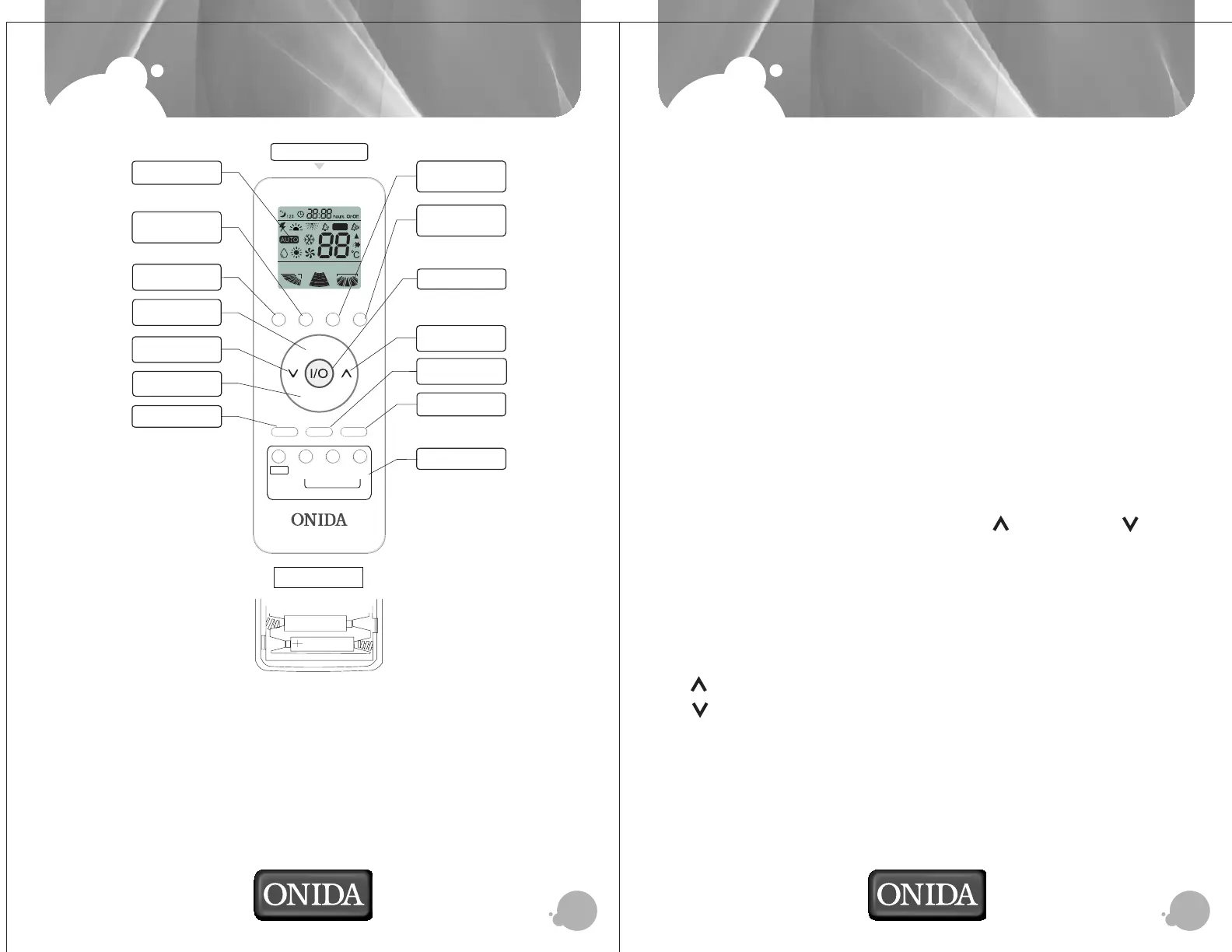
REMOTE OVERVIEW
OPERATIONS
BACK VIEW
1. Open back cover and put 2 Nos. AAA size alkaline batteries.
2. The remote signal can be reached upto six metres from the indoor unit.
3. When the button is pressed on remote, indoor unit will “beep” once, indicating
the receipt of signal. If no “beep” sound is heard, press the button once again.
4. Remove batteries if remote control has not been used for long time.
5. *Heat mode & Money Saved is not available with all models.
Operating Your Air Conditioner:
Your Split Air Conditioner can be conveniently operated using the intelligent cordless
remote control.
1. Switch on the MCB.
Press ON/OFF button on remote handset to switch ON the AC.
All icons will glow once.
Your AC switches on with parameters that were set before power was switched
off. The unit receives the signal with "BEEP" tone and your AC starts operation.
Time Delay: To protect the compressor, a time delay is incorporated in the circuit.
The Time Delay ensures that the compressor switches ON only after a delay of about 3
minutes.
2. Press the “MODE” Button for Auto, Cool, Dry, or Fan Mode selection.
3. Press the "FAN” Button to set the Fan Speed. Each press changes the fan speed
from Low-Med.- High-Auto Fan speed. The selected fan setting symbol can be
seen on the LCD.
4. The Set Temp. is displayed on LCD, Press button ” “ to increase and “ “ to the
decrease the temperature.
5. To switch off the AC, press the same ON/OFF Button.
Setting the Desired Room Temp.:
You can set the temp. at which you would like your room to be.
O
Press " " button to increase the set temp. On every press, the temp. increases by 1 C.
O
Press " " button to decrease the set temp. On every press, the temp. decreases by 1 C
The two digit display shows the set temp. on LCD.
O
The setting temp. range is from 16- 31 C.
Your split AC operates in one of four modes, AUTO-COOL-DRY-FAN. The modes button
cyclically chooses between these operating modes.
*Cooling capacity measured at High speed, as per IS 1391:1992 Part 2
FAN SPEED
SLEEP
RUN/STOP
TEMPERATURE
ADJUSTMENT
TEMPERATURE
ADJUSTMENT
TIMER ON/OFF
i-Cool CONTROL
Signal ejecting window
MONEY SAVED
BUTTON
DISPLAY ON/OFF
MODE
ENERGY SAVER
OPERATION DISPLAY
TURBO MODE
OPERATION MODE
MANUAL/AUTO
SWING
FFAANNAAUUTTOOSSWWIINNGG
CLEANCLEANCLEANCLEAN
i-cool
MANUAL
MODEMODE
MONEMONEYY
SSAAVEDVED
SS
ENEGRYENEGRY
AAVERVER
SWINGSWING TIMERTIMER ON/OFF ON/OFF SLEESLEEPP
CONTRO CONTROLL
C.C.FF..
ON/OFFON/OFF
C.C.FF..
+ +
C.C.FF..
--
TURBOTURBO
DISPLDISPLAAYY
ON/OFFON/OFF
FFAN SPEEDAN SPEED
i-cooli-cool


 To Next Page