EasyManua.ls Logo

Onix ACBB-0918 - Installation; Connecting to Power

Onix ACBB-0918
9 pages
Print Icon
To Next Page IconTo Next Page
To Previous Page IconTo Previous Page
Loading...
lnstallation
'1
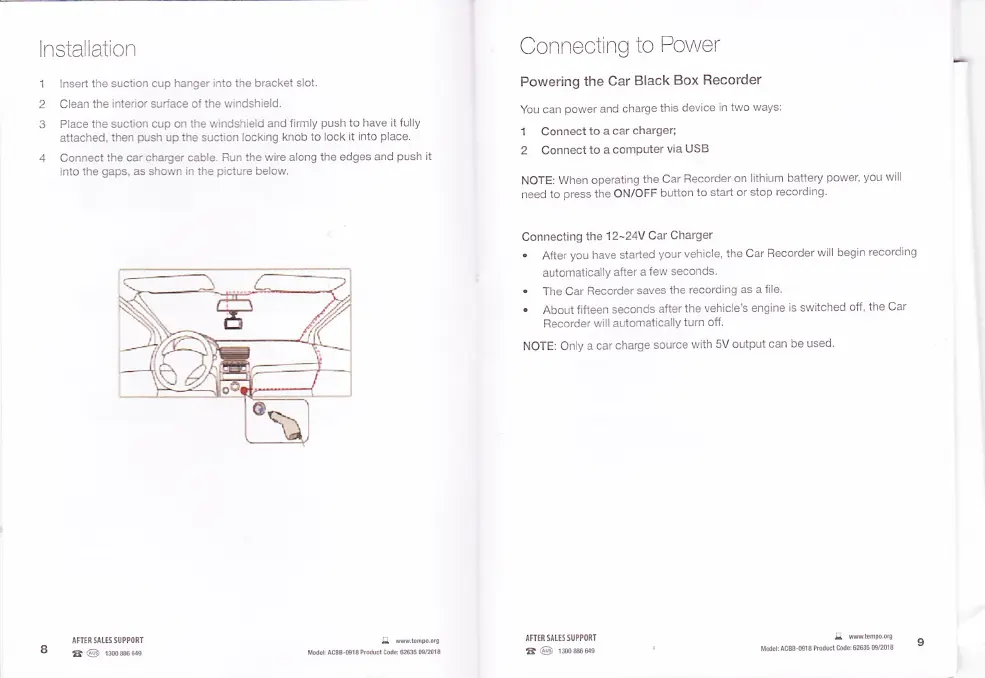
lnsert the suction
cup hanger into the bracket
slot.
2 Clean
the
interior
surlace of
the windshield.
3
Place the suction cup on
the windshield and
firmly
push
to
have it lully
attached,
then
push
up the suction
locking knob to
lock it into
place.
4 Connect
the car charger cable. Run
the wire along
the edges and
push
il
into the
gaps,
as shown in the
picture
below.
Connecting
to Power
Powering
the Car
Black
Box Recorder
You can
power
and
charge
this
device
in two ways:
1 Connect
to a
car charger;
2 Connect
to a
comPuter
via USB
NOTE:
When operating
the Car
Recorder
on lithium
battery
power, you
wiil
need
1o
press
the ON/OFF
button
to
start or stop
recording.
Connecting
the
'l
2-24V
Cat Cha(ger
.
After
you
have started
your
vehicle, the Car
Recorder
will begin
recording
automatically
after a
few seconds.
.
The Car
Recorder
saves
the recording
as a lile
.
About fifteen
seconds
after
the vehicle's
engine
is switched
off,
the Car
Recorder
will automatically
turn
off.
NOTE:
Only a
car charge
source
with
5V outpui can
be used
IFTIISIUSSUPPORI
I
@
1msils
ITTIR9E55UPPORT
I @
1il6ile
q
tw.tmForc
Md.rr
Ac33 Gl3
Prdud Cod.: ffi
w2013