Operation Instructions
Setup
14
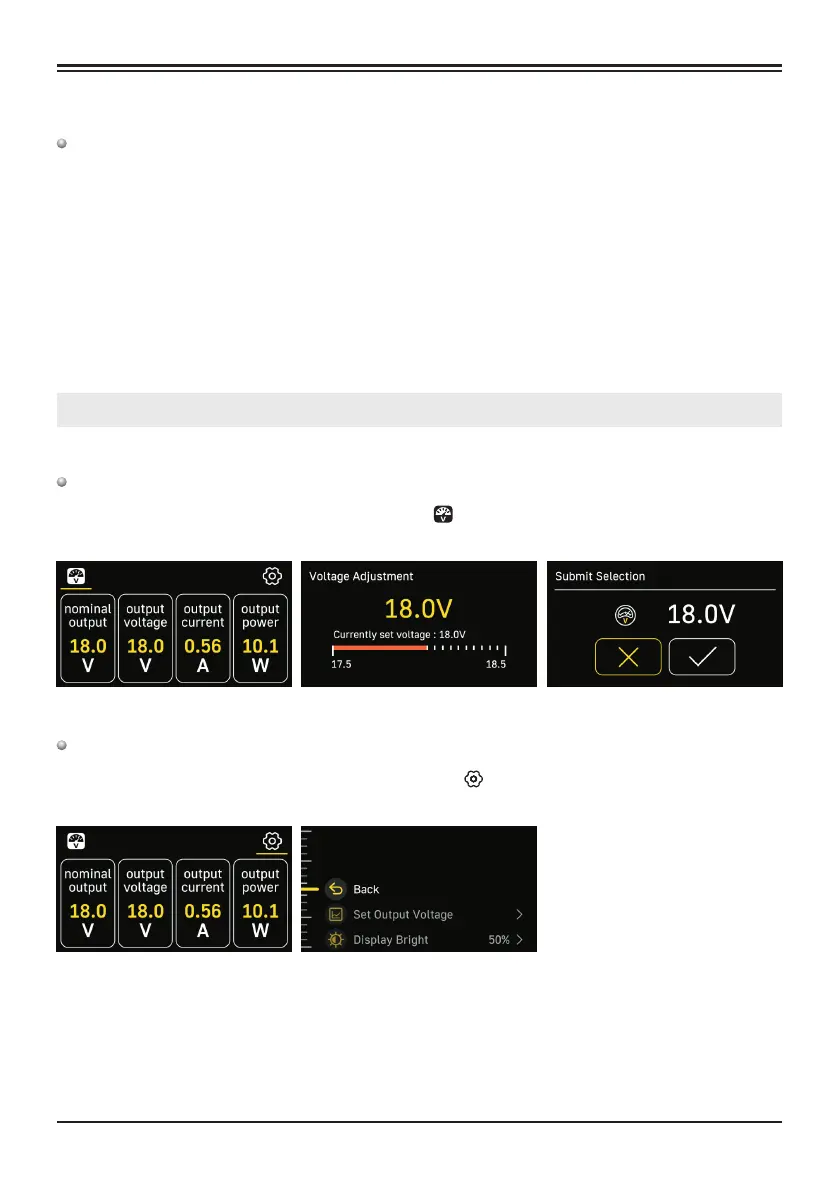
Voltage Adjustment
Menu Navigation
Note: Switch off XPS10 before connecting its power output to DAC.
1. Connect both power cables to the XPS10.
2. Turn on the XPS10, using the power switch on the back, put it into ON position. XPS10 standby
indicator will light up red and the device will enter standby mode. Press and hold the Power Wheel on
XPS10 for 2 seconds to power on the system.
3. To power off the XPS10, press and hold the Power wheel for 2 seconds. Indicator will turn red and the
device will enter standby mode. To completely cut off power, switch the power switch on the rear to
the OFF position.
4. If the machine will not be sued for longer period of time, please disconnect it from power outlet.
Turn the wheel to select the fine-tuning voltage icon Use wheel to adjust and then press the wheel
to confirm and exit setting.
" "
Turn the wheel and then press to select Settings icon Use the wheel to navigate through the
settings. Go to "Back" and press on the wheel to exit the settings.
" "
XPS10 Linear Power Supply


 To Next Page