Front & Rear Panels-Continued
10
CD
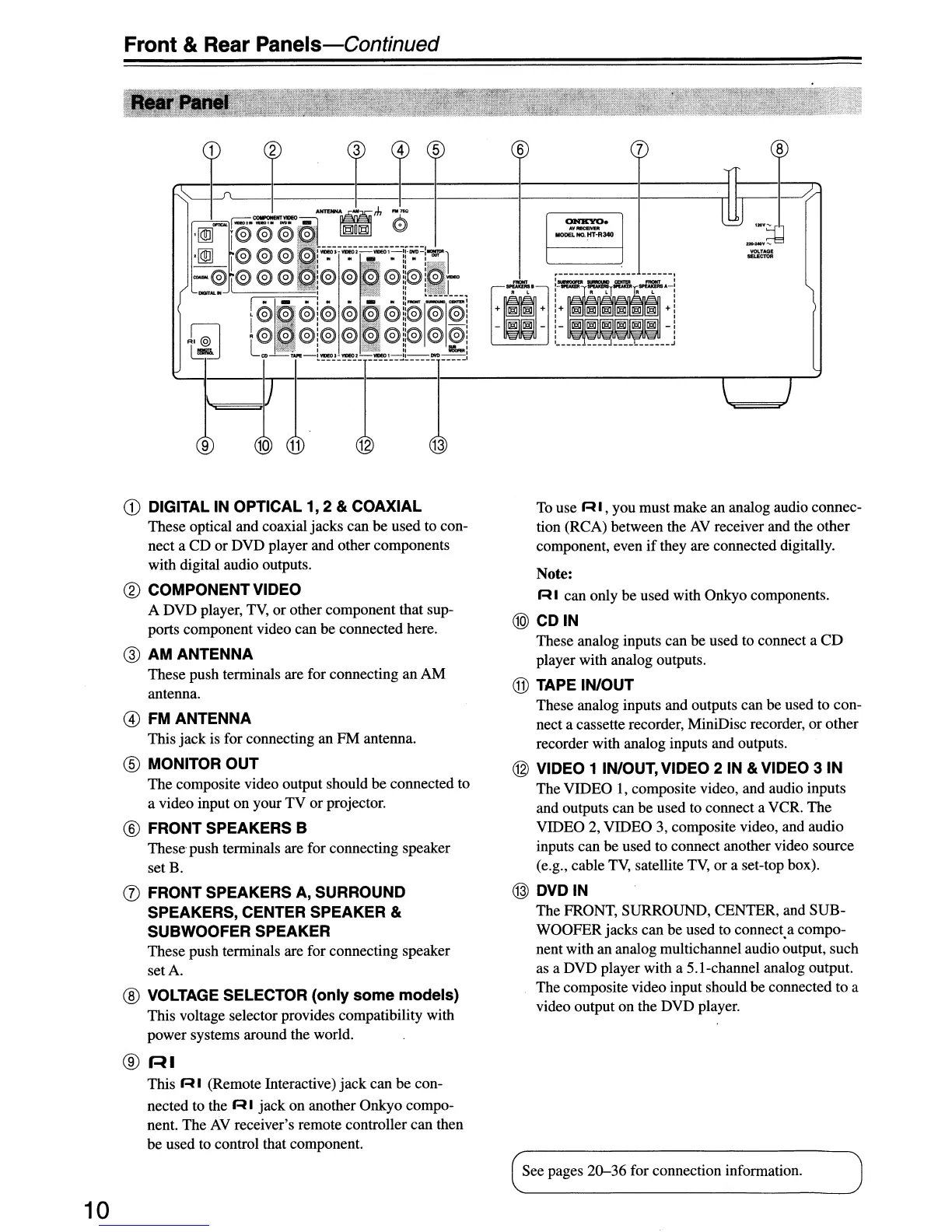
DIGITAL IN OPTICAL 1, 2 & COAXIAL
These optical and coaxial jacks can
be
used to con-
nect a CD
or
DVD player and other components
with digital audio outputs.
®
COMPONENT
VIDEO
A DVD player,
TV,
or other component that sup-
ports component video can be connected here.
@ AM ANTENNA
These push terminals are for connecting an AM
antenna.
@
FMANTENNA
This jack is for connecting an PM antenna.
® MONITOR
OUT
The composite video output should be connected to
a video input on your TV or projector.
® FRONT SPEAKERS B
These push terminals are for connecting speaker
set B.
(J)
FRONT
SPEAKERS A,
SURROUND
SPEAKERS, CENTER SPEAKER &
SUBWOOFER
SPEAKER
These push terminals are for connecting speaker
setA.
® VOLTAGE SELECTOR (only
some
models)
This voltage selector provides compatibility with
power systems around the world.
®
r-U
This
RI
(Remote Interactive) jack can be con-
nected to the
R I jack on another Onkyo compo-
nent. The
AV
receiver's remote controller can then
be used to control that component.
To
use R I , you must make an analog audio connec-
tion (RCA) between the
AV
receiver and the other
component, even
if
they are connected digitally.
Note:
R I can only be used with Onkyo components.
@CDIN
These analog inputs can be used to connect a
CD
player with analog outputs.
® TAPE IN/OUT
These analog inputs and outputs can be used to con-
nect a cassette recorder, MiniDisc recorder, or other
recorder with analog inputs and outputs.
@ VIDEO 1 IN/OUT, VIDEO 2 IN & VIDEO 3
IN
The VIDEO I, composite video, and audio inputs
and outputs can be used to connect a VCR. The
VIDEO 2, VIDEO 3, composite video, and audio
inputs can be used to connect another video source
(e.g., cable
TV,
satellite
TV,
or a set-top box).
@
DVDIN
The FRONT, SURROUND, CENTER, and SUB-
WOOFER jacks can be used to connect.a compo-
nent with an analog multichannel audio output, such
as a DVD player with a S.l-channel analog output.
The composite video input should be connected to a
video output on the DVD player.
See pages
20-36
for connection information.



 To Next Page
 Loading...