EasyManua.ls Logo

Onkyo TX-860 - Component Connections; AM Antenna Connections; Remote Control Connections; Speaker Connections

Onkyo TX-860
13 pages
Print Icon
To Next Page IconTo Next Page
To Previous Page IconTo Previous Page
Loading...
i
|
i
;
ne
er
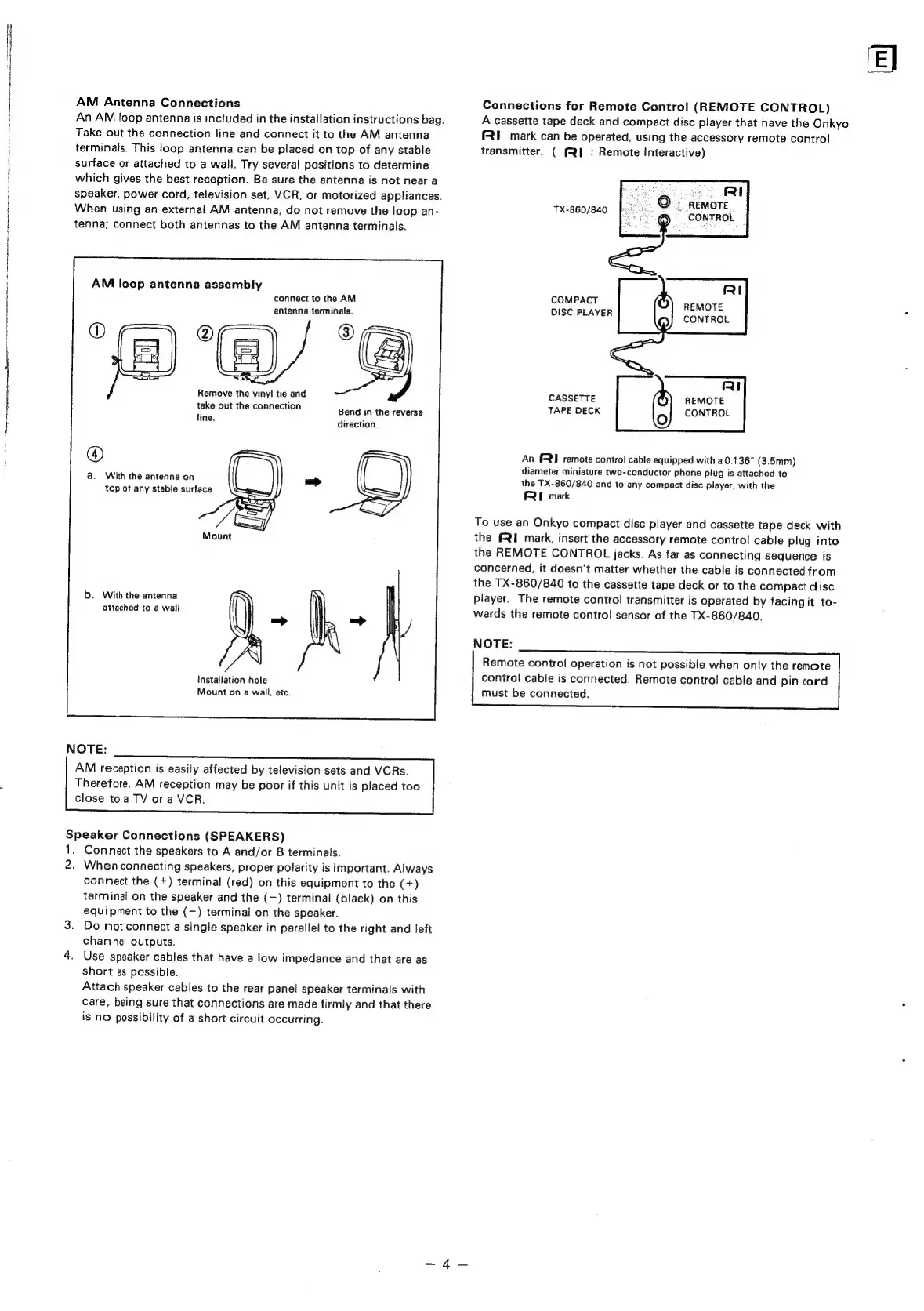
AM
Antenna
Connections
An
AM
loop
antenna
is
included
in
the
installation
instructions
bag.
Take
out
the
connection
line
and
connect
it
to
the
AM
antenna
terminals.
This
loop
antenna
can
be
placed
on
top
of
any
stable
surface
or
attached
to
a
wall.
Try
several
positions
to
determine
which
gives
the
best
reception.
Be
sure
the
antenna
is
not
near
a
speaker,
power
cord,
television
set,
VCR,
or
motorized
appliances.
When
using
an
external
AM
antenna,
do
not
remove
the
loop
an-
tenna;
connect
both
antennas
to
the
AM
antenna
terminals.
AM
loop
antenna
assembly
connect
to
the
AM
antenna
terminals.
tS
Remove
the
vinyl
tie
and
take
out
the
connection
i
Bend
in
the
reverse
line.
direction.
a.
With
the
antenna
on
top
of
any
stable
surface
b.
With
the
antenna
attached
to
a
wall
Installation
hole
Mount
on
a
wall,
etc.
NOTE:
AM
reception
is
easily
affected
by
television
sets
and
VCRs.
Therefore,
AM
reception
may
be
poor
if
this
unit
is
placed
too
close
toa
TV
ora
VCR.
Speaker
Connections
(SPEAKERS)
1.
Connect
the
speakers
to
A
and/or
B
terminals.
2.
When
connecting
speakers,
proper
polarity
is
important.
Always
connect
the
(+)
terminal
(red)
on
this
equipment
to
the
(+)
terminal
on
the
speaker
and
the
(—)
terminal
(black)
on
this
equipment
to
the
(—)
terminal
on
the
speaker.
3.
Do
not
connect
a
single
speaker
in
parallel
to
the
right
and
left
channel
outputs.
4.
Use
speaker
cables
that
have
a
low
impedance
and
that
are
as
short
as
possible.
Attach
speaker
cables
to
the
rear
panel
speaker
terminals
with
care,
being
sure
that
connections
are
made
firmly
and
that
there
is
no
possibility
of
a
short
circuit
occurring.
Connections
for
Remote
Control
(REMOTE
CONTROL)
A
cassette
tape
deck
and
compact
disc
player
that
have
the
Onkyo
FRE
mark
can
be
operated,
using
the
accessory
remote
contro!
transmitter.
(
(RE
:
Remote
Interactive)
ey)
©
-
pemore
CONTROL
TX-860/840
Poooe
3
RI
Disc
PLAYER
nEMOS
CONTROL
RI
CASSETTE
REMOTE
TAPE
DECK
CONTROL
An
§RI
remote
control
cable
equipped
with
a
0.136”
(3.5mm)
diameter
miniature
two-conductor
phone
plug
is
attached
to
the
TX-860/840
and
to
any
compact
disc
player,
with
the
FRE
mark.
To
use
an
Onkyo
compact
disc
player
and
cassette
tape
deck
with
the
FRI
mark,
insert
the
accessory
remote
control
cable
plug
into
the
REMOTE
CONTROL
jacks.
As
far
as
connecting
sequence
is
concerned,
it
doesn’t
matter
whether
the
cable
is
connected
from
the
TX-860/840
to
the
cassette
tape
deck
or
to
the
compact
disc
player.
The
remote
control
transmitter
is
operated
by
facingit
to-
wards
the
remote
control
sensor
of
the
TX-860/840,
NOTE:
Remote
control
operation
is
not
possible
when
only
the
renote
control
cable
is
connected.
Remote
contro!
cable
and
pin
cord
must
be
connected.
El