onsenproducts.ca
800-996-5559
ENGLISH
ADJUSTING THE WATER TEMPERATURE
WARNING: THIS WATER HEATER MAY PRODUCE SCALDING WATER TEM-
PERATURES. USE EXTREME CAUTION WHEN OPERATING THIS WATER
HEATER.
Follow these steps to adjust the outgoing water temperature:
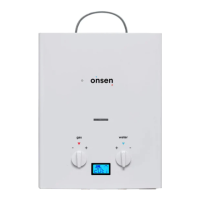
Set the water heater to the lowest setting available by turning the
water regulator knob to maximum and the gas regulator knob to min-
imum. Carefully check the water temperature.
To raise the water temperature, turn the gas knob slowly towards
maximum, checking the water temperature often. Wait several sec-
onds after turning the gas knob before checking the temperature.
To further raise the water temperature once the gas knob is at max-
imum, turn the water knob slowly towards minimum, checking the
water temperature often until the desired temperature is achieved.
The digital screen between the gas and water knobs displays the tem-
perature of the outgoing water. Adjust the gas and water knobs to
achieve the desired temperature.
1
2
3
4


 To Next Page