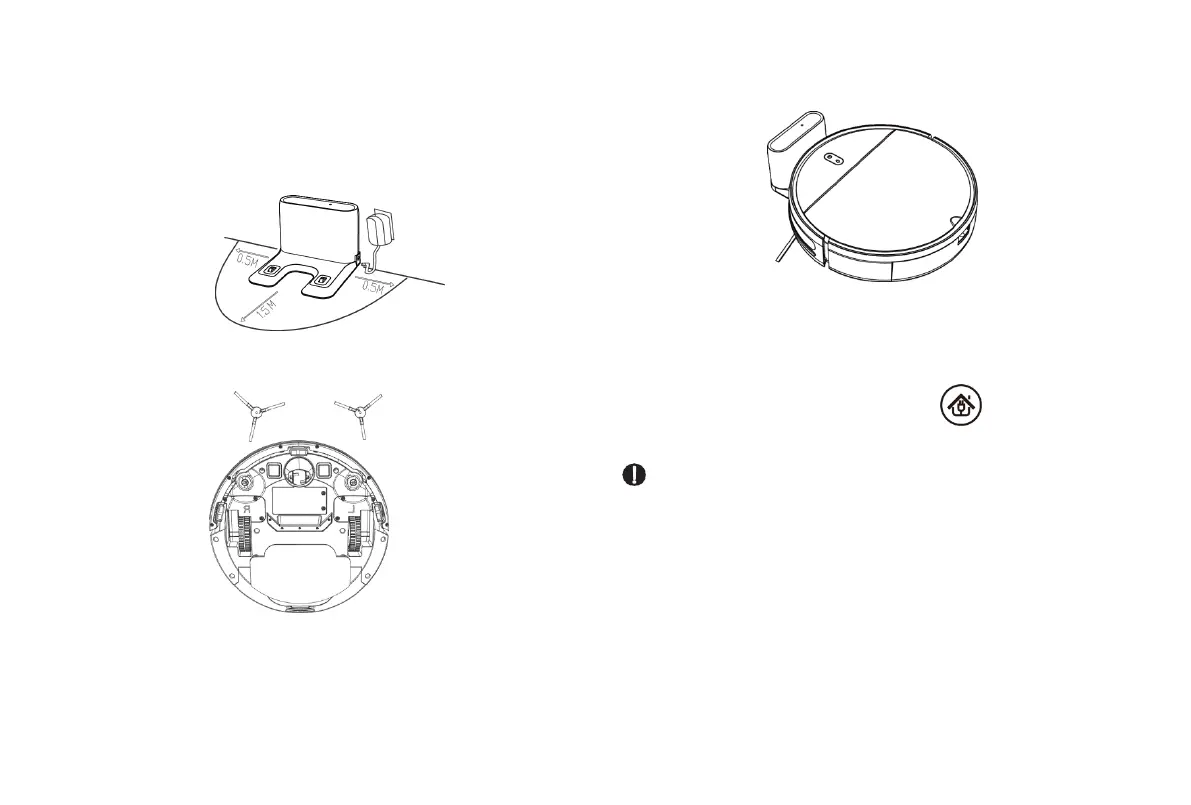
1. Place the charging stand on the flat ground against the wall. Do
not place any articles 0.5 m on the left and right of the charging
stand or 1.5 m in front of the charging stand.
2. Connect the charging stand to the power supply.
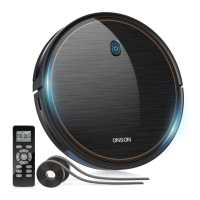
3. Install the left and right side brushes.
4. Charging: Place the main unit on the charging stand to charge
the main unit. During charging, the indicator blinks. When charging
is complete, the indicator is steady on. It takes about five hours to
fully charge the main unit.
During cleaning, the main unit automatically checks its power level.
If the power is insufficient, the main unit activates the mode of
returning to the charging stand and automatically returns to the
charging stand for charging.
Alternatively, you can press the button on the remote
control to instruct the main unit to activate the mode of returning to
the charging stand.
Caution:
1. Do not use the charging stand in reflective environments such
as the environment exposed to direct sunlight and environment
with mirrors nearby. If there are reflective objects, cover the
charging stand at a height of 7 cm from the bottom.
2. To ensure the normal working duration of the main unit, fully
charge the main unit before use. The charging time is about five
hours.
3. To ensure the safety of charging and prevent a damp cloth from
damaging the floor, remove the water tank before charging the
main unit.


 To Next Page