22 23
Alternative Ethernet Setup Options
The Ooma Telo is flexible enough to work in almost any home network and with a variety of devices.
Review the following options to see if any of them apply to you.
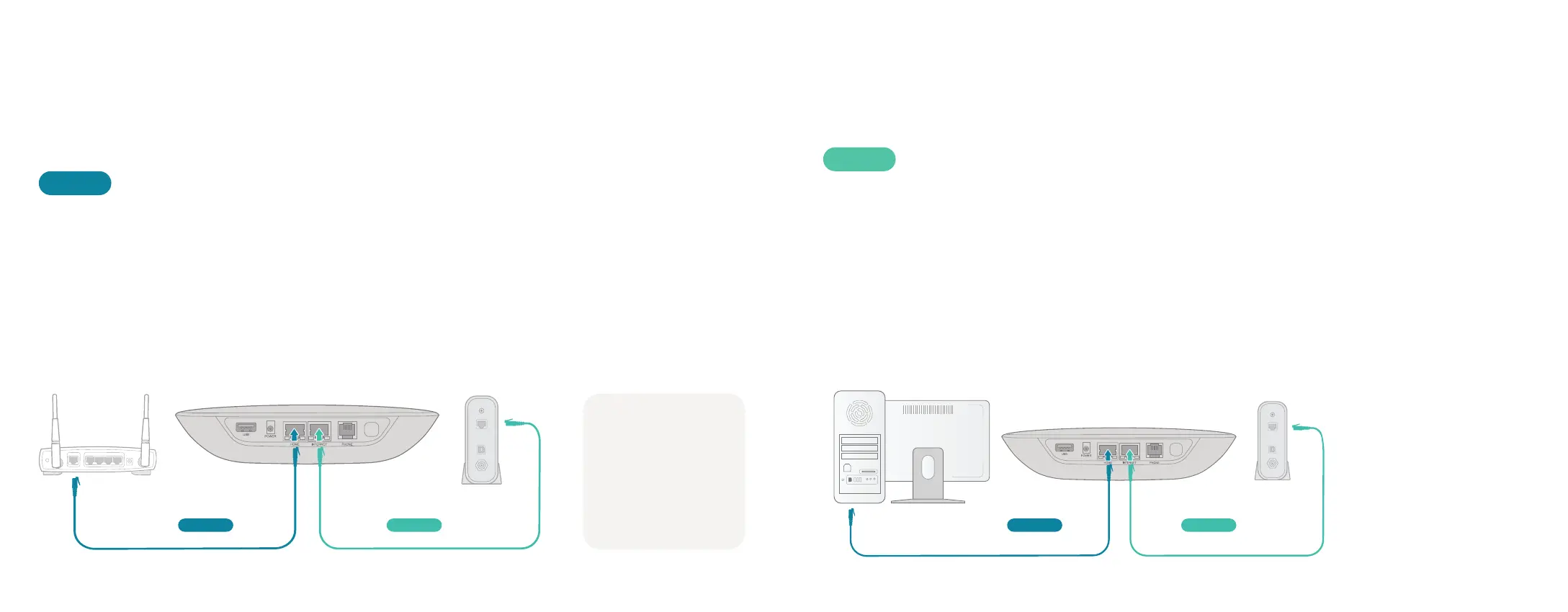
Install Telo between modem and router (best voice quality)
This setup allows Ooma to prioritize your phone calls over other network traffic.
1. Find the Ethernet cable that connects your modem to your router.
2. Unplug the modem end and plug into the HOME port of the Telo.
3. Use the included Ethernet cable and connect the INTERNET port of the Telo
to your modem.
4. Reboot your modem and router.
OPT. A
ModemOoma TeloRouter
HOME INTERNET
NOTE: Option A is
required to use Ooma
Internet Security,as
Internet traffic needs
to pass througah
the Telo in order to
be filtered.
Install Telo between modem and PC
If you only have one computer and it is connected to your modem, use this option.
1. Find the Ethernet cable that connects your modem to your computer.
2. Unplug the modem end and plug it into the HOME port of the Telo.
3. Use the included Ethernet cable and connect the INTERNET port of the
Telo to your modem.
4. Reboot your modem and computer.
OPT. B
ModemComputer
Ooma Telo
INTERNETHOME


 To Next Page