24 25
Fax and Home Wiring Setup Options
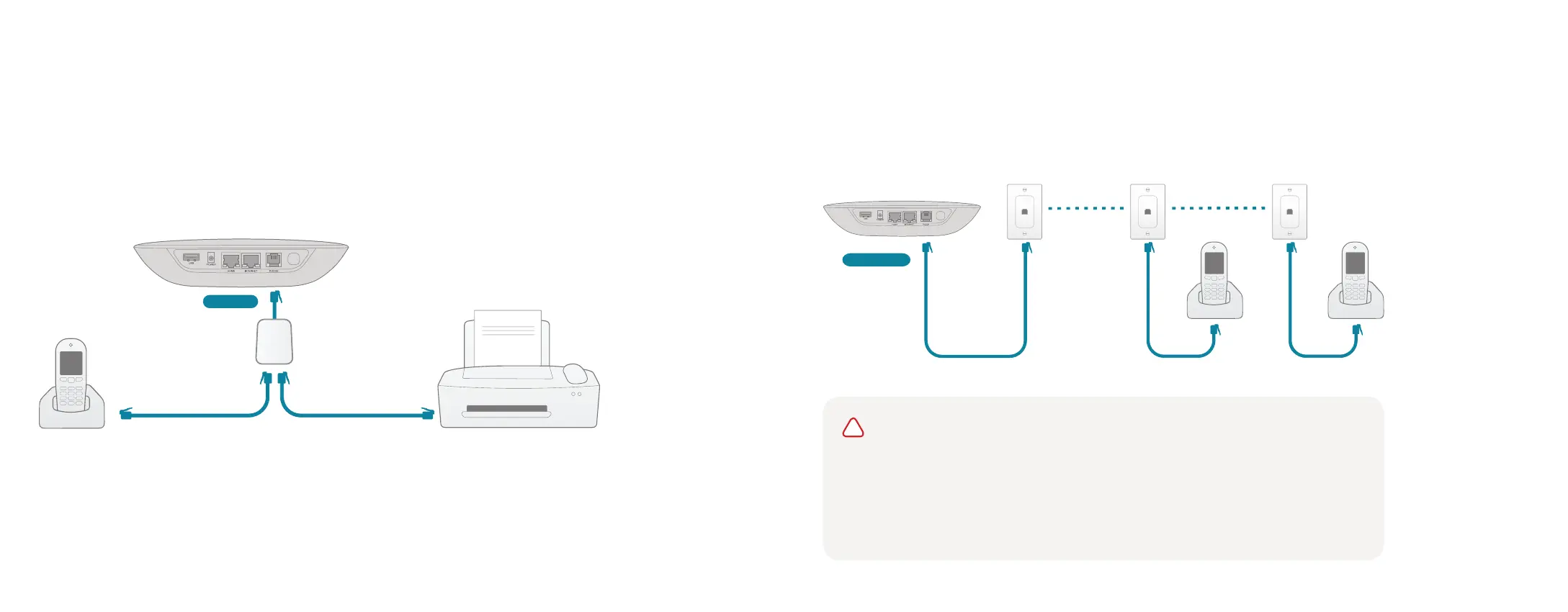
Connecting your Fax
A standard phone splitter can be used to connect more than one device to the PHONE port.
To learn more, visit: www.ooma.com/fax
Phone
Ooma Telo
Phone
Splitter
Fax, DVR or STB
PHONE
PHONE
Phone
Phone
Ooma Telo
Connecting Your Phone Jacks
You can link the Ooma Telo to the phone jacks in your home, allowing you to connect phones
in multiple rooms.
!
IMPORTANT: The PHONE port on the back of your Ooma Telo is not designed or
certified for connecting to your phone company’s wiring, whether through the phone
jacks in your home or otherwise. To avoid the risk of fire and/or electrical shock, you
must first completely disconnect the phone company’s wiring outside of your house
from the phone wiring inside of your house. Do not plug your Ooma Telo into your
phone jacks before doing this. Please visit ooma.com/homedistribution before you
proceed with connecting your Telo in this manner.


 To Next Page