5 6 56
Immunity
56
snow
mode
56
normal
heavy
snow
mode
3 4 3 4 3 4 34
Position
1
Position
2
Position
3
Position
4
3
2
01.0m2.0m 1.0m
18
2
7
3
6
45
01.0m 1.0m 2.0m
3.0m
2.8m
2.6m
2.4m
2.2m
2.0m
1.0m
3.0m
2.8m
2.6m
2.4m
2.2m
2.0m
1.0m
18
2
7
3
6
4
5
01.0m 1.0m
3.0m
2.8m
2.6m
2.4m
2.2m
2.0m
1.0m
1
2
3
4
8
7
6
5
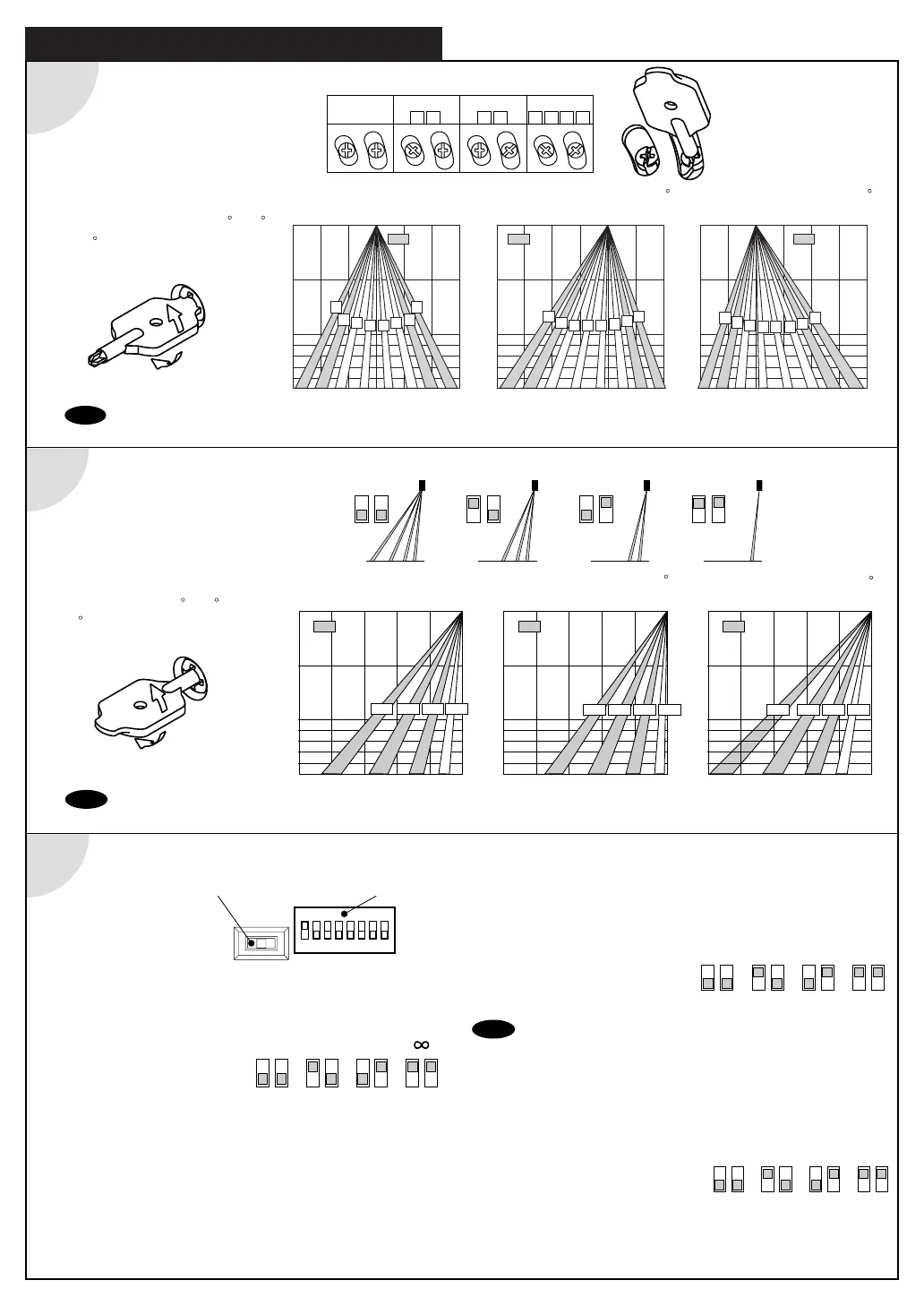
Adjusting the Pattern Width
Pattern when changed 7
to Right
Pattern when changed 7
to Left
Pattern when Standard
1
ADJUSTMENT
Note
Setting the pattern for exact door opening may give a slow response to side approaching traffic.
: Erasable
Area
: Erasable
Area
: Erasable
Area
Setting the Width
adjustment shutters
Adjusting the Width Angle
Left or Right : between 0
to 7
(3.5
per click)
to Left
Opens
All Areas
Eliminate
12787 812
Eliminate
Eliminate
to Right
Setting the Row with the
Dipswitch 7 & 8.
Pattern when changed 4
to Deep (outside).
Pattern when changed -4
to Shallow (inside).
Pattern when Standard
0m
1.0m2.0m
1.0m
2.0m
2.2m
2.4m
2.6m
2.8m
3.0m
0m
1.0m2.0m
1.0m
2.0m
2.2m
2.4m
2.6m
2.8m
3.0m
0m
1.0m2.0m
1.0m
2.0m
2.2m
2.4m
2.6m
2.8m
3.0m
0m
1.0m2.0m
1.0m
2.0m
2.2m
2.4m
2.6m
2.8m
3.0m
Adjusting the Pattern Depth
78
4ROW 3ROW 2ROW 1ROW
78 78 78
: Erasable
Area
: Erasable
Area
: Erasable
Area
1st
2nd3rd4th 1st2nd3rd4th
1st2nd3rd4th
1 2 12
15sec.
12
180sec.
1 2
2sec.
1 2 3 4 5 6 7 8
ON
ON
LMHL M H
Setting of Sensitivity Switch and Dipswitches
Sensitivity Switch
Dipswitches
Setting the Sensitivity
Normally set to “M.”
“H” increases the sensitivity and “L” lowers the sensitivity.
Setting the Presence timer
1st Row and 2nd Row from
door provide the presence detection.
(1) Select the presence detection time.
(2) Turn the power off and on again. Otherwise it may
leave door open for the duration of the presence time
set.
(3) After making sure that the door closes, wait for 10
seconds before entering the detection area to set the
Presence timer.
Setting the Frequency Function
(Interference Prevention)
Four different frequencies can be
set by adjusting the Dipswitch 3
and 4.
Note When two or more sensors are installed close to each
other, it is possible that they interfere. When that happens,
change the Frequency.
Setting the Snow mode
Set the Dipswitch5 and 6 to snow
mode , if the sensor is used in a
region with snow or a lot of insects.
Adjusting the Depth
Angle between -4 to 4
(1
per click).
Shallow
Note Set the pattern for actual traffic. It may cause slow activation for the traffic from the front, when the Row is eliminated.
Depth


 To Next Page