TROUBLESHOOTING
Note The door may open once after the power is switched on.
Inform the following items to the building
owner/operator
1. When turning the power on, always walk-test the sensor pattern to ensure proper operation.
2. Always keep the detection window clean. If dirty, wipe the window with a damp cloth. (Do not use any cleaner or solvent.)
3. Do not wash the sensor with water.
4. Do not disassemble, rebuild or repair the sensor yourself; otherwise electric shock may occur.
5. Contact your installer or the sales engineer if you want to change the settings.
6. Do not place an object that moves or emits light in the detection area. (Ex. Plant, illumination, etc.)
7. Do not paint the Detection Window.
Contact your installer or the sales engineer if:
- you need to change the settings or replace the sensor.
- the trouble still persists after checking and remedying as described above.
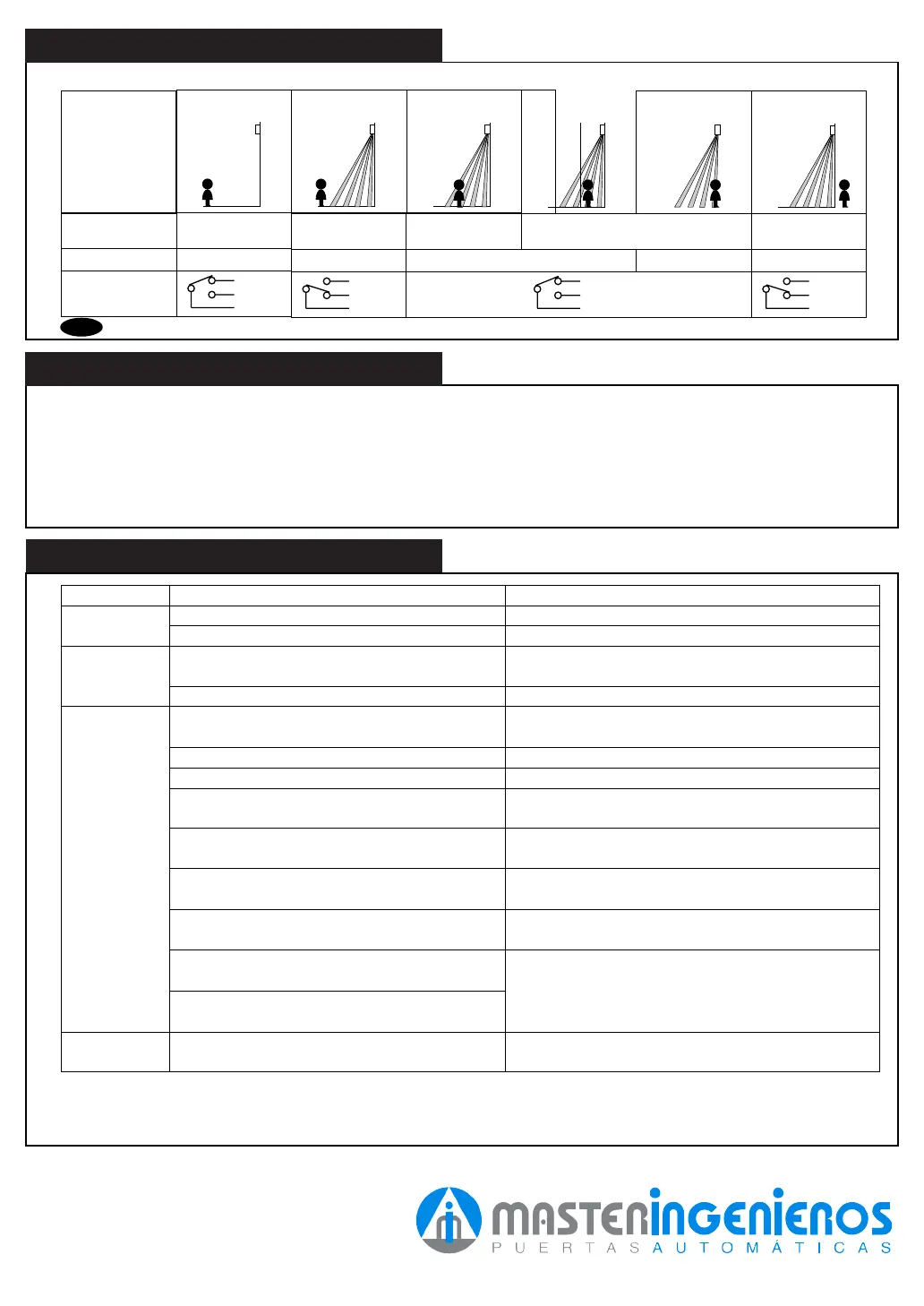
Entry motion
Power OFF
Outside the
Detection area
Entry into 3rd or
4th Row
(image)
Sensor status
Power OFF
Stand-by
Motion
Detection Active
Entry into 2nd Row Entry into 1st
Row
Outside the
Detection area
Motion or Presence
Detection Active
Stand-by
Orange Red Green
Yellow
Green
White
Output
Operation indicator
GreenOFF
Yellow
Green
White
Yellow
Green
White
Yellow
Green
White
Does not
operate
Dose not
operate
consistently
Operates by
itself
(Ghosting)
Power supply is not adequate.
Connection Failure.
Dirty detection window.
Sensitivity is Low.
There is an object that moves or emits light in
the detection area. (Ex. plant, illumination, etc.)
Vibration of the header.
Sensitivity is high.
Waterdrops on detection window.
Detection area has interfered the area of
another sensor.
The detection 1st row spots are overlapping with
the door / header.
Door stay
open or closed
There is an reflected object in the detection area.
Solar light reflects.
Presence timer is Infinity. There was an abrupt
condition change in the detection area.
Adjust to stated voltage.
Check the wiring and the connector.
Wipe the detection window with a damp cloth. (Do not
use any cleaner or solvent.)
Set the Sensitivity Switch “H.”
Set the Sensitivity Switch “L.”
Remove the object.
Remove the object.
Secure the header. Or set the Sensitivity Switch “L.”
I
nstall in a place keeping the waterdrops off. OR
use a rain-cover (Optional).
Set the different frequency position each other.
Adjust the detection area to deep (outside).
Turn the power off and on again.
Trouble Possible Cause Solution
CHECKING
Check the operation according to the chart below.
There was a puddle left by rain or snow.
The floor has gotten wet.
The exhaust of the car and the fog penetrate into
the detection area.
This sensor is equipped with the anti-malfunction.
However, pay attention when installing as malfunction
may occur under the left conditions.


 To Previous Page
 Loading...