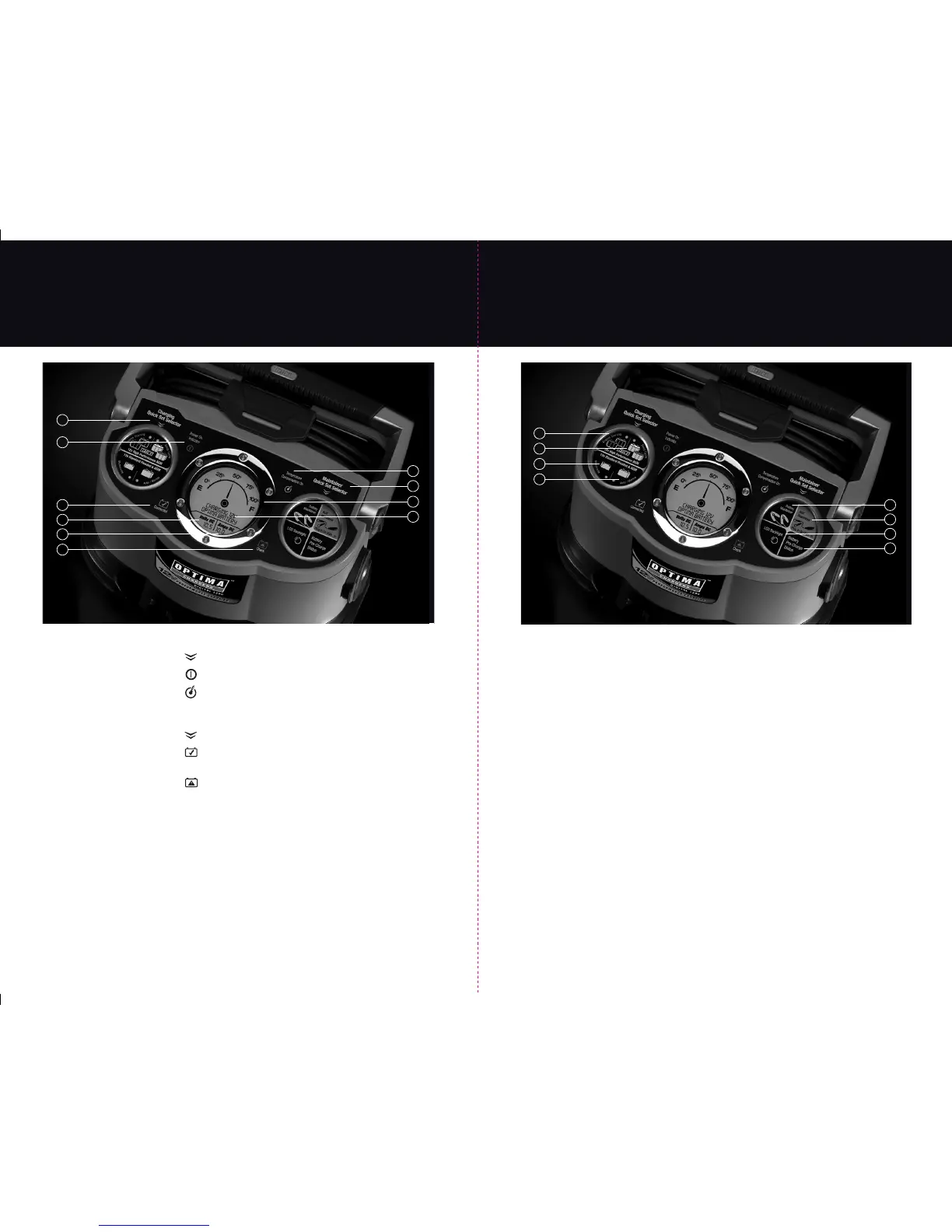
Feature Function
15. Quick Set Charging Prompt Illuminates green prompting user to make a selection.
16. AC Power Illuminates blue when AC power is applied and unit is on.
17. Temperature Compensation On Illuminates green after making a quick set selection as it
monitors the ambient air temperature and digitally controls the
charging process by ambient air temperature.
18.Quick Set Maintainer Prompt Illuminates green prompting user to make a selection.
19. Battery Connected Illuminates green after making a quick set selection.
Check mark LED is on confirming battery is connected
20. Check Battery Fault warning LED will illuminate red only if there is a
connection or battery problem requiring attention in addition
to LCD fault messaging. Charger will “chirp” with an audible tone
letting you know to read the fault message and attend to the battery
or charger.
21. Fill Gauge Empty to full pre-charge status, charge and auto-maintain mode gauge.
22. Mode/Fault Message Center Displays charging, conditioning and auto maintain mode status
and fault condition.
23. Volts DC Display Displays pre-charge status, charging and auto maintain
charger voltage.
24. Amps DC Display Displays charging and auto maintain charger amperage
Getting to Know your Charger
19
17
18
15
20
23
24
22
16
21
15
Digital 12 00 Digital 12 00
Getting to Know your Charger
25
26
27
28
29
30
31
32
Feature Function
25. OPTIMA
®
Starting Charge Profile For quick set automatic selection of OPTIMA
®
RedTop and BlueTop
AGM STARTING batteries or other High Performance starting AGM's.
26. OPTIMA
®
Deep Cycle Charge Profile For quick set automatic selection of OPTIMA
®
YellowTop and
BlueTop AGM DEEP CYCLE batteries
and/or other High Performance
deep cycle AGM's.
27. (Small) Standard Flooded Charge Profile For quick set selection of standard 12V motorcycle, power sports, tractor
(small) AGM and Flooded batteries. Up to 40 Amp hour rated batteries.
28. (Large) Standard Flooded Charge Profile For quick set selection of standard 12V auto, marine, truck, RV
(large) AGM and Flooded batteries. 40 - 130 Amp hour rated batteries.
29. Maintain Battery by Charging Clamps If your battery is fully charged and you want to automatically
maintain your battery in or out of a vehicle keeping it fully charged.
30. Maintain Battery by Auxiliary Port If your battery is fully charged and you want to automatically
maintain your battery in or out of a vehicle keeping it fully charged.
Ideal method for most existing and all new vehicle “ring terminal”
maintainer cable installations (cable assembly included).
31. LCD Backlight The LCD display will turn off when a battery is fully charged and
is being automatically maintained. To turn off/on the LCD back
light simply touch this button.
32. Pre-Charge Battery Status Prior to charging your battery you may select this function.
ENGINE MUST BE OFF to have the charger identify the state
of charge of your battery before charging.
16


 To Next Page