7
6
Recording TV Programs
Record a TV Program You Are Watching
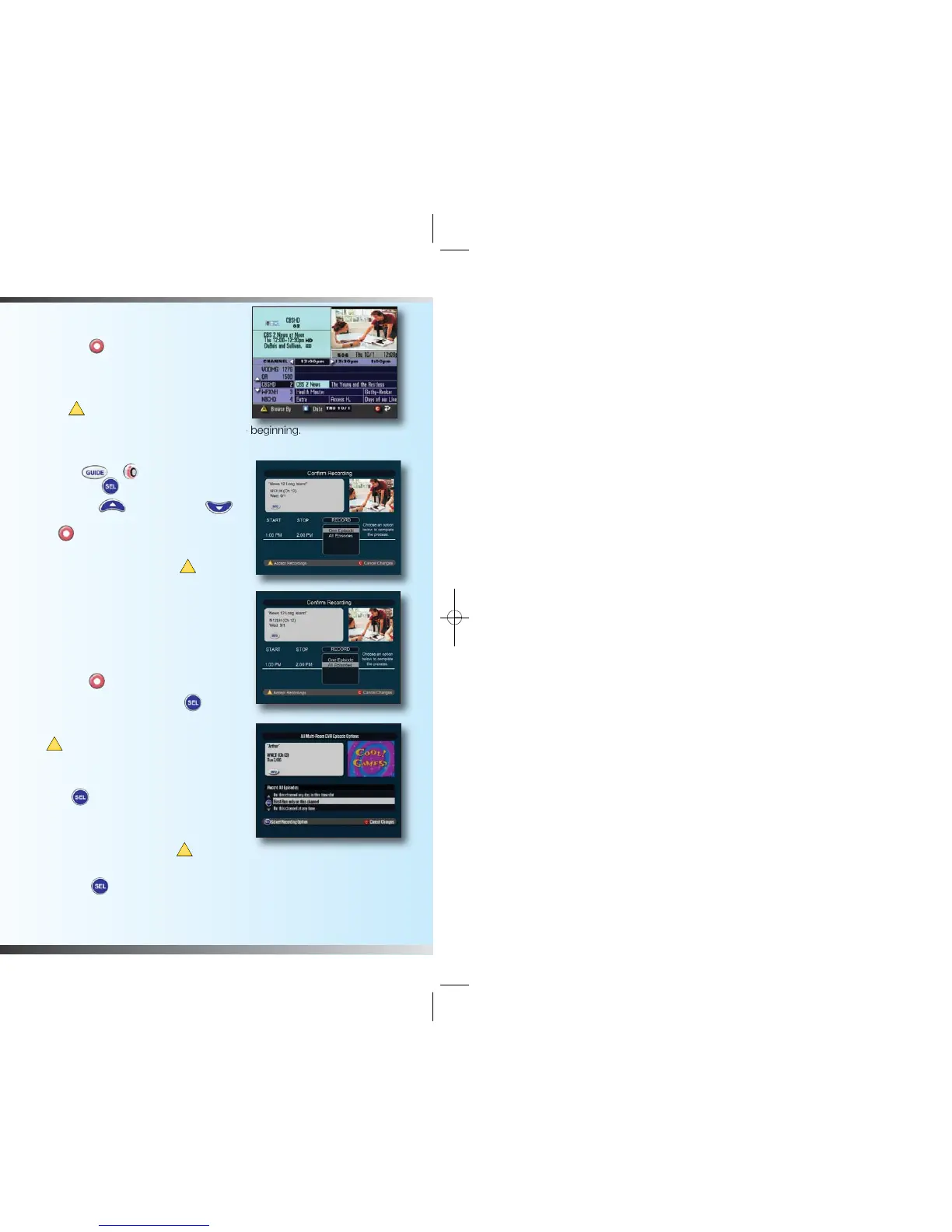
1. Press Record . The Confirm
Recording screen appears.
2. While in the Confirm Recording
screen, choose your recording options
and press .
Note: Be sure to record your program from the beginning.
Record a TV Program from the Channel Guide
1. Press Guide or to get to the Main
Menu, then SEL “Channel Guide”.
2. Press Move Up or Move Down
to highlight a TV program, and then press
Record .
3. In the Confirm Recording screen, choose
your recording options and press .
The recording program is highlighted in
red in the Channel Guide.
Record Multiple Episodes or New First Run
Episodes of a TV Program
If you want to record all the episodes
of a program, follow these steps:
1. Press Record .
2. Choose All Episodes. Press SEL .
Notice the information in the fourth column
changes based on your selection.
Press . The All Episodes Recording
Options screen appears.
3. Choose one of the options on the screen.
4. Press SEL to save your settings.
If you want to record new first-run
episodes only, follow these steps:
1. Choose All Episodes and press .
2. Highlight First Run only on this channel
and press SEL .
Using the Channel Guide
Find a Program to Watch
1. Press Guide or to get to the
Main Menu, then SEL “Channel
Guide”.
2. Press the directional keys
( )
to
move through the program listings and
highlight the program you want to watch.
3. Press SEL . If the program is currently on, the Channel Guide closes, and
the program you selected appears in full-screen TV.
Search for a Program by Title, Channel or Theme
1. Press Guide or to get to the Main Menu, then SEL
“Channel Guide”.
2. Press Browse By . The Browse By area of the Channel Guide
displays the options: Title, Channel and Theme.
3. Press Move Up or Move Down to highlight one of the
following options:
• Title, which lists programs alphabetically by program title
• Channel, which lists programs numerically by channel number
• Theme, which lists programs by theme
4. Press SEL . The Browse By area of the Channel Guide displays the
programs according to the option you selected.
Search for a Program by Date
1. Press Guide or to get to the Main Menu, then SEL
“Channel Guide”.
2. Press Date . The Browse By area of the Channel Guide displays
the next 7 dates.
3. Press Move Up or Move Down to highlight a date.
4. Press SEL . The Channel Guide displays the programs that will
broadcast on that date.
The Channel Guide is an easy way to find, watch and record TV programs. When
selected, the Channel Guide appears and lists the next 7 days of programs.
1634 Multi Room DVR booklet 2.5:Layout 1 11/4/10 5:30 PM Page 6



 To Next Page