13
Filter Change Frequency:
Several situations will mandate filter changes.
C
omplete filter sets should be changed when any of
the following apply:
• Six (6) Months have passed since unit
installation or previous filter change.
• Reduced water flow.
If filter change frequency is less than 6 months due to
pressure drop, it may be necessary to add
additional prefiltration or evaluate system sizing
recommendations.
Filter Cartridge Replacement Procedure:
IMPORTANT: Determine whether all equipment
connected to the OptiPure System must be turned off
prior to shutting off water supply from filters.
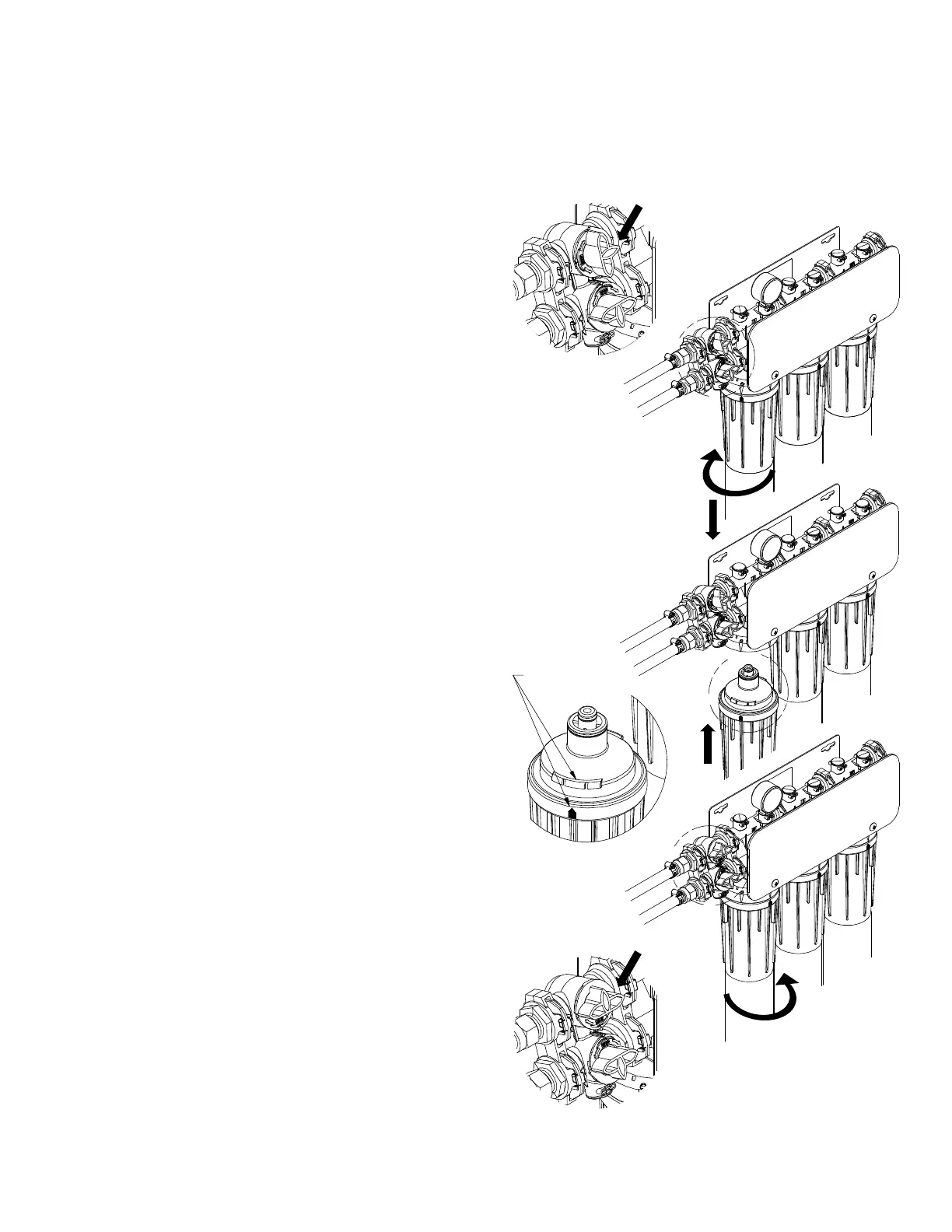
1. On Multi-Function Valve Turn Upper handle to the
OFF Position. (See figure 2 on page 10)
2. Relieve pressure downline by opening flush valve
or briefly actuating equipment.
3. Turn cartridge to the left 1/4 turn until the
cartridge stops.
4. Pull down on the cartridge until the cartridge clears
the system connection. Discard old cartridge.
NOTE: Some water will drip from Optipure
System during cartridge removal.
5. Line up the upward-arrow on the new cartridge
with the arrow on the side of the cartridge
connection on the Optipure System. NOTE: Some
cartridges do not have arrows. Reference the Key
Feature in figure when connecting to system.
6. Push cartridge up into head until the base of the
cartridge is next to the base of the filter system.
Turn the cartridge to the right about a 1/4 turn or
until the cartridge stops.
REPEAT Steps 3 thru 6 on additional filters.
7. On Multi-Function Valve Turn Upper Handle to the
Operation Position. (See figure 1 on page 10)
8. Open down-stream flush valve to flush new
cartridge for a recommended 5 to 10 minutes or
until water runs clear.
Operation:
With adequate pressure, normal operation of the OptiPure System is completely automatic.
Dependable operation involves only monitoring of outlet pressure, periodic filter changes and
service documentation.
Filter Cartridge
Arrow / Key Feature
STEP 2
S
TEP 3
STEP 1
STEP 4
STEP 5
STEP 6
STEP 7



 To Next Page