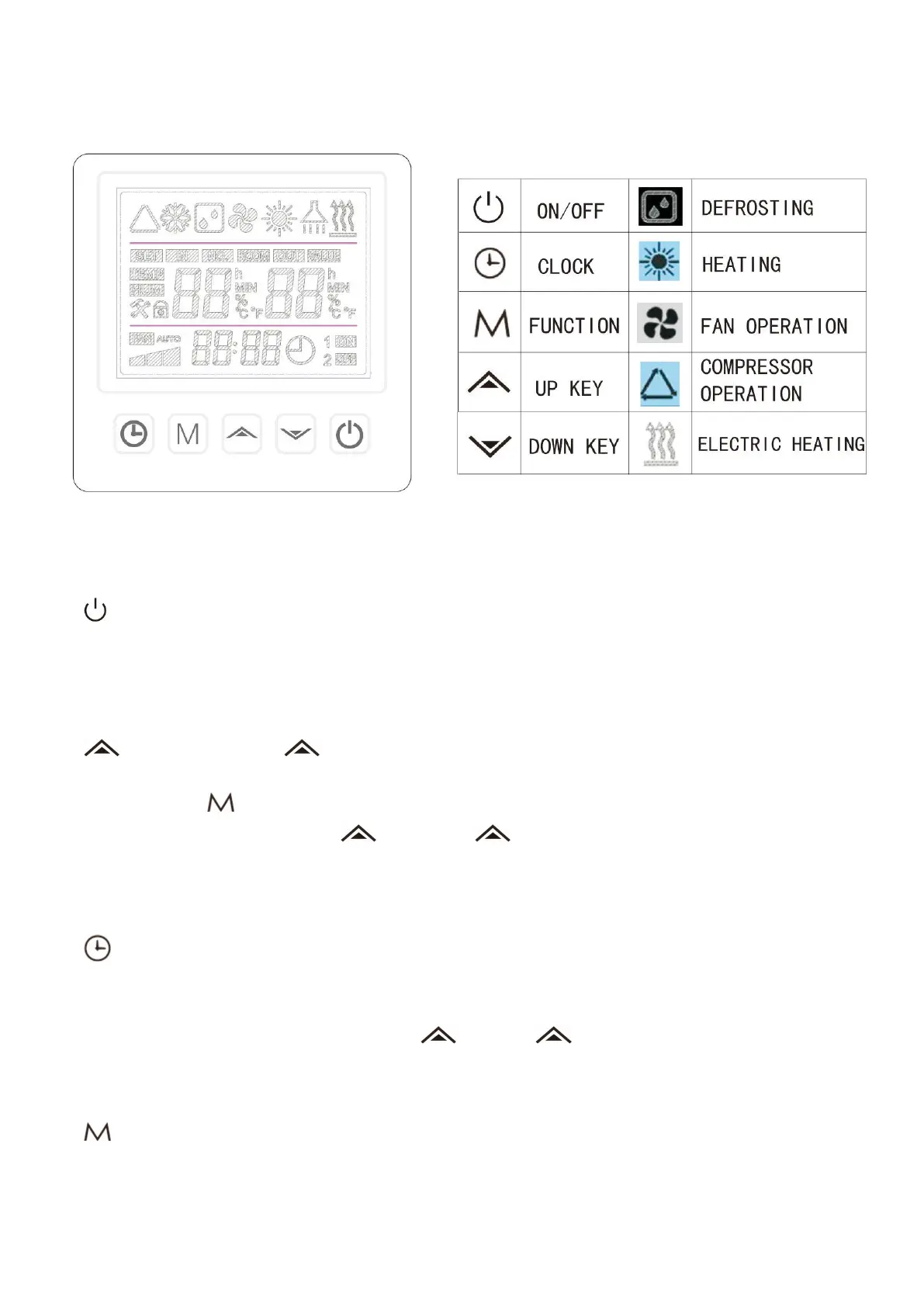
Operation Instructions
Definition of Wire-Controlled Keyboard
1. “ ” ON/OFF Key
A. In the state of unlock, press this key for 1 second to switch on/off.
B. .In other settings state, press this key to return to the main interface.
C. When the screen is locked, press this key for 3 seconds to unlock the screen.
2. “ ” UP Key and “ ”DOWN Key
A. Up and down page turning for parameter values query.
B. Use with the “ ” Key ,the parameters can be queried.
C. In the working state,Press the “ ” key or the “ ” key to set the temperature of the current mode.
When the setting is completed, press the ON/OFF key to confirm. The setting temperature will flicker for
5 seconds and then confirm.
3. “ ” Clock Key
A. Press the clock key to enter the clock setting state.
B. Press the clock key to enter the state of clock setting, press the clock key for 5 seconds to enter the
state of timing on/off setting. Combining the “ ” and the “ ” keys, the start and shutdown time of
the timer group can be set.
4. “ ” Function Key
A. Under the main interface, press this key for 3 seconds to enter the system parameters query, and
automatically return to the main interface after 30 seconds without operation.


 To Next Page