English
42
USING THE PROJECTOR
Native mode No scaling will be made; the resolution is dependent on which input source and is then
displayed.
Auto -If source is 4:3, auto resize to 1024x768.
-If source is 16:9 auto resize to 1024x576.
-If source is 15:9 auto resize to 1024x614.
-If source is 16:10 auto resize to 1024x640.
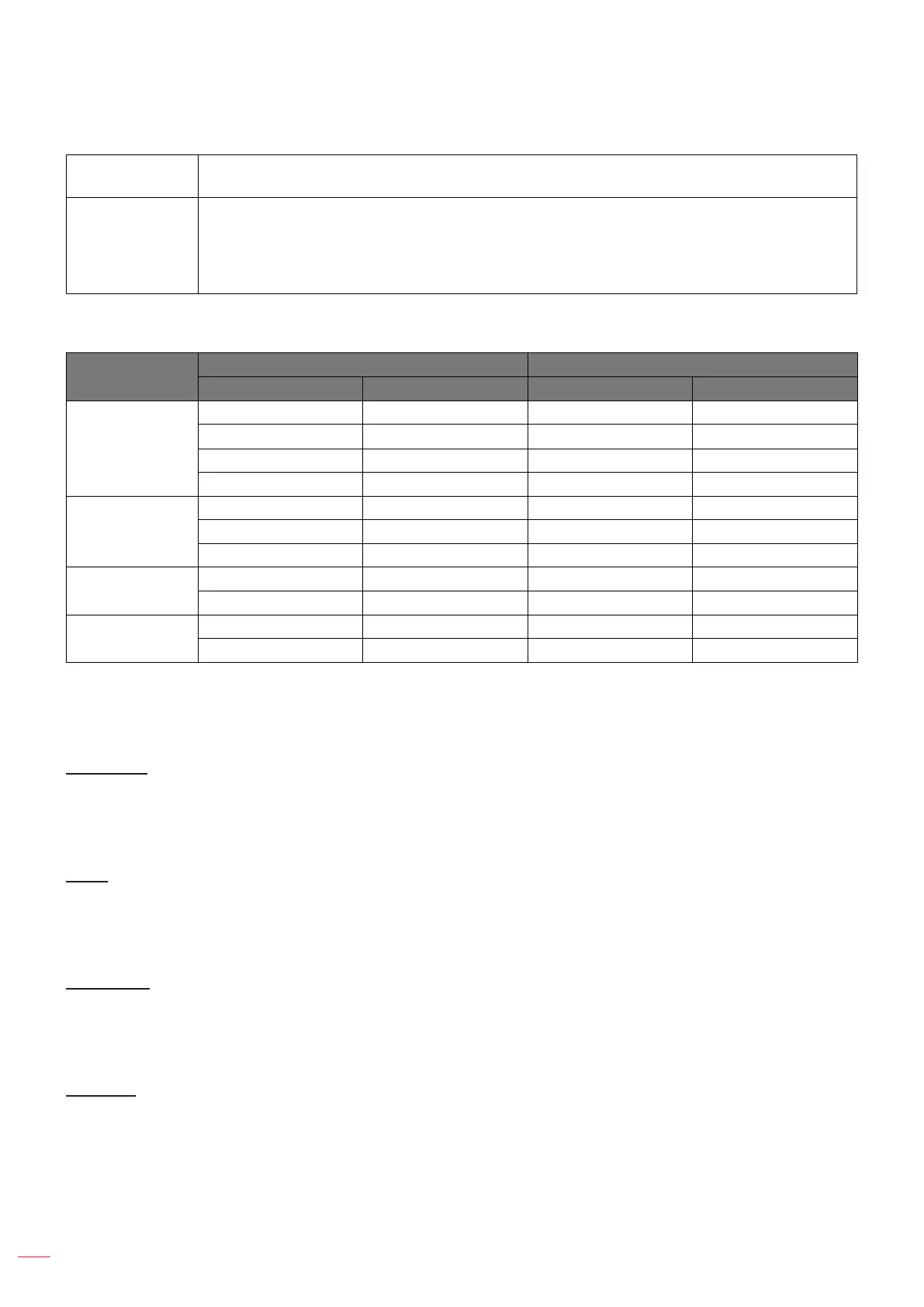
SVGA and XGA auto mapping rule (screen type 16:9):
Auto
Input resolution Auto/Scale
H-resolution V-resolution 1024 768
4:3
640 480 1024 768
800 600 1024 768
1024 768 1024 768
1600 1200 1024 768
Wide Laptop
1280 720 1024 576
1280 768 1024 614
1280 800 1024 640
SDTV
720 576 1024 576
720 480 1024 576
HDTV
1280 720 1024 576
1920 1080 1024 576
Display edge mask menu
Edge Mask
Use this function to remove the video encoding noise on the edge of video source.
Display zoom menu
Zoom
Use to reduce or magnify an image on the projection screen.
Display image shift menu
Image Shift
Adjust the projected image position horizontally (H) or vertically (V).
Display keystone menu
Keystone
Adjust the image distortion caused by tilting the projector.



 To Next Page