EX330/EW330/EX330(1W)/EW330(1W) Condential
4-11
Factory Default - The factory settings (with appro-
priate centering, size, geometry
distortion, etc.) shall be displayed
upon “Recall” is selected from OSD
Display Size - All preset modes shall expand to
full screen size using OSD Horizon-
tal and Vertical Size controls
Display Data Channel (DDC) - The purpose of the DDC test is to
verify the DDC1/DDC2B operation
of the projector and to verify Plug &
Play function.
Acoustic - High pitch sound from cooling fan
and color wheel is unacceptable.
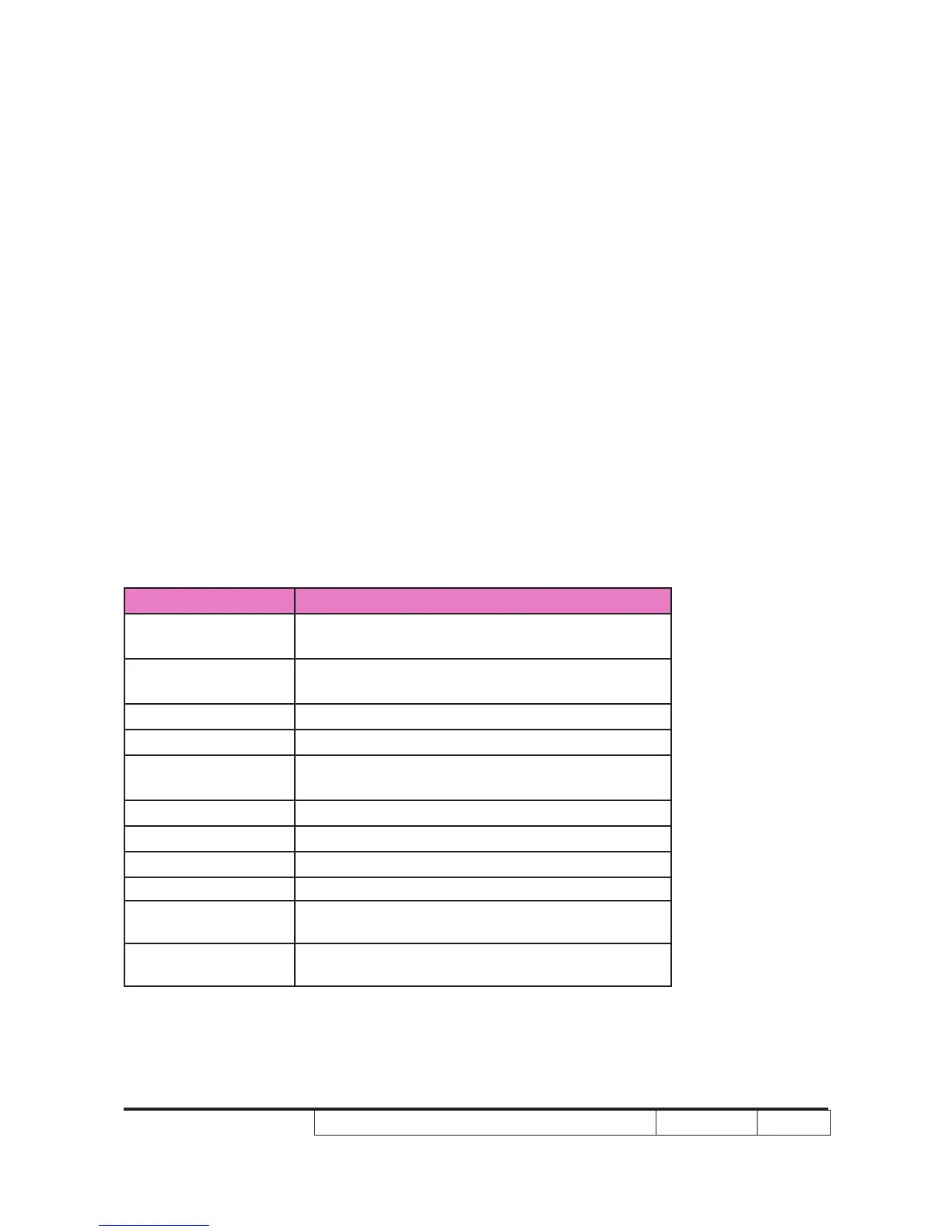
2. Check points for exterior and print pattern
Check item Check point
Text & Pattern
Missing letters & pattern or blurry prints are
unacceptable.
Exterior
Dirt, scrape, water ripples and uneven color are
unacceptable.
Buttons Stuck buttons are unacceptable.
Focus ring Focus ring is functioning smoothly.
Logo
Missing logo, missing prints and blurry prints are
unacceptable
Screw
All screw sure be xed and in right type.
Pedestal Well-functioned
Lamp Cover It should be locked in the correct place.
Plastic Parts All plastic parts can not be brocken and damaged.
Safety or warning
label
All safety and warning label should be visible,
including all contents.
Connector
All interface connector should be complete and
workable.


 To Next Page