
 Need help?
Do you have a question about the ORANGE Pi 2 and is the answer not in the manual?
Details the various applications and functions possible with the Orange Pi 2.
Identifies the intended users and their motivations for using the Orange Pi 2.
Details the CPU and GPU specifications of the Orange Pi 2, including clock speeds.
Covers SDRAM type and size, and onboard storage options like TF card slots.
Specifies onboard Ethernet and Wi-Fi capabilities.
Lists supported video and audio input/output ports and protocols.
Details power source requirements and available USB 2.0 ports.
Identifies physical buttons and LED indicators on the board.
Describes 40-pin headers, GPIO pins, and other interface definitions.
Lists the operating systems compatible with the Orange Pi 2.
Specifies the product dimensions and weight.
Lists the essential accessories needed to use the Orange Pi 2.
Guides on preparing a TF card by formatting and writing an OS image.
Detailed steps for writing OS images to TF card using Windows and Linux.
Specific instructions for writing Android OS images using PhoenixCard.
Instructions on connecting peripherals and setting up the Orange Pi 2.
Methods for safely shutting down the Orange Pi 2 via GUI or terminal.
Details the pinout for the 40-pin GPIO header, matching Raspberry Pi.
Specifications for the 24-pin FPC CSI camera connector and its pin mapping.
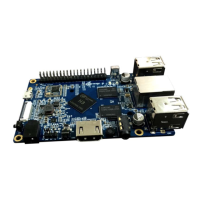
The Orange Pi 2 is an open-source, single-board computer designed for a wide range of applications, from basic computing to advanced development. It functions as a versatile platform for users who want to create, experiment, and control their surrounding world with technology, rather than merely consume it. This device is a simple, fun, and useful tool, making it accessible for both beginners and experienced users in the realm of embedded systems and DIY electronics.
At its core, the Orange Pi 2 serves as a miniature computer capable of running various operating systems, including Android 4.4, Ubuntu, Debian, Raspberry Pi Image, and Banana Pi Image. This broad compatibility allows users to tailor the device to specific needs, whether it's for a desktop-like experience, a server, or a specialized embedded application.
One of its primary functions is to act as a personal computer. Users can connect a monitor, keyboard, and mouse to transform the Orange Pi 2 into a functional desktop environment for web browsing, document editing, and other everyday computing tasks. Its ability to run different Linux distributions makes it suitable for development work, allowing programmers and hobbyists to write and test code directly on the device.
Beyond general computing, the Orange Pi 2 excels as a wireless server. With its onboard Wi-Fi and Ethernet capabilities, it can be configured to host various network services, such as file servers, web servers, or even home automation hubs. This functionality makes it an ideal choice for building custom network-attached storage (NAS) solutions or for creating a personal cloud.
For entertainment purposes, the Orange Pi 2 can be used for playing games, music, and sounds. Its multimedia capabilities allow it to handle HD video playback, making it suitable for setting up a media center or a dedicated streaming device. Users can connect it to a TV or monitor via HDMI for a high-quality visual experience, or use the 3.5mm audio jack for stereo sound. The device also supports Android, opening up access to a vast ecosystem of apps and games available on the Android platform.
The Orange Pi 2 is also designed for educational and creative projects. Its open-source nature and compatibility with tools like Scratch make it an excellent platform for learning programming and electronics. Students and educators can use it to build interactive projects, robots, or other embedded systems, fostering creativity and problem-solving skills. The presence of a 40-pin GPIO header, compatible with Raspberry Pi B+, further extends its utility for interfacing with external hardware, sensors, and actuators, enabling users to control physical devices and build complex IoT solutions.
The device also supports camera input via a CSI connector, allowing users to integrate external camera modules for applications such as surveillance, image processing, or custom photography projects. This expands its utility into areas requiring visual data capture and analysis.
Setting up the Orange Pi 2 is designed to be straightforward, allowing users to get started quickly. The process involves three main steps: preparing the TF card, connecting peripherals, and powering on the device.
To begin, users need to install an operating system onto a TF card. The manual provides detailed instructions for both Windows and Linux environments. For Windows users, a TF card format tool like TF Formatter is recommended to prepare the card, followed by using Win32 Disk Imager to write the OS image. For Android OS images, a specific tool called PhoenixCard is required, which handles both formatting and burning the image to the TF card. Linux users can use command-line tools such as fdisk, umount, mkfs.vfat, and dd to prepare the TF card and write the OS image. The flexibility in OS installation methods caters to users with different technical backgrounds and preferred operating systems.
Once the TF card is prepared, users can connect the necessary peripherals. The Orange Pi 2 features multiple USB 2.0 ports, allowing for the connection of a USB keyboard and mouse, which are essential for interacting with the graphical user interface. For display output, the device offers an HDMI port for connecting to HD TVs and monitors, providing a high-quality visual experience. Alternatively, an AV video lead can be used to connect to analogue displays if an HDMI connection is not available.
Networking capabilities are provided through a 10/100M Ethernet RJ45 port for wired connections and an onboard Wi-Fi module (Realtek RTL8189ETV, IEEE 802.11 b/g/n) for wireless connectivity. This ensures that the Orange Pi 2 can be easily integrated into existing networks for internet access, file sharing, or server applications.
Powering the device is done via a DC input connector, which requires a regulated power supply rated at 5V ± 5% and at least 1500mA (or 2.0A). It is explicitly stated that the USB OTG input should not be used for power supply, as it does not provide sufficient power for the board to function correctly.
The Orange Pi 2 includes several buttons for control: a Power Button (SW4), a Recovery Button (SW2), and a Uboot Button (SW3). These buttons facilitate various operations, including system power management and recovery procedures. An IR input is also available, allowing for remote control functionality, which is particularly useful for media center applications.
The device's physical interface includes a 40-pin header, compatible with Raspberry Pi B+, which exposes GPIO pins, UART, I2C, SPI, and other interfaces. This header is crucial for hardware interfacing, enabling users to connect a wide array of sensors, actuators, and other electronic components to expand the device's functionality. Additionally, a 1x3 GPIO pin header provides UART and ground connections for debugging or specific serial communication needs.
Proper maintenance of the Orange Pi 2 primarily revolves around safe shutdown procedures and careful handling of the TF card. To prevent data corruption and ensure system stability, users are advised to shut down the Orange Pi 2 safely. This can be done through the graphical user interface (GUI) of the installed operating system or by executing specific commands in the terminal, such as sudo halt or sudo shutdown -h. These commands ensure that all processes are properly terminated and the file system is unmounted before power is removed. Directly cutting power without a proper shutdown can damage the TF card's file system, leading to data loss or an unbootable system. After a safe shutdown, the power button can be pressed for 5 seconds to completely turn off the device.
The TF card, being the primary storage medium for the operating system, is a critical component. Using branded TF cards of at least class 4 and a minimum size of 4GB is recommended for better reliability and performance. Regular backups of the TF card image are also a good practice, especially after significant configuration changes or project development, to facilitate quick recovery in case of system issues.
The open-source nature of the Orange Pi 2 means that software updates and new software are frequently released by the community and the manufacturer. Networking the device, either via Ethernet or Wi-Fi, makes it much easier to download and install these updates, ensuring the system remains secure and performs optimally.
Physical handling of the Orange Pi 2 should be done with care. While the device is robust, it is an electronic board with exposed components. Users should avoid static discharge and physical damage to the board. The compact size (93mm x 60mm) and light weight (46g) make it portable, but also susceptible to mishandling if not properly enclosed or protected.
The availability of a recovery button (SW2) and a Uboot button (SW3) indicates built-in mechanisms for system recovery or entering specific boot modes, which can be useful for troubleshooting or flashing new firmware in advanced scenarios.
In summary, the Orange Pi 2 is a powerful and flexible single-board computer designed for a wide array of applications, from basic computing and multimedia to advanced development and IoT projects. Its ease of use, combined with extensive connectivity options and open-source support, makes it an excellent choice for anyone looking to explore the world of embedded systems and DIY electronics. Proper setup, safe shutdown procedures, and careful handling are key to ensuring its longevity and reliable performance.
 General
| Processor | Allwinner H3 Quad-Core Cortex-A7 |
|---|---|
| RAM | 1GB DDR3 |
| Wi-Fi | No |
| Bluetooth | No |
| GPU | Mali400MP2 |
| USB Ports | 3 x USB 2.0 |
| Video Output | HDMI |
| Network | 10/100 Ethernet |
| Audio Output | 3.5mm audio jack |
| Operating System | Android, Debian |
| GPIO | 40Pin Header |
| Camera Input | CSI |
| Power Supply | 5V/2A |
| Dimensions | 85mm × 56mm |

 To Next Page