OC ANT+ LEV DISPLAY28 | ORBEA ORBEA | 29 TECHNICAL MANUAL
8. USING THE OC ANT+ LEV DISPLAY
OPE N
A
B
D
C
AC/Reset
CR 2032
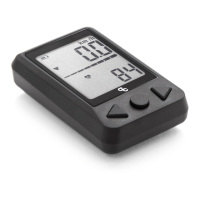
8.1. TURNING THE DISPLAY ON
To turn the display on, press the center button (B). To pair the unit to a bicycle or other
ANT+ sensors, make sure they are on and active before turning on the display. If the
bicycle or other sensors are off and the head unit has not found them, turn them on and
press the reset button on the back of the display (D).
8.2. SWITCHING THE DISPLAY OFF
The head unit will remain on while there is an active ANT+ connection with the bicycle or
other sensors, and will automatically switch itself off after 2 minutes from the moment the
connection is lost (Sleep).
Simply switch the bicycle off and the display will switch itself off after 2 minutes.
8.3. REPLACING THE BATTERY
When the CR2032 battery is depleted (the battery level is displayed on the top left hand
corner of the screen), remove the battery cover from the back of the head unit pulling
upwards from the tab on the lower part of the battery cover. Remove the old battery and
install a new one. The face of the battery with the lettering indicating the battery´s charac-
teristics (+) must be facing upwards.
Replace the battery cover aligning the tab on the cover with the lower recess and press
rmly until the cover is securely xed in place. Turn the display on and check that the
battery level is correct.


 To Next Page