TABLE OF CONTENTS
3
2
ENGLISH
1. Introduction . . . . . . . . . . . . . . . . . . . . . . . . . . . . . . . . . . . . . . . . . . . . . . . . . . .3
2. Installation Instructions . . . . . . . . . . . . . . . . . . . . . . . . . . . . . . . . . . . . . . . .7
3. Operation Checks . . . . . . . . . . . . . . . . . . . . . . . . . . . . . . . . . . . . . . . . . . . .10
4. Adjustments and Operation . . . . . . . . . . . . . . . . . . . . . . . . . . . . . . . . . . . . .13
5. Troubleshooting . . . . . . . . . . . . . . . . . . . . . . . . . . . . . . . . . . . . . . . . . . . . . .18
FRANCAIS
1. Introduction . . . . . . . . . . . . . . . . . . . . . . . . . . . . . . . . . . . . . . . . . . . . . . . . . .22
2. Instructions d’installation . . . . . . . . . . . . . . . . . . . . . . . . . . . . . . . . . . . . . .26
3. Contrôles du fonctionnement . . . . . . . . . . . . . . . . . . . . . . . . . . . . . . . . . . .29
4. Réglages et utilisation . . . . . . . . . . . . . . . . . . . . . . . . . . . . . . . . . . . . . . . . .32
5. Résolution des problèmes . . . . . . . . . . . . . . . . . . . . . . . . . . . . . . . . . . . . . .38
ESPAÑOL
1. Introducción . . . . . . . . . . . . . . . . . . . . . . . . . . . . . . . . . . . . . . . . . . . . . . . . .42
2. Instrucciones de instalación . . . . . . . . . . . . . . . . . . . . . . . . . . . . . . . . . . . .46
3. Comprobaciones de funcionamiento . . . . . . . . . . . . . . . . . . . . . . . . . . . . .49
4. Ajustes y operación . . . . . . . . . . . . . . . . . . . . . . . . . . . . . . . . . . . . . . . . . . .52
5. Resolución de problemas . . . . . . . . . . . . . . . . . . . . . . . . . . . . . . . . . . . . . . .58
ENGLISH
Thank you for selecting an Orbit
®
Wireless Rain / Freeze Sensor. This Orbit
®
Sensor provides conservation, convenience, and flexibility to your fully
automatic watering system. Never again will you see your sprinklers running
on a rainy day. Now, after a set amount of rain has fallen, the sensor will
send a wireless signal to the receiver and prevent the timer from watering.
The added freeze sensor will provide peace of mind (when temperatures
drops below 37°F (3°C) by interrupting your sprinklers and reduce the hazards
of standing water freezing on your driveway, sidewalks, and patios.
Please read this manual completely before you install and use the sensor.
A few of the notable design features include:
RF Communication
RF (Radio Frequency) technology eliminates unsightly wires and simplifies
mounting.
Battery Power
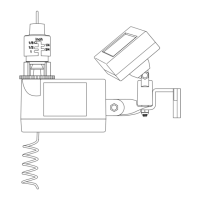
The Rain/Freeze sensor is powered by 2 replaceable 3V lithium batteries
(models 57071, 57271, 27681) or by a solar cell and a rechargeable battery
pack (models 57070, 57270, 27680). (See figure 1)
SECTION 1
Introduction


 To Next Page