EasyManua.ls Logo

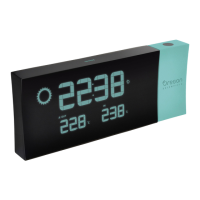
Oregon Scientific BAR623PU - User Manual

Oregon Scientific BAR623PU
19 pages
Print Icon
To Next Page IconTo Next Page
Loading...
1
EN
CONTENTS
Contents ................................................................ 1
Introduction ........................................................... 2
Product Overview ................................................. 2
Front View ......................................................... 2
Back View ......................................................... 3
LCD Display ...................................................... 4
Remote Sensor (THN122N) .............................. 5
Getting Started ...................................................... 6
Batteries ............................................................ 6
AC Adaptor ........................................................ 7
Change Settings ................................................ 7
Remote Sensor (THN122N) .................................. 8
Setup Sensor .................................................... 8
Data Transmission ............................................ 9
Search for Sensor ............................................. 10
Clock ...................................................................... 10
Turn Clock ON / OFF ........................................ 10
Set Clock / Calendar ......................................... 11
Switch Clock Display ......................................... 11
Alarm ...................................................................... 11
View Alarm Settings .......................................... 11
Set Alarm ........................................................... 11
Activate Alarm ................................................... 11
Silence Alarm .................................................... 12
Weather Forecast .................................................. 12
Temperature .......................................................... 13
Select Temperature Unit .................................... 13
Minimum / Maximum Records ........................... 13
Moon Phase ........................................................... 13
Backlight ................................................................ 13
Reset System ........................................................ 14
Projection Unit ...................................................... 14
Safety and Care ..................................................... 14
Warnings ................................................................ 14
Troubleshooting .................................................... 15
Specifications ........................................................ 16
Main Unit Dimensions ....................................... 16
Remote Sensor Dimensions ............................. 16
Temperature ...................................................... 16
Remote Sensor (THN122N) .............................. 16
Clock / Projector ................................................ 16
Power ................................................................ 17
About Oregon Scientific ....................................... 17
EC-Declaration of Conformity .............................. 18
BAR623P_EN_R2.p65 7/27/04, 12:40 AM1

Questions and Answers

  • M
    Martin BaileyAug 8, 2025
    How to fix clock on Oregon Scientific Weather Station?
    • H
      hvaughnAug 8, 2025
      To fix the clock on your Oregon Scientific Weather Station: 1. Adjust the batteries. 2. Press RESET. 3. Manually activate the clock feature.

  • R
    Robert NguyenAug 12, 2025
    How to fix my Oregon Scientific BAR623PU Clock when it's not working?
    • A
      Andrea Rocha DVMAug 12, 2025
      There are a few things you can try if your Oregon Scientific Clock is not working. First, make sure the batteries are correctly installed. Next, press the RESET button. Finally, manually activate the clock feature.
  • P
    Paul FisherAug 16, 2025
    What to do if data does not match the main unit on my Oregon Scientific Clock?
    • M
      Michele MortonAug 16, 2025
      If the data displayed on your Oregon Scientific Clock doesn't match the main unit, initiate a manual sensor search. This should resolve the discrepancy.
  • M
    Morgan GriffithAug 21, 2025
    What to do if my Oregon Scientific BAR623PU Clock remote sensor isn't working?
    • T
      Tracy ThomasAug 21, 2025
      If you're experiencing issues with the remote sensor on your Oregon Scientific Clock, there are a few things you can try. First, ensure that the batteries are properly installed and have sufficient charge. Next, consider the location of the sensor and make sure it's placed in an optimal spot for signal transmission. Finally, you can initiate a manual sensor search to re-establish the connection.
  • M
    Michelle RobertsAug 26, 2025
    What to do if my Oregon Scientific Weather Station shows the wrong temperature?
    • T
      Tonya KennedyAug 26, 2025
      If your Oregon Scientific Weather Station displays an incorrect temperature, check the batteries to ensure they are working correctly.
  • J
    Joel ClarkAug 30, 2025
    Why is the temperature wrong on my Oregon Scientific Weather Station?
    • A
      amy12Aug 30, 2025
      If your Oregon Scientific Weather Station displays an incorrect temperature, consider the location of the device. Ensure it's placed in an area that provides accurate readings.
  • A
    aparsonsSep 3, 2025
    What does 'LLL' or 'HHH' mean on my Oregon Scientific BAR623PU Clock?
    • C
      Cassandra SmithSep 3, 2025
      If your Oregon Scientific Clock displays 'LLL' or 'HHH', it indicates that the temperature is out-of-range.

Oregon Scientific BAR623PU Specifications

General IconGeneral
TypeProjection Clock
DisplayLCD
Temperature SensorYes
Humidity SensorYes
AlarmYes
BacklightYes
ProjectionYes
Projection AngleAdjustable
Dual AlarmYes
SnoozeYes
Battery BackupYes
AC AdapterIncluded
Power SourceBattery and AC Adapter
FeaturesProjection, Temperature and Humidity Measurement
Time Format12/24-hour
Temperature Display°C/°F

Related product manuals