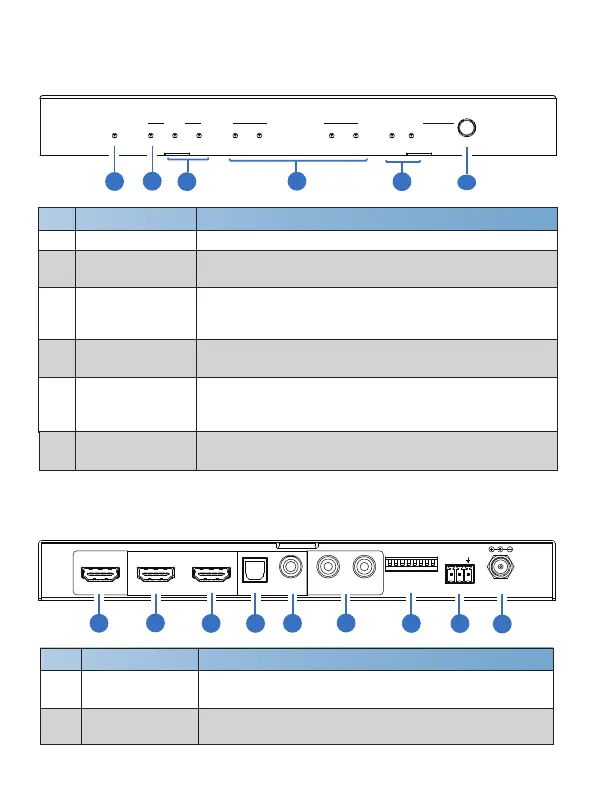
5. Operation Controls and Functions
No. Function DescriptionName
5.1 Front Panel
Audio formats indicator. When PCM/DOLBY/DTS/DTS-
HD is decoding, the corresponding LED will be on.
2
POWER LED
Red LED will be on when the product is powered on.
HDMI IN LED
4
HDMI OUT 1/2
LED
HDMI signal output indicators. The correspongding blue
OUT 1/2 LED will be on when the HDMI OUTPUT 1/2
port is connected to display device.
5.2 Rear Panel
No. Function DescriptionName
1 HDMI IN
HDMI signal input port, connect to HDMI source device
such as DVD, PS4 or Set-top Box with HDMI cable.
2 HDMI OUTPUT 1
HDMI video signal output port, connected to TV with
ARC/eARC function with HDMI cable.
4/8
1
3
PCM/DOLBY/DTS
/DTS-HD LED
HDMI signal input indicator. Blue LED will be on when
there is HDMI signal input.
1
2
3
4
5
6
1
2
3 4
5
6
7
AUDIO INPUT
LED
5
6
SELECT Button
Press this button to select the HDMI extracting audio
or ARC/eARC audio as the input audio.
Audio source indicator. When the HDMI extracting audio
or ARC/eARC audio is selected as the input audio, the
corresponding LED wii be on
.
POWER
HDMI AUDIO FORMATS
IN OUT 1 OUT 2 PCM DTS DTS-HDDOLBY ARC/
eARC
HDMI
IN
SELECT
AUDIO INPUT
SETTINGHDMI IN
DOWNSCALE
eARC/ARC/CEC
AUDIO ONLY
+DECODED eARC/ARC
DC 12VRS-232
TX
8 765 4
3 2 1
0
1
RX
HDMI OUTPUT DIGITAL AUDIO OUT DOWNMIXED AUDIO OUT
COAXIAL
1 2
L R
TOSLINK
8
9


 To Next Page