page 08
Operation controls
and functions
1
2
3
4
5
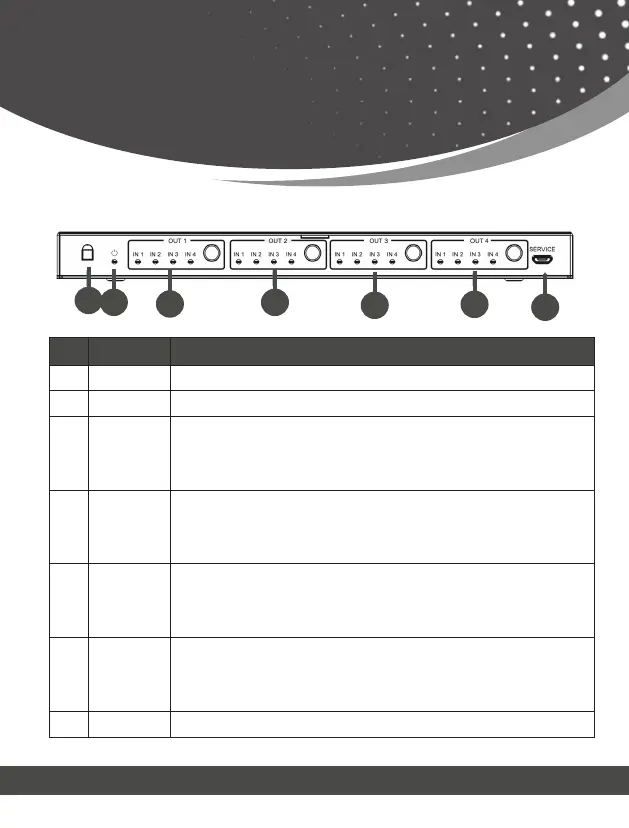
5.1 Front Panel
6
No. Name Function/Description
1. IR TIR receive window
2. POWER LED The red LED illuminates when the device is working or on standby.
3. OUT 1 Button: Short press to switch the input selected by OUT 1;
Long press for 3s to turn on/off the downscaler corresponding to OUT 1.
LED: When switching to the corresponding input source, the correspongding input
LED illuminates green; Otherwise, the LED will not light up.
4. OUT 2 Button: Short press to switch the input selected by OUT 2;
Long press for 3s to turn on/off the downscaler corresponding to OUT 2.
LED: When switching to the corresponding input source, the correspongding input
LED illuminates green; Otherwise, the LED will not light up.
5. OUT 3 Button: Short press to switch the input selected by OUT 3;
Long press for 3s to turn on/off the downscaler corresponding to OUT 3.
LED: When switching to the corresponding input source, the correspongding input
LED illuminates green; Otherwise, the LED will not light up.
6. OUT 4 Button: Short press to switch the input selected by OUT 4;
Long press for 3s to turn on/off the downscaler corresponding to OUT 4.
LED: When switching to the corresponding input source, the correspongding input
LED illuminates green; Otherwise, the LED will not light up.
7. SERVICE Connect to PC via Micro to USB cable for firemware upgrade.
7



 To Next Page