ORGAPACK OR-T 50
23
12.06/WE
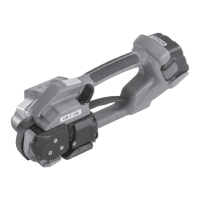
7.4 ADJUSTING STRAP WIDTH
– To change the strap width, the strap stop (16/2)
must be removed with the screw (16/1) from the tool
and refi tted with washers (1.5 mm thick) according to
the width of the strap.
– Strap width 19 mm (
3
/
4
“) one washer
– Strap width 15–16 mm (
5
/
8
“) one washer
– Strap width 12–13 mm (
1
/
2
“) two washers
– Strap width 9–10 mm (
3
/
8
“) three washers
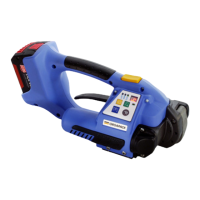
– Loosen screw (17/4) and remove knife bushing
(17/1).
– Remove pin screw (17/2) and move the pawl (17/3)
to desired position according to strap width. Tighten
pin screw (17/2)
– Insert washers between base plate and knife
bushing according to strap width.
– Tighten screw (17/4).
– Strap width 19 mm (
3
/
4
“) one washer
– Strap width 15–16 mm (
5
/
8
“) one washer
– Strap width 12–13 mm (
1
/
2
“) two washers
– Strap width 9–10 mm (
3
/
8
“) three washers
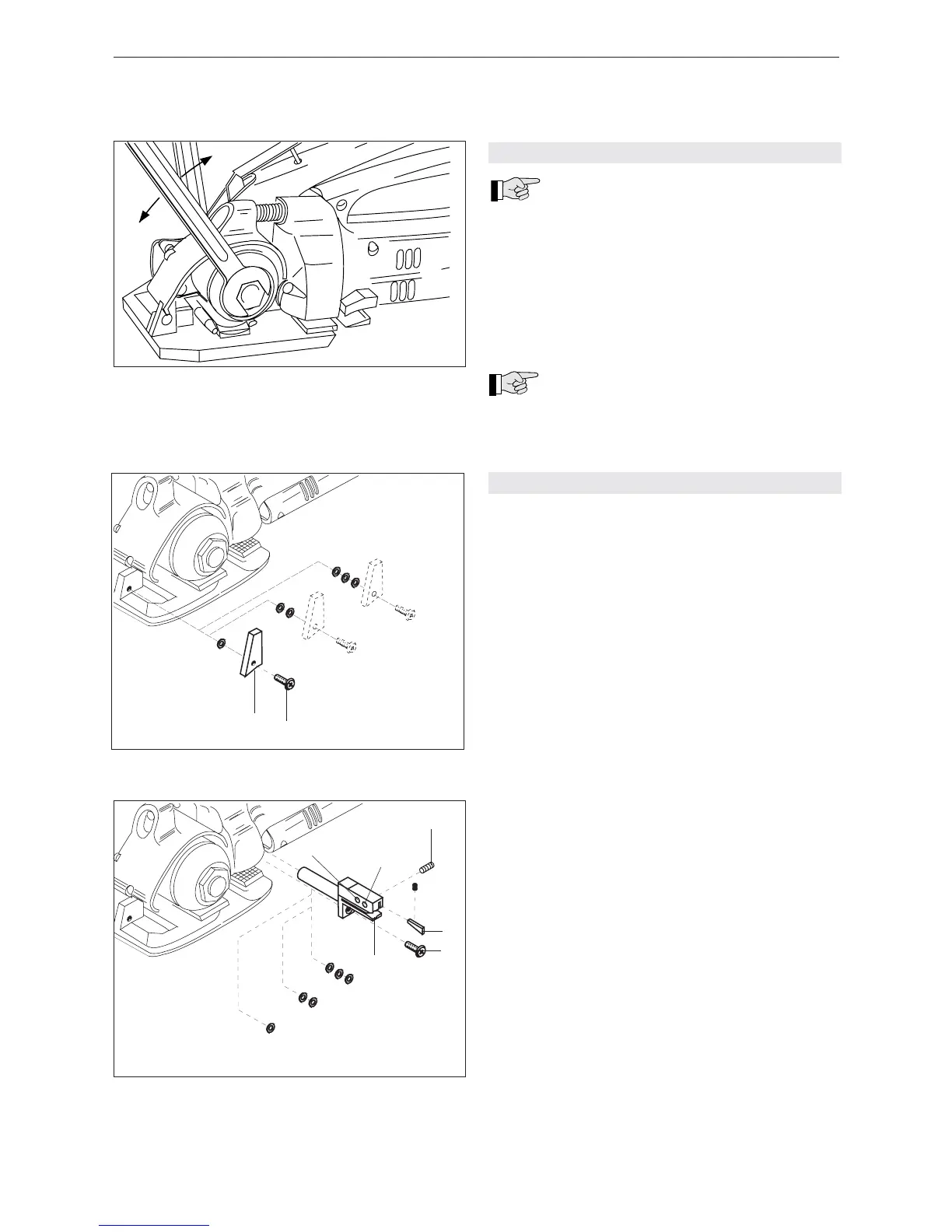
7.3 ADJUSTING STRAP TENSION
The maximum strap tension is determined
by the adjustment of the friction clutch. For
this reason two fork wrenches are supplied.
– Block the tension shaft with the small fork wrench
(SW 11).
– With the other fork wrench (SW 17) adjust the nut.
– Turning the nut in clockwise direction the strap
tension is increased.
– Turning the nut in counterclockwise direction the
strap tension is reduced.
Best results are achived by adjusting the
clutch to the maximum tension for the pa-
ckage being strapped. But not as tight that the tensi-
on wheel will turn over or the strap breaks.
Fig. 15
17
+
–
Fig. 17
10 mm
13 mm
16/19 mm
1
2
3
4
10/13 mm
16/19 mm
Fig. 16
10 mm
13 mm
16/19 mm
2
1


 To Next Page