2
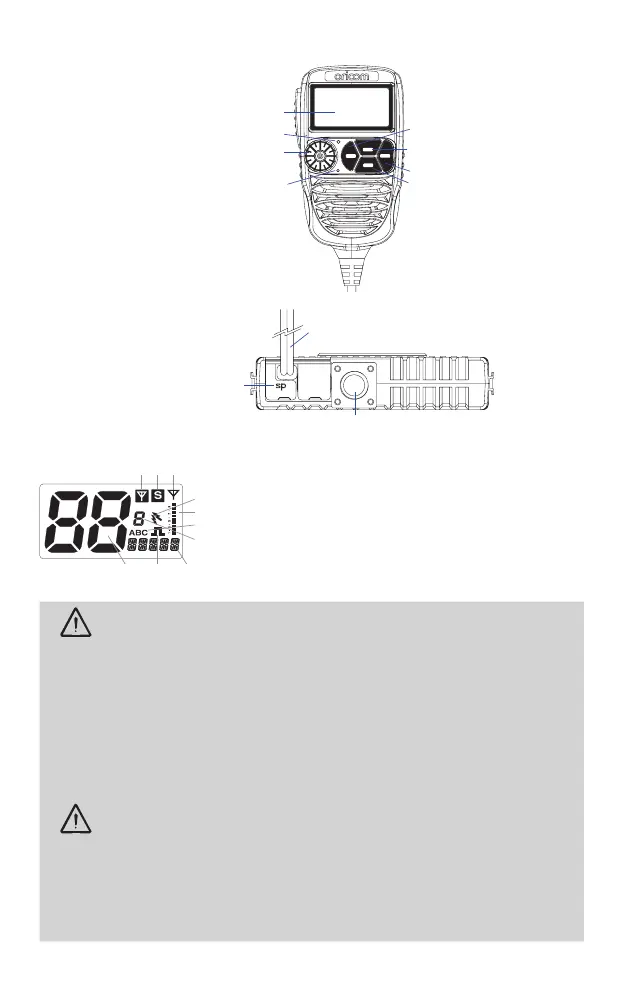
Controls and Indicators
Front View
LCDdisplay
Light sensor
Microphone
Scan(openscan/memorygroup
scan)/scanskip
Main&Subchannelswapping/
SRXon/off
Memoryrecall/memorywrite
Menu/Grouptonescan
(JogWheel)Poweron/offandVolume/channel/
squelchandSVL(subreceivervolume)
SC
RM
MR
MW
SWP
SRX
GTS
MENU
Rear View
3.5mmexternaljackfor
optional8ohmspeaker
Powersupplyconnection
Antennaconnection
LCD Icons & Indicators
1. Subchannelbusy
2. Subchannelon
3. Mainreceiverbusy
4. Duplexon
5. Signalstrength&TXpower
&SWRmeter
6. Groupdisplay(A,B,C
groups)
7. Groupaddresschannel
8. Statusdisplay
9. CTCSSorDCSon
10. Channeldisplay
Warnings and Safety Information
WARNING
Potentially Explosive Atmosphere
TurnyourradioOFFwheninanyareawithapotentiallyexplosiveatmosphere.Sparksinsuch
areascouldcauseanexplosionorreresultingininjuryorevendeath.
NOTE:Areaswithpotentiallyexplosiveatmospheresareoften,butnotalwaysclearlymarked.They
includefuellingareassuchasbelowdeckonboats;fuelorchemicaltransferorstoragefacilities;
areaswheretheaircontainschemicalsorparticles,suchasgrain,dust,ormetalpowders;andany
otherareawhereyouwouldnormallybeadvisedtoturnoffyourvehicleengine.
Blasting Caps and Areas
Toavoidpossibleinterferencewithblastingoperations,turnyourradioOFFnearelectricalblastingcaps
orina“blastingarea”orinareasposted:“Turnofftwowayradios.”Obeyallsignsandinstructions.
Electromagnetic Interference/Compatibility
Nearlyeveryelectronicdeviceissusceptibletoelectromagneticinterference(EMI).Toavoidthe
possibilityofelectromagneticinterferenceand/orcompatibilityconicts,turnoffyourradioinany
locationwherepostednoticesinstructyoutodososuchashealthcarefacilities.
CAUTION
Thisradioisdesignedforoperationona12Voltbatterysystem.Itshouldnotbeconnected
directlytoa24Voltsystem.
Wheninstallingyourradioinyourvehicle,checkthatduringinstallationyoudonotdamageany
wiringorvehiclecomponentsthatmaybehiddenaroundthemountingposition.
Ensuretheinstallationdoesnotinterferewiththeoperationofthevehicleandmeetsall
regulatoryandsafetyretirementsforaccessoriesttedtoyourvehicle.
Foroptimumperformance,yourradioneedstobeinstalledcorrectly.Ifyouareunsureabout
howtoinstallyourradio,wesuggestyouhaveyourradioprofessionallyinstalledbyaUHF
specialistorAutoelectrician.Wheninstallingtheradio,avoidmountingitclosetoheatersorair
conditioners.NeverpressthePTTbuttonbeforeconnectingtheantennatotheradio.
OricomofferauniqueJogWheel,whichmakes
usingtheControllerSpeakerMicrophonesimple
and intuitive.


 To Next Page
 Loading...






