EN
ZOOM+ INSTRUCTIONS
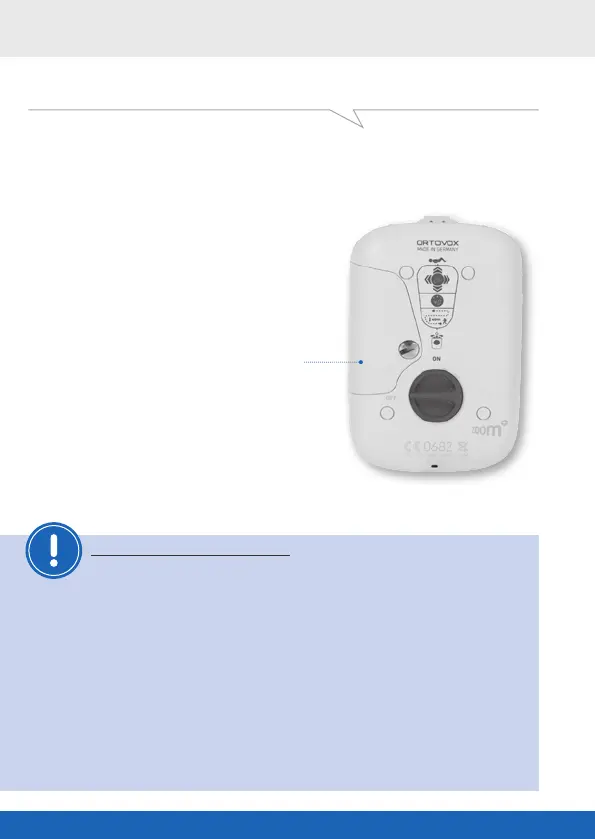
CHANGING THE BATTERY
(when the device is switched o)
Remove the screw from the battery
compartment () and insert a new battery
(.V, alkaline, AA, mignon, LR ).
When changing the battery, make
sure the polarity is correct. See the
labeling in the battery compartment.
BATTERY
Remove the battery from the ZOOM+
during the summer months.
In the case of damage due to batteries that
have run out, the ORTOVOX warranty lapses.
ORTOVOX recommends that you change the battery when its remaining
capacity falls below %.
RECHARGEABLE BATTERIES
NEVER use rechargeable batteries (such as nickel-cadmium
batteries, lithium-ion batteries etc.).
Rechargeable batteries have a significantly lower operating voltage,
and thus a lower range and limited service life. In addition, defective
rechargeable batteries cannot be detected immediately.
After recharging they initially show the full operating voltage,
only to severely drop o again after a very short operating period
(THIS CAN BE VERY DANGEROUS).
OX-GAL-ZOOM+-BUCH-vh.indd 42 06.06.13 15:48



 To Next Page