4
PAPER
MAN
AUTO
PLASTIC
+/-
English
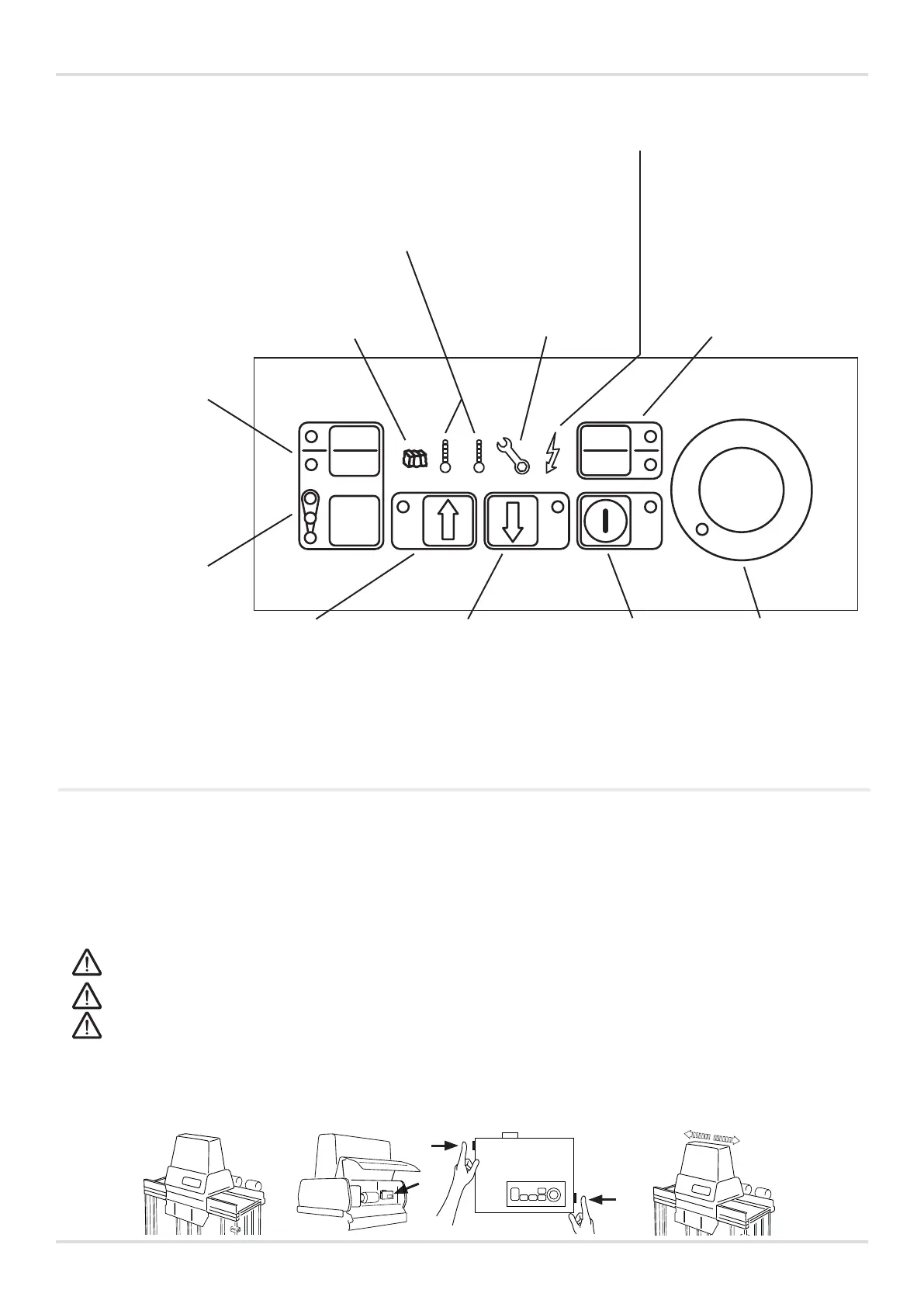
CONTROL PANEL
Paper – indicates that
the machine is set to
compact paper and
cardboard.
The machine operates
using high pressure.
Plastic – indicates that
the machine is set to
compact plastic.
The machine operates
using low pressure. See
Technical specications
for more details.
Do not use the “Paper"
setting when
compacting plastic,
as this may damage
the machine.
Bale size – indicates
the selected bale size
(small - medium -
large).
The bale size can be
locked.
Contact your local
distributor for more
information.
Flammable and explosive materials, such as pressurised containers or the like, which may cause damage, re
or an explosion when exposed to pressure or sparks, must not be compacted in the machine.
Only use straps recommended by the machine manufacturer.
Heavily expanding materials, e.g. bubble wrap, must not be compacted in the machine.
Temperature warning lights
Blue light – indicates that the machine is
cold. The machine may still be operated.
Red light – indicates that the machine has
overheated and may NOT be operated
until it has returned to normal temperature
and the light has gone out.
Bale light – this light
illuminates when it is
time to remove the bale
from the machine.
Service light – see
under TROUBLE-
SHOOTING below for
more information.
Power light – this light indi-
cates that there is power to
the machine.
MAN – indicates that the
machine is set to start
manually. The start button
must be pressed to start
a press cycle.
Up arrow – used
to raise the press
plate to its normal
position.
Down arrow – used
to lower the press
plate. The press plate
will come to a stop
WITH PRESSURE
against the bale in the
lower position (e.g.
for manual baling).
Start – starts a press
cycle (when using
manual start).
Steady LED: the
machine is ready for use.
Flashing LED: the upper
door must be opened
and closed for the press
cycle to be able to start.
Emergency
stop – used if a
press cycle has
to be stopped
immediately.
TROUBLESHOOTING
Flashing service light = fault. First, try removing the plug from the mains and then plugging it back in.
If the fault persists: do not use the machine until an authorised service engineer has rectied the fault. Fault
messages can be interpreted via the service light.
Press the emergency stop button and count the number of ashes, e.g. LED o for 10 seconds followed by 2 ashes.
For optimal service assistance – specify the ashing message when reporting the fault.
Service light, steady light = time for servicing. Contact your authorised service engineer.
The machine can continue to be operated.
IF THE PRESS UNIT IS POSITIONED BETWEEN THE CHAMBERS AND HAS BECOME STUCK
Open the front cover and press the buttons located on the sides of the electrical controls. Press both buttons
simultaneously until the press plate is in the correct position and the machine has come to a stop. Then move the
press unit so that it is over the desired chamber.



 To Next Page
 Loading...