5
1
3
5
6
2
ON
4
English
OPERATING INSTRUCTIONS – operation
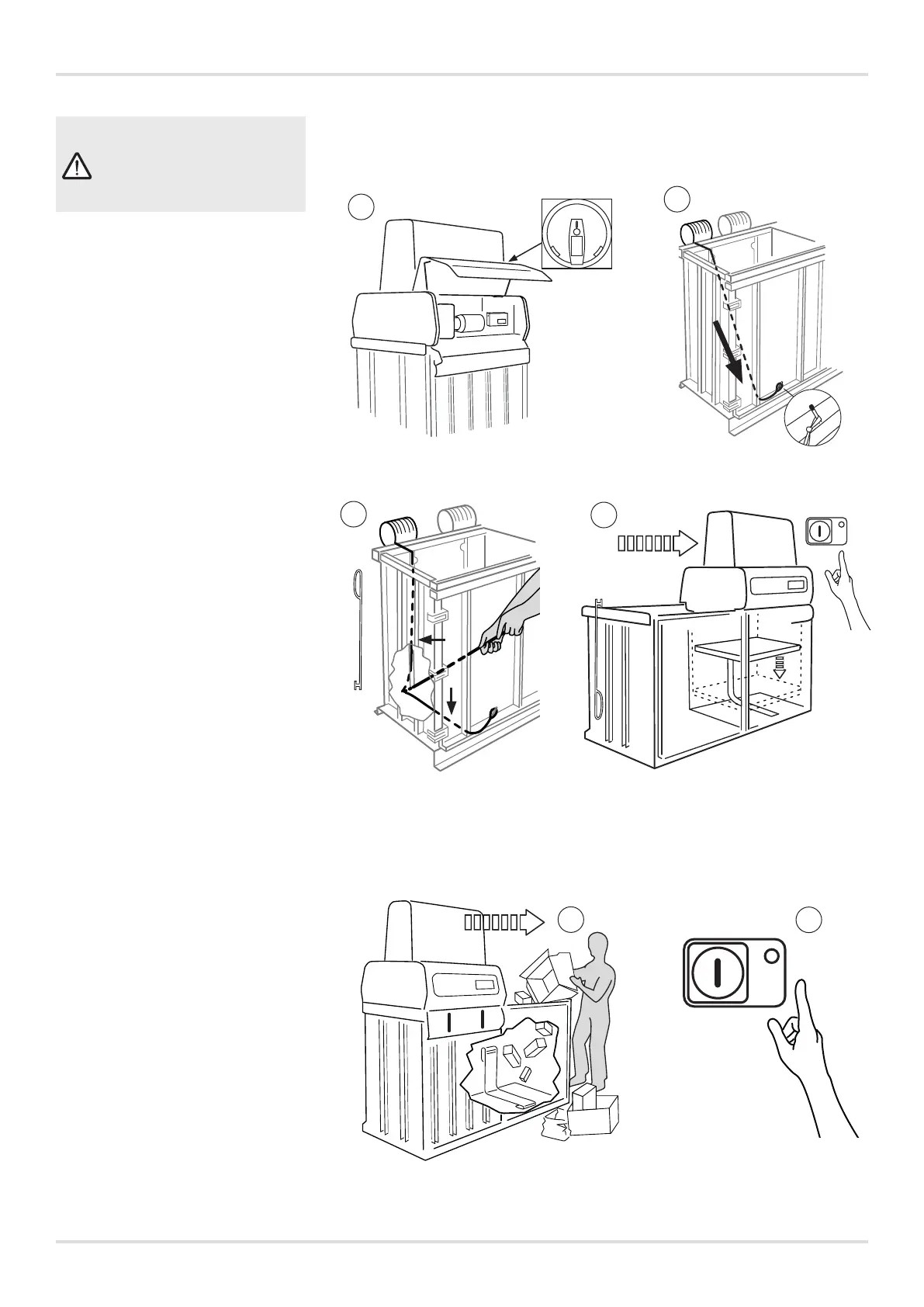
Mounting the straps
1 Make sure that the main power
switch is on.
2 Thread the strap through the
slots on the front and rear of
the chamber. Tie a loop in the
end of the strap, and place the
loop around the pin on the front
of the chamber.
3 Use the strap hook to place
the strap in the groove at the
bottom of the chamber. It is
important that the strap is
pressed against the back of the
chamber.
4 Hang the strap hook back up.
Check that the bale ejection
mechanism is in its lowermost
position. If it is not, press the
start button to lower the press
plate so that the bale mecha-
nism is pressed down to its
lowermost position. If the bail
mechanism fails to stay in its
lowermost position, please
contact an authorised service
technician.
Compaction
5
Place the waste in the
chamber such that it is evenly
distributed.
Place the press unit over the
chamber.
The green light lights up
when the press unit is in the
correct position.
6
Press the start button for a
press cycle.
WARNING!
Only the operator is allowed
in the working area of the
machine!



 To Next Page